hamburger-menu icon
เลือกภาษา

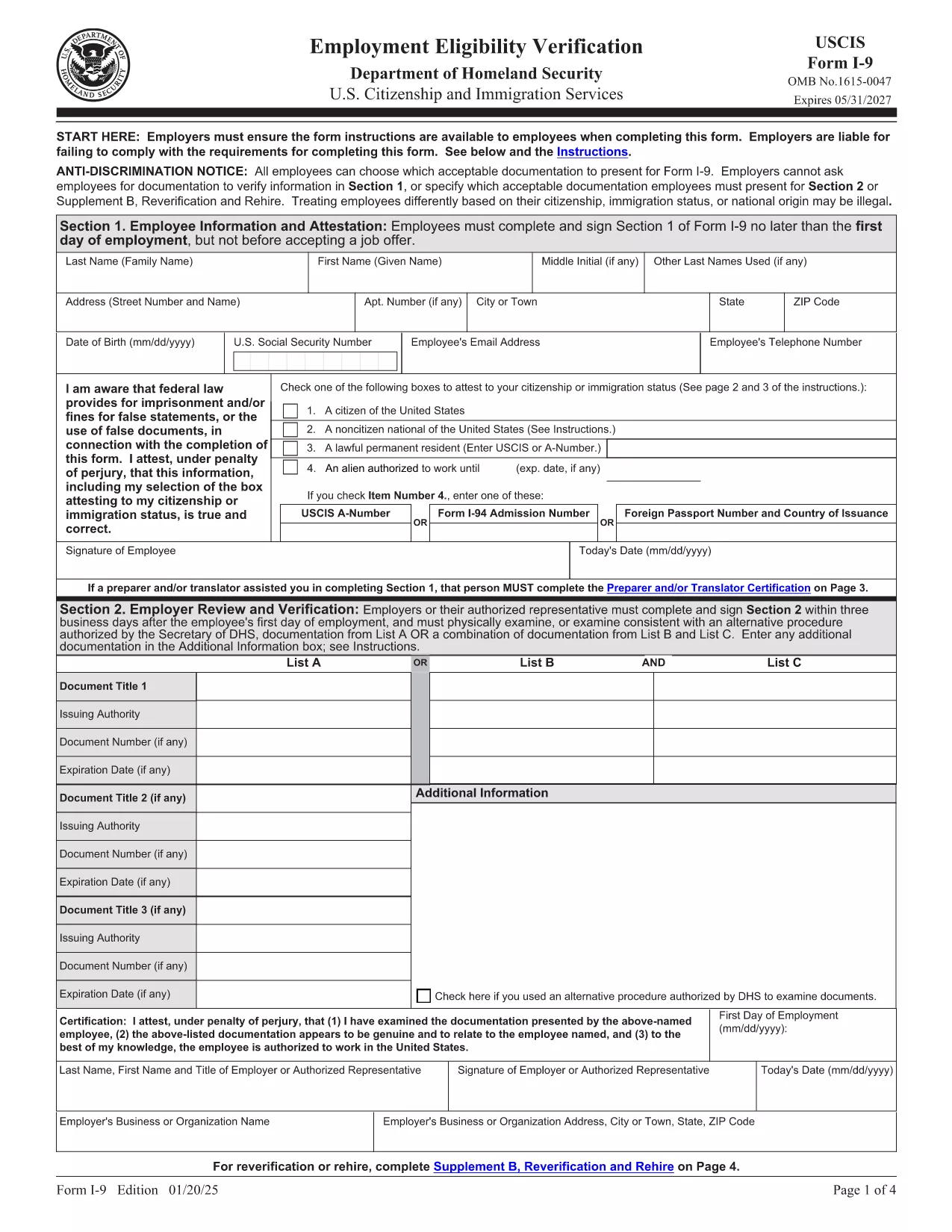
The Form I‑9 (Employment Eligibility Verification) is required for every new employee hired in the United States. Employers must verify both identity and work authorization within three business days of hiring. Our fillable PDF version lets you complete the form quickly, securely, and without the hassle of downloading a separate editor.

What Is the I‑9 Form and Why You Need It

The I‑9 is issued by the U.S. Citizenship and Immigration Services (USCIS). It ensures that all employees are legally authorized to work in the U.S. Failure to complete the form correctly can result in fines and penalties for both employer and employee.

How to Fill Out the I‑9 Form Online with Formize

Instead of downloading the PDF and opening it in a PDF editor, simply click the "Fill out this form" button on this page. The Formize PDF Filler app will load in your browser, allowing you to type, check boxes, and add signatures directly on the form.

Common Mistakes & Tips for a Perfect I‑9 Submission

  • Do not leave any required fields blank. Every box marked with an asterisk must be completed.
  • Use the correct document codes. Refer to the USCIS instructions for List A, B, and C documents.
  • Sign and date the form. Both employee and employer signatures are mandatory.
  • Keep the form on file for three years. Store it securely and separate from the employee’s personnel file.

When you’re ready, click the button below, fill the form, and download the completed PDF for your records.

คำถามที่พบบ่อย
  • Is the I‑9 form required for all new hires?

    Yes. Every employee hired after November 6, 1986 must complete Form I‑9, regardless of citizenship or work status.

  • Can I use a scanned copy of a handwritten I‑9?

    No. The form must be completed electronically or on a legible, printable PDF. Handwritten forms that are scanned are not acceptable.

  • How long must I keep the I‑9 on file?

    Employers must retain the I‑9 for three years after the date of hire, or one year after employment ends, whichever is later.

  • What documents can I use for verification?

    You may present either one document from List A (identity + employment authorization) or a combination of one document from List B (identity) and one from List C (employment authorization).

  • Do I need to re‑verify an employee’s work authorization?

    Only if the employee’s work‑authorization document has an expiration date. Re‑verification must be done before the document expires.

  • Can I fill out the I‑9 on a mobile device?

    Yes. The Formize PDF Filler works on most modern browsers, including mobile Safari and Chrome, allowing you to complete the form on a phone or tablet.

  • Is there a fee to use Formize’s PDF filler?

    Formize offers a free basic filler for standard PDFs like the I‑9. No credit‑card information is required to complete the form.

  • What should I do if I make a mistake on the I‑9?

    Correct errors by striking through the incorrect entry, entering the correct information, and initialing the change. Do not erase or use white‑out.

  • Do I need to submit the I‑9 to USCIS?

    No. The I‑9 is kept by the employer for inspection by authorized government officials, such as the Department of Labor or ICE, upon request.

  • Is the PDF version of the I‑9 the same as the paper version?

    Yes. The official USCIS PDF is an exact replica of the paper form and meets all legal requirements when completed correctly.

ทำอย่างไร

วิธีกรอก I-9 form ฟรีทางออนไลน์ใน 5 ขั้นตอนง่ายๆ:

  1. 1
    Open the Fillable I‑9 Form
    Click the "Fill out this form" button on the page. The Formize PDF Filler app loads in your browser.
  2. 2
    Enter Employee Information
    Complete Section 1 with the employee’s name, address, date of birth, and Social Security Number. Select the appropriate citizenship status.
  3. 3
    Upload or Type Document Details
    In Section 2, choose the document type (List A, B, or C) and enter the document numbers, expiration dates, and issuing authority.
  4. 4
    Add Signatures
    Both the employee and the employer must sign and date the form. Use the signature tool in the Formize app.
  5. 5
    Save and Download
    When all fields are completed, click "Save" then "Download" to store the finished PDF on your computer or cloud storage.
สร้างแอป PDF Filler
เกี่ยวกับ

เทมเพลต I-9 form

ด้วยชุดคุณสมบัติดั้งเดิมสำหรับการดูและกรอกเอกสาร PDF รวมกับประโยชน์ของเว็บแอปพลิเคชันและเค้าโครงที่ตอบสนอง คุณสามารถสร้าง I-9 form ให้เสร็จภายในไม่กี่นาที

คุณสมบัติ

PDF ฟิลเลอร์

วิธีที่ง่ายที่สุดในการกรอกแบบฟอร์ม PDF ทางออนไลน์

  • กรอก I-9 form อย่างรวดเร็ว
    กำลังมองหาวิธีเติม I-9 form ทางออนไลน์อย่างรวดเร็วอยู่ใช่ไหม ด้วยตัวกรอกแบบฟอร์ม PDF ออนไลน์ฟรีของเรา คุณจะรู้วิธีแก้ไขและกรอกเอกสาร PDF นี้ในเวลาไม่ถึงนาที
  • โปรแกรมแก้ไข PDF ออนไลน์ที่ใช้งานง่าย
    เบื่อกับการพิมพ์ไฟล์ PDF เพื่อให้คุณสามารถแก้ไขได้ก่อนที่จะสแกนซ้ำและส่งกลับหรือไม่? แก้ไขเอกสาร PDF ออนไลน์ฟรี ใช้โปรแกรมแก้ไข PDF ออนไลน์ของเราเพื่อประหยัดเวลาและกระดาษ
  • เครื่องมือที่ยอดเยี่ยมสำหรับทุกแพลตฟอร์ม
    สงสัยวิธีเติม I-9 form บน Mac หรืออาจใช้ตัวเติม PDF ฟรีได้อย่างไร เครื่องมือ PDF ออนไลน์ของเราทำงานได้บนทุกแพลตฟอร์ม
  • การจัดเก็บไฟล์ที่ปลอดภัย
    ไฟล์ "I-9 form" ที่เสร็จสมบูรณ์จะถูกจัดเก็บไว้ในฐานข้อมูลที่ปลอดภัยซึ่งจัดการโดย Amazon Cloud hosting คุณสามารถลบไฟล์ของคุณออกจากระบบของเราได้ตลอดเวลา ไม่ว่าในกรณีใด ไฟล์เหล่านี้จะถูกลบโดยอัตโนมัติหลังจากผ่านไป 24 ชั่วโมง
  • สนทนากับ I-9 form
    แชทกับ "I-9 form" บน Chatize ที่เป็นผู้ช่วยอ่าน PDF ฟรี ถามคำถามและรับคำตอบจาก "I-9 form" เพียงคลิกที่ปุ่ม แชทด้วยเอกสาร ด้านบน

ลบเซสชันการบรรจุ

ลบเซสชันการกรอกข้อมูลที่เลือกหรือไม่?ในกรณีนี้ความคืบหน้าในการกรอกแบบฟอร์มจะหายไป

ลบเซสชันการแก้ไข

ลบเซสชันการแก้ไขที่เลือกหรือไม่ ในกรณีนี้ ความคืบหน้าในการสร้างและแก้ไขแบบฟอร์มจะหายไป