
Dil Seçin

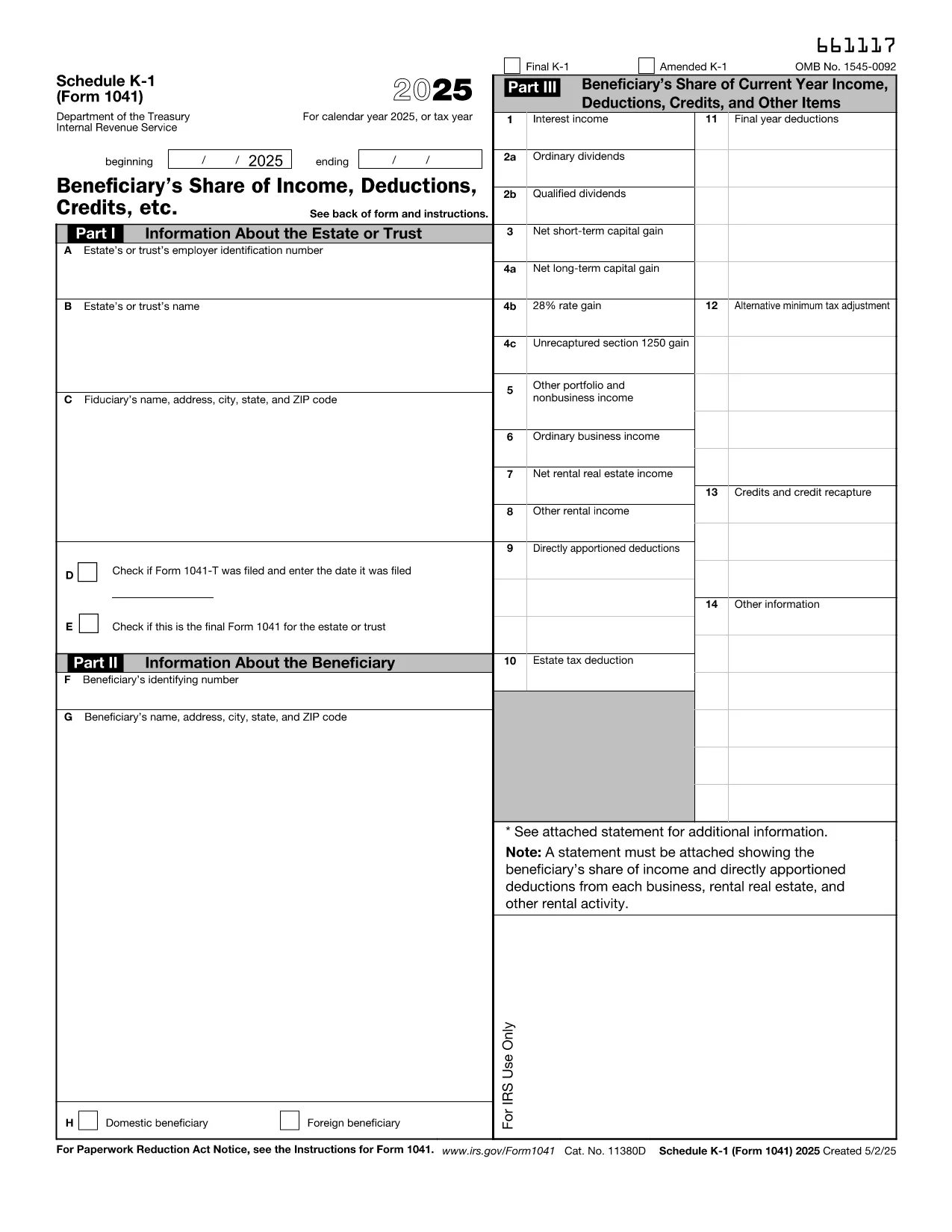
Fillable IRS Schedule K‑1 (Estate) – Form 1041

  1. Ülke Amerika Birleşik Devletleri
  2. Dil İngilizce
  3. Aktivite vergiler
  4. Departman İç Gelir Servisi
Fillable IRS Schedule K‑1 (Estate) – Form 1041

Schedule K‑1 (Form 1041) is the IRS document used by estates and trusts to report each beneficiary’s share of income, deductions, and credits. Our fillable PDF lets you complete the form directly in your browser – no extra software required.

What Is Schedule K‑1 (Form 1041)?

The Schedule K‑1 (Form 1041) accompanies the estate’s income tax return (Form 1041). It breaks down the taxable items that flow through to each beneficiary, such as interest income, capital gains, and charitable deductions. Beneficiaries use the information on the K‑1 to fill out their personal tax returns.

How to Complete the Fillable K‑1 Online

Instead of downloading the PDF and opening it in a separate editor, simply click the "Fill out this form" button on this page. The Formize PDF Filler app will load in seconds, allowing you to:

  • Enter beneficiary details, tax‑year information, and each line item directly on the screen.
  • Validate entries in real‑time, reducing the chance of arithmetic errors.
  • Save your progress and return later, or download a completed, printable PDF.

Common Mistakes & Tips for Estate Beneficiaries

  • Incorrect SSN or EIN: Double‑check the numbers before saving.
  • Missing Box 14 codes: Use the IRS instructions to match each code with the correct amount.
  • Failing to report foreign income: If the estate earned income abroad, it must appear on the K‑1.
  • Not signing the form: The executor’s signature is required for the K‑1 to be valid.

Where to Submit Your Completed K‑1

Beneficiaries attach the Schedule K‑1 to their individual tax returns (Form 1040). The estate’s executor files Form 1041 with the IRS, and each beneficiary includes the K‑1 information on the appropriate lines of their personal return.

If you need additional guidance, refer to the IRS instructions for Schedule K‑1 (Form 1041) or consult a qualified tax professional.

Talimatlar

SSS
  • Who must receive a Schedule K‑1 (Form 1041)?

    Every person or entity that is a beneficiary of the estate or trust and receives a share of its taxable income must be issued a Schedule K‑1.

  • Can I edit the IRS PDF directly in my browser?

    Yes. By clicking "Fill out this form" you can use Formize’s online PDF filler to edit the form without downloading separate software.

  • What is Box 14 on the K‑1 used for?

    Box 14 contains codes that identify the type of income or deduction (e.g., capital gains, foreign tax credit). The code must match the amount shown in the corresponding box.

  • Do I need to file the K‑1 separately with the IRS?

    No. The Schedule K‑1 is attached to each beneficiary’s individual tax return (Form 1040). The estate files Form 1041 with the IRS.

  • What if the estate has foreign income?

    Foreign income must be reported on the K‑1 and may require additional forms (e.g., Form 1116) on the beneficiary’s return.

  • Is there a deadline for beneficiaries to receive their K‑1?

    The executor must provide Schedule K‑1 to beneficiaries by the due date of the estate’s Form 1041, typically March 15 for calendar‑year estates.

  • Can I correct a mistake after I’ve saved the PDF?

    Yes. Open the saved PDF again with the Formize filler, make the correction, and re‑save or re‑print the updated form.

NASıL

IRS Schedule K-1 estate formunu ücretsiz, çevrimiçi olarak 4 kolay adımda nasıl doldurabilirsiniz:

  1. 1
    Open the Fillable Form
    Click the "Fill out this form" button on the page. The Formize PDF Filler app will launch in a new window.
  2. 2
    Enter Your Information
    Type the beneficiary’s name, SSN, and each line‑item amount directly into the fields. Real‑time validation will highlight any errors.
  3. 3
    Review & Save
    After completing all sections, review the summary, then click "Save" to download a filled‑out PDF or "Print" to generate a hard copy.
  4. 4
    Submit with Your Tax Return
    Attach the completed Schedule K‑1 to your personal Form 1040 when you file your federal income tax return.
PDF Filler uygulamasını biçimlendirin
HAKKıNDA

Vergi formları

IRS Schedule K-1 estate, ​​vergilerle ilgili bilgileri ilgili vergi dairesine bildirmek için kullanılan belgeler olan Vergi formlarından biridir. Vergi mükellefinin koşullarına ve konumuna bağlı olarak değişebilen federal, eyalet ve yerel vergi formları dahil olmak üzere çeşitli vergi formları vardır.

ÖZELLIKLERI

PDF Doldurucu

PDF formlarını çevrimiçi doldurmanın en kolay yolu

  • IRS Schedule K-1 estate'ü hızlıca doldurun
    IRS Schedule K-1 estate çevrimiçi olarak hızlı bir şekilde doldurmanın bir yolunu mu arıyorsunuz? Çevrimiçi ücretsiz PDF form doldurucumuzla, bu pdf belgesini nasıl düzenleyeceğinizi ve dolduracağınızı bir dakikadan kısa sürede öğreneceksiniz.
  • Kullanımı kolay çevrimiçi PDF düzenleyici
    PDF dosyalarını yeniden tarayıp geri göndermeden önce düzenleyebilmek için yazdırmaktan bıktınız mı? PDF belgelerini çevrimiçi olarak ücretsiz düzenleyin. Zamandan ve kağıttan tasarruf etmek için çevrimiçi pdf editörümüzü kullanın.
  • Harika araçlar, tüm platformlar
    Bir Mac'te IRS Schedule K-1 estate'ü nasıl dolduracağınızı veya PDF doldurucuyu ücretsiz olarak nasıl kullanacağınızı mı merak ediyorsunuz? Çevrimiçi PDF araçlarımız tüm platformlarda çalışır.
  • Güvenli dosya depolama
    Tamamlanan "IRS Schedule K-1 estate" dosyaları, Amazon Cloud barındırma tarafından yönetilen güvenli bir veritabanında depolanır. Dosyalarınızı istediğiniz zaman sistemimizden silebilirsiniz. Her durumda, bu dosyalar 24 saat sonra otomatik olarak silinir.
  • IRS Schedule K-1 estate ile sohbet et
    Ücretsiz bir PDF okuyucu asistanı olan Chatize'da "IRS Schedule K-1 estate" ile sohbet edin. "IRS Schedule K-1 estate" adlı kişiden sorular sorun ve yanıtlar alın. Yukarıdaki Belgeyle Sohbet Et düğmesini tıklamanız yeterlidir.

Doldurma oturumunu sil

Seçilen doldurma oturumunu silin mi? Bu durumda, formu doldurmadaki ilerlemeniz kaybolacaktır.

Düzenleme oturumunu sil

Seçilen düzenleme oturumu silinsin mi? Bu durumda formu oluşturma ve düzenleme konusundaki ilerlemeniz kaybolacaktır.