Dil Seçin

Fillable IRS Form 8949 – Capital Gains Tax PDF

  1. Ülke Amerika Birleşik Devletleri
  2. Dil İngilizce
  3. Aktivite vergiler
  4. Departman IRS
Fillable IRS Form 8949 – Capital Gains Tax PDF

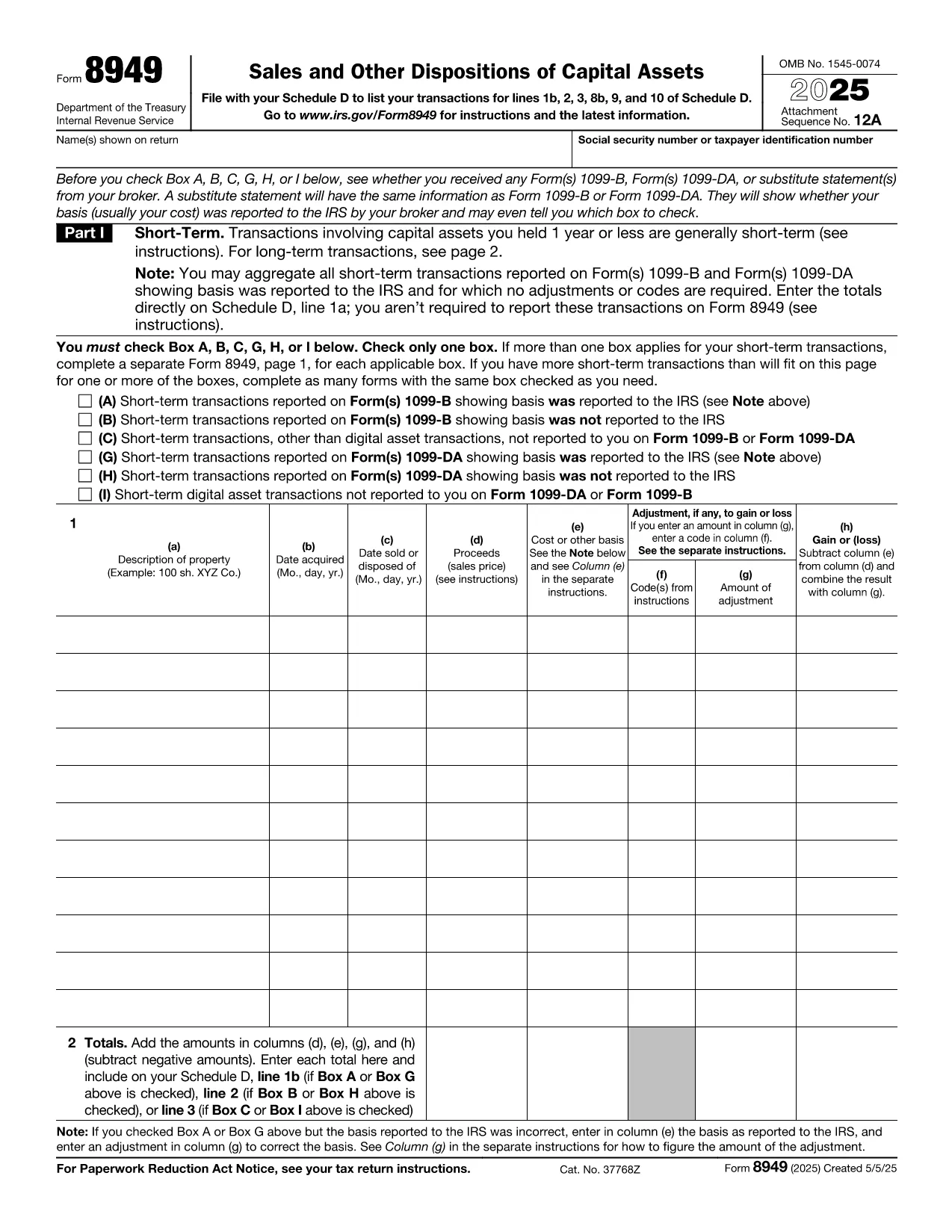
When you sell stocks, bonds, real estate, or other capital assets, the IRS requires you to report those transactions on Form 8949. This fillable PDF lets you capture every sale, purchase, and adjustment in a format the IRS accepts.

What Is Form 8949?

Form 8949, Sales and Other Dispositions of Capital Assets, is the primary document for reporting capital gains and losses. The information you provide on this form feeds into Schedule D, which determines your overall capital gain or loss for the tax year.

How to Fill Out the Form Using Formize

Instead of downloading the PDF and opening a separate editor, simply click the "Fill out this form" button on this page. The Formize PDF Filler app will load in your browser, and you can start entering data instantly.

  • Enter the description of each asset, dates of acquisition and sale, and the amounts.
  • Select the correct type of gain or loss (short‑term, long‑term, or mixed).
  • Use the built‑in calculator to apply any adjustments, such as wash‑sale rules.
  • When finished, download the completed PDF or export it directly to your tax software.

Common Mistakes to Avoid

  • Incorrect dates: Double‑check the acquisition and sale dates; a single‑day error can change the short‑term/long‑term classification.
  • Missing basis adjustments: Forgetting commissions, fees, or previous wash‑sale adjustments can inflate your taxable gain.
  • Wrong totals: Use the Formize calculator to ensure totals on each page match the summary on Schedule D.
  • Incomplete identification: Provide the correct CUSIP or identification number for each security.

Where to Submit Your Completed Form

After saving the filled PDF, attach it to your Form 1040 filing. If you e‑file, the PDF can be uploaded directly through most tax‑preparation software. For paper filing, include the printed form with your tax return.

FAQs About Capital Gains Reporting

Below are quick answers to the most common questions taxpayers have about reporting capital gains.

SSS
  • Do I need to file Form 8949 if I have no capital gains?

    If you have no capital gains or losses to report, you can skip Form 8949 and enter "0" on Schedule D. However, the IRS may still request a completed form if you filed a return that references capital transactions.

  • Can I use Form 8949 for cryptocurrency transactions?

    Yes. Cryptocurrency sales are treated as capital assets. List each transaction on Form 8949, providing the date acquired, date sold, and fair market value at sale.

  • What is the difference between short‑term and long‑term gains?

    Short‑term gains arise from assets held one year or less and are taxed at ordinary income rates. Long‑term gains are from assets held more than one year and benefit from lower capital‑gain tax rates.

  • How do I report a wash‑sale loss?

    If a wash sale occurs, you must adjust the cost basis of the replacement security. Form 8949 includes a column for wash‑sale adjustments; the Formize filler automatically calculates the corrected basis.

  • Do I need to attach Form 8949 to my e‑file?

    Most modern tax‑software programs automatically import the data from Form 8949 into Schedule D. If you e‑file manually, you can upload the PDF when prompted.

  • Where can I find instructions for Form 8949?

    The IRS provides detailed instructions on the same page as the PDF (https://www.irs.gov/forms-pubs/about-form-8949). The Formize page also includes a quick‑start guide.

NASıL

capital gains tax form formunu ücretsiz, çevrimiçi olarak 4 kolay adımda nasıl doldurabilirsiniz:

  1. 1
    Open the Fillable Form
    Click the "Fill out this form" button on this page. The Formize PDF Filler app loads directly in your browser.
  2. 2
    Enter Your Transaction Details
    Fill in the asset description, acquisition and sale dates, purchase price, sale price, and any adjustments.
  3. 3
    Review Totals and Calculations
    Use the built‑in calculator to verify gains, losses, and the final totals that will flow to Schedule D.
  4. 4
    Save or Export the Completed PDF
    When all fields are complete, download the filled PDF or export it to your tax‑preparation software.
PDF Filler uygulamasını biçimlendirin
HAKKıNDA

Vergi formları

capital gains tax form, ​​vergilerle ilgili bilgileri ilgili vergi dairesine bildirmek için kullanılan belgeler olan Vergi formlarından biridir. Vergi mükellefinin koşullarına ve konumuna bağlı olarak değişebilen federal, eyalet ve yerel vergi formları dahil olmak üzere çeşitli vergi formları vardır.

ÖZELLIKLERI

PDF Doldurucu

PDF formlarını çevrimiçi doldurmanın en kolay yolu

  • capital gains tax form'ü hızlıca doldurun
    capital gains tax form çevrimiçi olarak hızlı bir şekilde doldurmanın bir yolunu mu arıyorsunuz? Çevrimiçi ücretsiz PDF form doldurucumuzla, bu pdf belgesini nasıl düzenleyeceğinizi ve dolduracağınızı bir dakikadan kısa sürede öğreneceksiniz.
  • Kullanımı kolay çevrimiçi PDF düzenleyici
    PDF dosyalarını yeniden tarayıp geri göndermeden önce düzenleyebilmek için yazdırmaktan bıktınız mı? PDF belgelerini çevrimiçi olarak ücretsiz düzenleyin. Zamandan ve kağıttan tasarruf etmek için çevrimiçi pdf editörümüzü kullanın.
  • Harika araçlar, tüm platformlar
    Bir Mac'te capital gains tax form'ü nasıl dolduracağınızı veya PDF doldurucuyu ücretsiz olarak nasıl kullanacağınızı mı merak ediyorsunuz? Çevrimiçi PDF araçlarımız tüm platformlarda çalışır.
  • Güvenli dosya depolama
    Tamamlanan "capital gains tax form" dosyaları, Amazon Cloud barındırma tarafından yönetilen güvenli bir veritabanında depolanır. Dosyalarınızı istediğiniz zaman sistemimizden silebilirsiniz. Her durumda, bu dosyalar 24 saat sonra otomatik olarak silinir.
  • capital gains tax form ile sohbet et
    Ücretsiz bir PDF okuyucu asistanı olan Chatize'da "capital gains tax form" ile sohbet edin. "capital gains tax form" adlı kişiden sorular sorun ve yanıtlar alın. Yukarıdaki Belgeyle Sohbet Et düğmesini tıklamanız yeterlidir.

Doldurma oturumunu sil

Seçilen doldurma oturumunu silin mi? Bu durumda, formu doldurmadaki ilerlemeniz kaybolacaktır.

Düzenleme oturumunu sil

Seçilen düzenleme oturumu silinsin mi? Bu durumda formu oluşturma ve düzenleme konusundaki ilerlemeniz kaybolacaktır.