Dil Seçin

IRS Schedule E – Fillable PDF for Investment Property Tax Reporting

  1. Ülke Amerika Birleşik Devletleri
  2. Dil İngilizce
  3. Aktivite vergiler
  4. Departman IRS
IRS Schedule E – Fillable PDF for Investment Property Tax Reporting

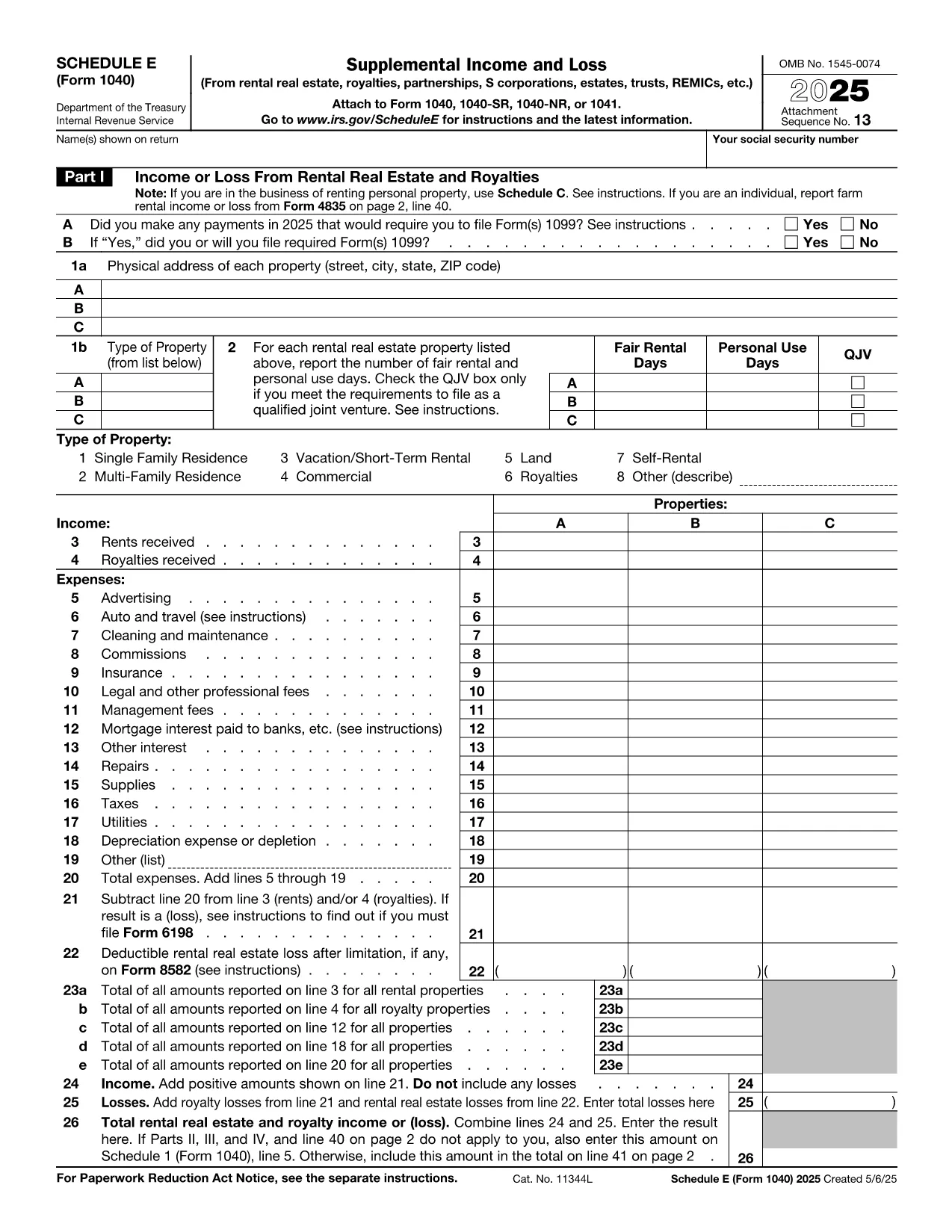
Investing in rental or other real‑estate assets? The IRS Schedule E (Form 1040) is the essential tax form for reporting income, expenses, and depreciation on investment properties. Our fillable PDF version lets you complete the form quickly, accurately, and without any extra software.

Whether you own a single‑family rental, a multi‑unit building, or a commercial investment property, Schedule E captures the financial details you need to claim deductions and calculate taxable rental income.

Below you’ll find a concise guide to each part of the form, tips for avoiding costly errors, and a simple, one‑click way to start filling it out directly on Formize.

What Is Schedule E and Who Needs It?

Schedule E is part of the U.S. Individual Income Tax Return (Form 1040). It is required for anyone who receives income from:

  • Rental real estate
  • Royalties
  • Partnerships, S corporations, estates, and trusts (via Schedule K‑1)

If you own an investment property that generates rent or other passive income, you must file Schedule E each year.

Key Sections of the Investment Property Tax Form

The form is divided into clear sections:

  • Part I – Income: Report gross rents, royalties, and other income.
  • Part II – Expenses: Deduct mortgage interest, property taxes, insurance, repairs, utilities, and management fees.
  • Part III – Depreciation & Amortization: Calculate depreciation using IRS Publication 946.
  • Part IV – Summary: Net rental income or loss that flows to Form 1040.

How to Complete Schedule E Online with Formize

Skip the download‑and‑edit workflow. Just click the button below, wait for the Formize PDF Filler to load, and start typing directly into the fields.

Common Mistakes to Avoid

  • Mixing personal and rental expenses – keep receipts separate.
  • Forgetting to include all sources of rental income, such as security deposits that are not returned.
  • Incorrectly calculating depreciation – use the correct recovery period (27.5 years for residential, 39 years for non‑residential).
  • Leaving required fields blank – the Formize filler highlights missing entries before you save.

Where to Get Help and Additional Resources

Need clarification? The IRS provides detailed instructions for Schedule E here. For depreciation tables, see Publication 946. If you have specific tax questions, consider consulting a qualified CPA or tax professional.

SSS
  • Do I need Schedule E if I only rent out a single property?

    Yes. Any rental income, even from one property, must be reported on Schedule E.

  • Can I claim home‑office expenses on Schedule E?

    Home‑office deductions belong on Form 8829, not Schedule E, unless the space is part of a rental property you own.

  • How do I calculate depreciation for my investment property?

    Use the Modified Accelerated Cost Recovery System (MACRS). Residential rental property is depreciated over 27.5 years; non‑residential over 39 years. See IRS Publication 946 for tables.

  • What if I have a loss on Schedule E?

    Passive activity loss rules may limit the amount you can deduct against other income. Review IRS Form 8582 instructions for details.

  • Is the Formize filler secure for my personal tax data?

    Yes. Formize uses SSL encryption and does not store your completed PDF on our servers after you download it.

  • Can I edit the PDF after I’ve saved it?

    Absolutely. Open the saved file in any PDF editor or re‑upload it to Formize for additional changes.

  • Do I need a separate form for each rental property?

    Schedule E allows you to list up to three properties per page. Add additional pages if you own more than three.

  • Where can I find the official IRS instructions for Schedule E?

    The official instructions are available at https://www.irs.gov/instructions/i1040se.

NASıL

investment property tax form formunu ücretsiz, çevrimiçi olarak 5 kolay adımda nasıl doldurabilirsiniz:

  1. 1
    Click the Fill‑out Button
    Press the “Fill out this form” button on the page. The Formize PDF Filler app will open in a new tab.
  2. 2
    Wait for the Filler to Load
    The fillable PDF loads automatically. All interactive fields become editable within seconds.
  3. 3
    Enter Your Information
    Type directly into each highlighted field—income, expenses, depreciation, and summary data.
  4. 4
    Validate and Save
    Use the built‑in validator to check for missing entries, then click “Save” to download the completed PDF.
  5. 5
    Attach to Your Tax Return
    Include the saved Schedule E with your Form 1040 when you file electronically or by mail.
PDF Filler uygulamasını biçimlendirin
HAKKıNDA

Federal vergi formları

investment property tax form, Amerika Birleşik Devletleri'nde federal gelir vergilerini Ulusal Gelir İdaresi'ne (IRS) bildirmek ve dosyalamak için kullanılan belgeler olan Federal vergi formlarından biridir. Bu formlar bireyler, işletmeler ve kuruluşlar tarafından gelirlerini, kesintilerini ve federal vergi yükümlülüklerini hesaplamak için gerekli diğer bilgileri bildirmek için kullanılır.

En yaygın kullanılan federal vergi formu, bireysel vergi mükellefleri tarafından kişisel gelir vergilerini bildirmek için kullanılan Form 1040'dır. Yaygın olarak kullanılan diğer formlar arasında ortaklıklar için Form 1065, Form 1120 ve vergiden muaf kuruluşlar için Form 990.

Federal vergi formları genellikle vergi mükelleflerinin ücretler, maaşlar ve bahşişler gibi çeşitli gelir kaynaklarının yanı sıra yatırımlardan, kiralık mülklerden ve diğer kaynaklardan elde edilen gelirleri bildirmelerini gerektirir. Formlar aynı zamanda vergi mükelleflerinin hayır amaçlı katkılar, ipotek faizi ve sağlık harcamaları gibi çeşitli harcamalar için kesinti ve kredi talep etmelerine de olanak tanıyor.

Federal vergi formlarının doğru ve zamanında doldurulması önemlidir; aksi takdirde IRS'den cezalar ve faiz kesintileri gelebilir.

ÖZELLIKLERI

PDF Doldurucu

PDF formlarını çevrimiçi doldurmanın en kolay yolu

  • investment property tax form'ü hızlıca doldurun
    investment property tax form çevrimiçi olarak hızlı bir şekilde doldurmanın bir yolunu mu arıyorsunuz? Çevrimiçi ücretsiz PDF form doldurucumuzla, bu pdf belgesini nasıl düzenleyeceğinizi ve dolduracağınızı bir dakikadan kısa sürede öğreneceksiniz.
  • Kullanımı kolay çevrimiçi PDF düzenleyici
    PDF dosyalarını yeniden tarayıp geri göndermeden önce düzenleyebilmek için yazdırmaktan bıktınız mı? PDF belgelerini çevrimiçi olarak ücretsiz düzenleyin. Zamandan ve kağıttan tasarruf etmek için çevrimiçi pdf editörümüzü kullanın.
  • Harika araçlar, tüm platformlar
    Bir Mac'te investment property tax form'ü nasıl dolduracağınızı veya PDF doldurucuyu ücretsiz olarak nasıl kullanacağınızı mı merak ediyorsunuz? Çevrimiçi PDF araçlarımız tüm platformlarda çalışır.
  • Güvenli dosya depolama
    Tamamlanan "investment property tax form" dosyaları, Amazon Cloud barındırma tarafından yönetilen güvenli bir veritabanında depolanır. Dosyalarınızı istediğiniz zaman sistemimizden silebilirsiniz. Her durumda, bu dosyalar 24 saat sonra otomatik olarak silinir.
  • investment property tax form ile sohbet et
    Ücretsiz bir PDF okuyucu asistanı olan Chatize'da "investment property tax form" ile sohbet edin. "investment property tax form" adlı kişiden sorular sorun ve yanıtlar alın. Yukarıdaki Belgeyle Sohbet Et düğmesini tıklamanız yeterlidir.

Doldurma oturumunu sil

Seçilen doldurma oturumunu silin mi? Bu durumda, formu doldurmadaki ilerlemeniz kaybolacaktır.

Düzenleme oturumunu sil

Seçilen düzenleme oturumu silinsin mi? Bu durumda formu oluşturma ve düzenleme konusundaki ilerlemeniz kaybolacaktır.