
Dil Seçin

Fillable IRS Form 1120‑C (Corporate Tax Return)

  1. Ülke Amerika Birleşik Devletleri
  2. Dil İngilizce
  3. Aktivite vergiler
  4. Departman IRS
Fillable IRS Form 1120‑C (Corporate Tax Return)

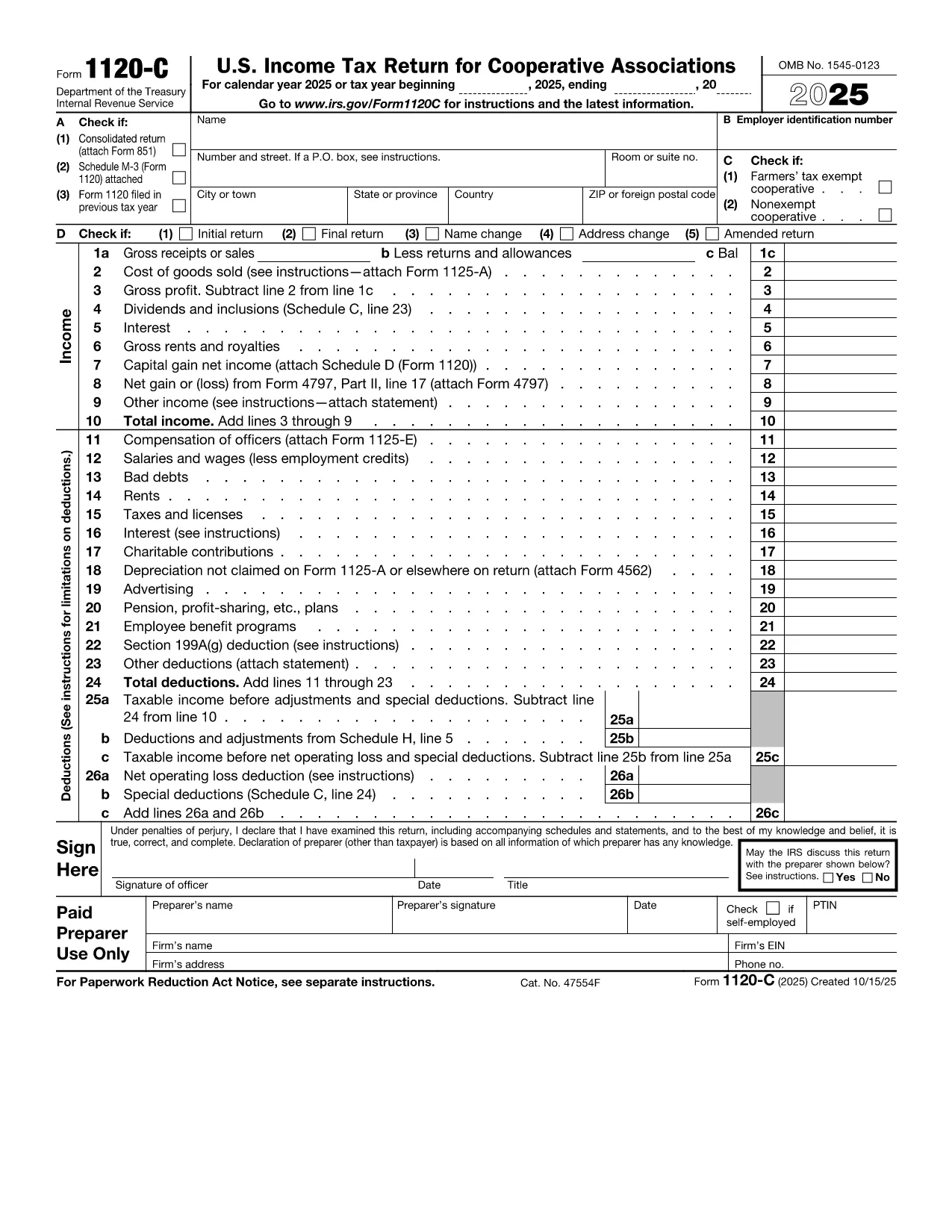
IRS Form 1120‑C is the corporate income‑tax return used by certain small‑business corporations that qualify for special filing rules. Instead of printing, printing‑and‑scanning, or hiring a tax professional, you can complete this form instantly with Formize’s secure, browser‑based PDF filler.

What Is IRS Form 1120‑C?

Form 1120‑C reports a corporation’s income, deductions, credits, and tax liability for the fiscal year. It is required for corporations that meet the IRS criteria for the “C‑Corporation” filing status and need to claim specific tax benefits.

How to Fill Out Form 1120‑C Online

Follow the simple steps below – no PDF editor download, no printing, no hassle.

  • Click the bright “Fill out this form” button on this page.
  • Wait a few seconds while the Formize PDF Filler app loads the fillable version of Form 1120‑C.
  • Enter your corporation’s information directly into the fields – the app validates numbers and dates in real time.
  • When you’re done, review the summary, then download the completed PDF or email it to your accountant.

Common Mistakes to Avoid

  • Incorrect EIN format: Use the nine‑digit format (XX‑XXXXXXX) without spaces.
  • Leaving Schedule C blank: Even if there are no entries, write “0” to avoid processing delays.
  • Mismatched tax year dates: The beginning and ending dates must reflect a 12‑month period unless you have a short‑year election.
  • Forgot to sign: The electronic signature field must be completed; otherwise the IRS will reject the return.

Where to Submit Your Completed Form

After you download the filled PDF, you can:

  • Mail it to the IRS address listed in the form’s instructions.
  • Electronically file through an approved e‑file provider (the PDF you download is e‑file ready).

Need Help? Resources and Guidance

The IRS provides a detailed instruction booklet for Form 1120‑C. You can also find video tutorials on the IRS website. For quick answers, see the FAQ section below.

SSS
  • Do I need to download any software to fill Form 1120‑C?

    No. Formize’s PDF filler runs entirely in your web browser, so there’s nothing to install.

  • Is the fillable version of Form 1120‑C officially approved by the IRS?

    Yes. The PDF is the exact IRS‑published form (f1120c.pdf) with added fillable fields that do not alter the content.

  • Can I save my progress and return later?

    Absolutely. Use the “Save Draft” button to download a partially completed PDF and reload it later.

  • What if I make a mistake after submitting?

    You can file an amended return using Form 1120‑X. Keep a copy of the original PDF for reference.

  • Is there a fee for using Formize’s filler?

    No. The fillable PDF and the online filler are completely free for all users.

  • How do I know which tax year to use?

    Use the calendar year that matches your corporation’s fiscal year unless you have an approved short‑year election.

  • Where can I find the official instructions for Form 1120‑C?

    The IRS provides a PDF instruction booklet at https://www.irs.gov/pub/irs-pdf/i1120c.pdf.

  • Can I e‑file Form 1120‑C directly from Formize?

    Formize creates a ready‑to‑e‑file PDF, but you must submit it through an IRS‑approved e‑file provider.

NASıL

IRS Form 1120-C formunu ücretsiz, çevrimiçi olarak 5 kolay adımda nasıl doldurabilirsiniz:

  1. 1
    Click the Fill‑out Button
    Press the “Fill out this form” button on this page to launch the Formize PDF Filler.
  2. 2
    Load the Fillable Form
    The browser will load the fillable version of IRS Form 1120‑C in a few seconds.
  3. 3
    Enter Your Data
    Type directly into each field. The app checks for formatting errors as you go.
  4. 4
    Review and Sign
    Use the built‑in review pane, add an electronic signature, and correct any highlighted issues.
  5. 5
    Download or Email
    Save the completed PDF to your computer or email it straight to your accountant or the IRS.
PDF Filler uygulamasını biçimlendirin
HAKKıNDA

Vergi formları

IRS Form 1120-C, ​​vergilerle ilgili bilgileri ilgili vergi dairesine bildirmek için kullanılan belgeler olan Vergi formlarından biridir. Vergi mükellefinin koşullarına ve konumuna bağlı olarak değişebilen federal, eyalet ve yerel vergi formları dahil olmak üzere çeşitli vergi formları vardır.

ÖZELLIKLERI

PDF Doldurucu

PDF formlarını çevrimiçi doldurmanın en kolay yolu

  • IRS Form 1120-C'ü hızlıca doldurun
    IRS Form 1120-C çevrimiçi olarak hızlı bir şekilde doldurmanın bir yolunu mu arıyorsunuz? Çevrimiçi ücretsiz PDF form doldurucumuzla, bu pdf belgesini nasıl düzenleyeceğinizi ve dolduracağınızı bir dakikadan kısa sürede öğreneceksiniz.
  • Kullanımı kolay çevrimiçi PDF düzenleyici
    PDF dosyalarını yeniden tarayıp geri göndermeden önce düzenleyebilmek için yazdırmaktan bıktınız mı? PDF belgelerini çevrimiçi olarak ücretsiz düzenleyin. Zamandan ve kağıttan tasarruf etmek için çevrimiçi pdf editörümüzü kullanın.
  • Harika araçlar, tüm platformlar
    Bir Mac'te IRS Form 1120-C'ü nasıl dolduracağınızı veya PDF doldurucuyu ücretsiz olarak nasıl kullanacağınızı mı merak ediyorsunuz? Çevrimiçi PDF araçlarımız tüm platformlarda çalışır.
  • Güvenli dosya depolama
    Tamamlanan "IRS Form 1120-C" dosyaları, Amazon Cloud barındırma tarafından yönetilen güvenli bir veritabanında depolanır. Dosyalarınızı istediğiniz zaman sistemimizden silebilirsiniz. Her durumda, bu dosyalar 24 saat sonra otomatik olarak silinir.
  • IRS Form 1120-C ile sohbet et
    Ücretsiz bir PDF okuyucu asistanı olan Chatize'da "IRS Form 1120-C" ile sohbet edin. "IRS Form 1120-C" adlı kişiden sorular sorun ve yanıtlar alın. Yukarıdaki Belgeyle Sohbet Et düğmesini tıklamanız yeterlidir.

Doldurma oturumunu sil

Seçilen doldurma oturumunu silin mi? Bu durumda, formu doldurmadaki ilerlemeniz kaybolacaktır.

Düzenleme oturumunu sil

Seçilen düzenleme oturumu silinsin mi? Bu durumda formu oluşturma ve düzenleme konusundaki ilerlemeniz kaybolacaktır.