
Оберіть мову

IRS Form 8863 – Education Credits for College Students

  1. Країна США
  2. Мова англійська
  3. діяльність податки
  4. відділ IRS
IRS Form 8863 – Education Credits for College Students

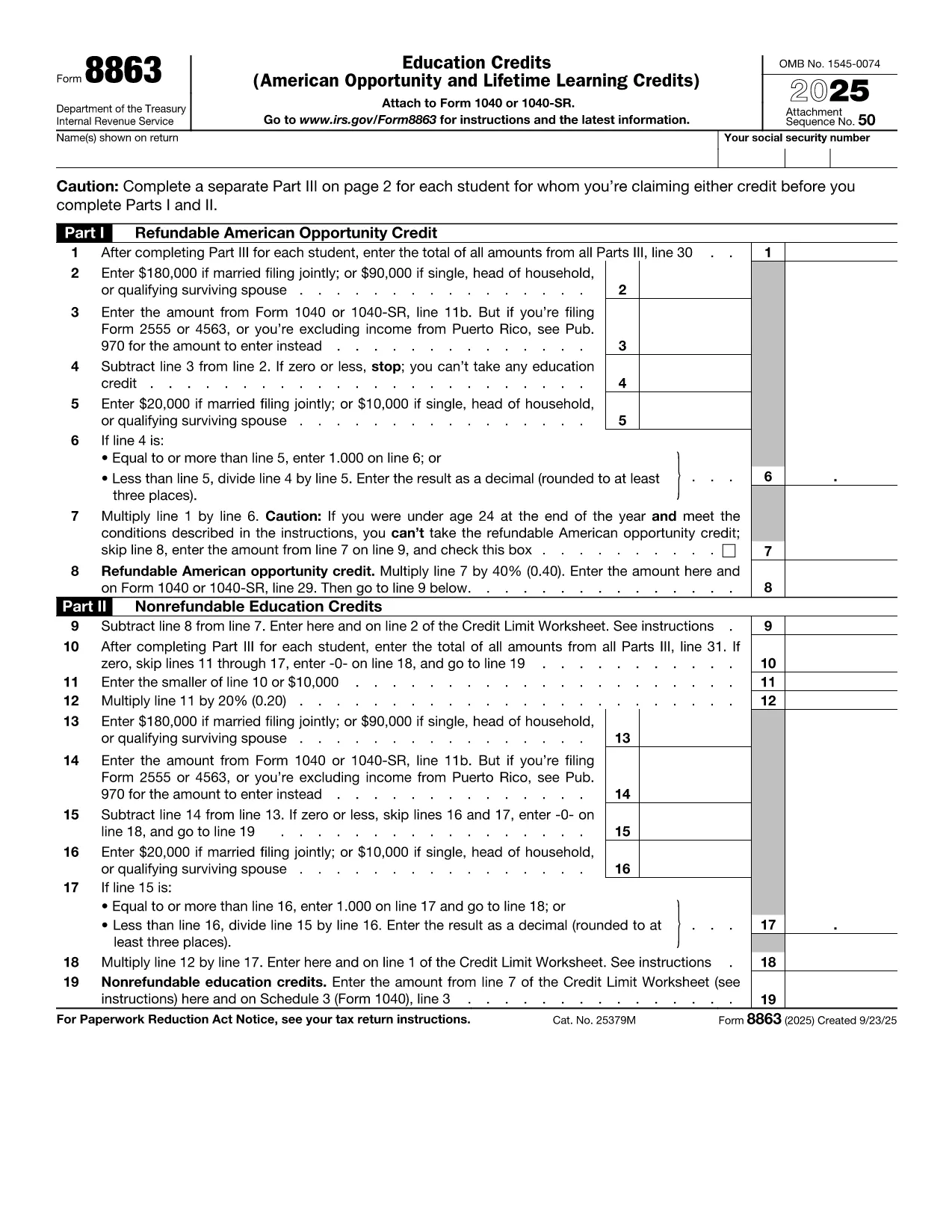
College tuition can be a big expense, but the IRS offers tax credits that can put money back in your pocket. IRS Form 8863Education Credits (American Opportunity and Lifetime Learning) – is the official form you need to claim these credits. With Formize, you can fill out the PDF directly in your browser, save time, and avoid printing errors.

What Is IRS Form 8863?

Form 8863 is used to claim two major education tax credits:

  • American Opportunity Credit (AOC) – up to $2,500 per eligible student for the first four years of post‑secondary education.
  • Lifetime Learning Credit (LLC) – up to $2,000 per tax return for any level of post‑secondary education, including courses to improve job skills.

The form is required for both credits and must be attached to your Form 1040 when you file.

How to Fill Out the Form Using Formize

Instead of downloading the PDF and opening a separate editor, simply click the "Fill out this form" button on this page. The Formize PDF Filler app will load in seconds, letting you:

  1. Enter personal information, school details, and qualified expenses.
  2. Automatically calculate the credit amount.
  3. Save your progress or download a completed PDF to attach to your tax return.

The process is secure, free, and works on any device.

Eligibility Requirements for College Students

To qualify for the credits on Form 8863, you must meet these criteria:

  • Be enrolled at an eligible educational institution.
  • Be pursuing a degree or recognized credential (AOC) or taking any post‑secondary course (LLC).
  • Have qualified tuition and related expenses paid during the tax year.
  • Not have exceeded the income limits for the credit.

Common Mistakes to Avoid

  • Incorrect Social Security Number: Double‑check both yours and the student’s SSN.
  • Double‑claiming expenses: You can’t claim the same expenses for both the AOC and the Lifetime Learning Credit.
  • Leaving fields blank: Even if a question doesn’t apply, write “0” or “N/A” to avoid processing delays.
  • Missing signatures: Form 8863 requires the taxpayer’s signature; an unsigned form will be rejected.

Where to Submit the Completed Form

After you finish, download the filled PDF and attach it to your Form 1040 when filing electronically or by mail. If you e‑file, the PDF is automatically included with your return. For paper filing, mail the complete Form 1040 package to the IRS address listed in the IRS mailing instructions.

If you need additional help, consult the IRS Form 8863 instructions or contact your college’s financial aid office.

FAQ
  • Which credit is better for me, the American Opportunity Credit or the Lifetime Learning Credit?

    The AOC offers a larger maximum credit ($2,500) but only for the first four years of college and requires at least half‑time enrollment. The LLC is smaller ($2,000) but can be used for any post‑secondary education, including part‑time courses.

  • Can I claim both credits in the same year?

    No. You must choose either the American Opportunity Credit or the Lifetime Learning Credit for each student in a tax year.

  • Do scholarships reduce the amount I can claim?

    Yes. Only qualified tuition and related expenses that are not covered by scholarships or grant money are eligible for the credit.

  • What if I make a mistake on the form after filing?

    You can file an amended return using Form 1040‑X. Attach a corrected Form 8863 and explain the changes.

  • Is there a deadline for submitting Form 8863?

    Form 8863 must be filed with your 2023 tax return, which is due April 15, 2024 (or the extended deadline if you filed for an extension).

  • Do I need a separate Form 8863 for each child in college?

    Yes. Each eligible student requires its own Form 8863 to claim the education credits.

  • Can I use Formize on a mobile device?

    Absolutely. The Formize PDF Filler works on smartphones and tablets, letting you complete the form anywhere.

  • Where can I find the official IRS instructions for Form 8863?

    Visit the IRS website at https://www.irs.gov/forms-pubs/about-form-8863 for the full instruction booklet.

ЯК

Як безкоштовно заповнити college student tax form онлайн за 5 простих кроків:

  1. 1
    Click the Fill‑out Button
    Press the blue “Fill out this form” button on this page. The Formize PDF Filler app will open in a new tab.
  2. 2
    Enter Your Information
    Complete every required field—personal data, school name, tuition paid, and any scholarships received.
  3. 3
    Review Calculations
    Formize automatically calculates the American Opportunity or Lifetime Learning credit based on the numbers you entered.
  4. 4
    Save or Download
    When you’re satisfied, click “Save” to store the form in your browser or “Download” to get a completed PDF ready for filing.
  5. 5
    Attach to Your Tax Return
    Include the filled Form 8863 with your Form 1040 when you e‑file or mail your paper return to the IRS.
Програма Formize PDF Filler
ПРО

Податкові форми

college student tax form – це одна з податкових форм, які є документами, які використовуються для подання відомостей про доходи фізичних осіб або компаній, відрахування та податкові зобов’язання відповідному податковому органу. Ці форми необхідні для дотримання податкового законодавства та виконання податкових зобов’язань. Форми оподаткування відрізняються залежно від країни та конкретних податкових вимог. Ось кілька поширених типів податкових форм:

Індивідуальні податкові форми: ці форми використовуються окремими платниками податків, щоб звітувати про свої особисті доходи та вимагати відрахувань, кредитів і звільнень. Приклади включають форму 1040 у Сполучених Штатах або форму податкової декларації з самооцінкою у Великобританії.

Податкові форми для бізнесу. Податкові форми для бізнесу використовуються компаніями, товариствами чи самозайнятими особами для звітування про доходи, витрати та іншу пов’язану з податками інформацію. Приклади включають форму Додатку C (Прибуток або збиток від бізнесу) у Сполучених Штатах або форму CT600 (Податкова декларація компанії) у Сполученому Королівстві.

Форми податку на заробітну плату: ці форми використовуються роботодавцями для звітування про заробітну плату, зарплату та податки, утримані із зарплат їхніх працівників. Приклади включають форму W-2 у Сполучених Штатах або форму P60 у Великобританії.

Форми податку з продажу: форми податку з продажу використовуються компаніями для звітування та сплати податку з продажу, стягненого з оподатковуваних товарів або послуг. Конкретні форми податку з продажів залежать від юрисдикції.

Форми податку на додану вартість (ПДВ). Форми ПДВ використовуються в країнах, де стягується податок на додану вартість, щоб звітувати та перераховувати ПДВ, зібраний із продажів, і вимагати кредиту з ПДВ для покупок. Приклади включають форми декларації з ПДВ, які використовуються в багатьох країнах.

Приблизні податкові форми. Приблизні податкові форми використовуються для звітування та сплати приблизних податків на доходи, які не підлягають утриманню, як-от дохід від самозайнятості чи дохід від інвестицій.

Це лише кілька прикладів численних податкових форм, які можуть існувати. Конкретні форми, які потрібні, залежать від податкового законодавства та норм у вашій країні чи юрисдикції. Важливо проконсультуватися з інструкціями податкового органу або отримати професійну пораду, щоб визначити, які форми застосовуються у вашій ситуації.

ОСОБЛИВОСТІ

Наповнювач PDF

Найпростіший спосіб заповнювати PDF-форми онлайн

  • Швидко заповніть college student tax form
    Шукаєте спосіб швидко заповнити college student tax form онлайн? За допомогою нашого безкоштовного онлайн-заповнювача PDF-форм ви знатимете, як редагувати та заповнювати цей PDF-документ менш ніж за хвилину.
  • Простий у використанні онлайн-редактор PDF
    Набридло роздруковувати PDF-файли, щоб ви могли їх редагувати, перш ніж сканувати повторно та надсилати назад? Безкоштовно редагуйте PDF-документи онлайн. Використовуйте наш онлайн-редактор PDF, щоб заощадити час і папір.
  • Чудові інструменти, усі платформи
    Хочете знати, як заповнити college student tax form на комп’ютері Mac або, можливо, як використовувати PDF-заповнювач безкоштовно? Наші онлайн-інструменти PDF працюють на всіх платформах.
  • Безпечне зберігання файлів
    Завершені файли "college student tax form" зберігаються в захищеній базі даних, якою керує хостинг Amazon Cloud. Ви можете будь-коли видалити свої файли з нашої системи. У будь-якому випадку ці файли автоматично видаляються через 24 години.
  • Чат із college student tax form
    Спілкуйтеся з "college student tax form" у Chatize, який є безкоштовним помічником для читання PDF. Ставте запитання та отримуйте відповіді від "college student tax form". Просто натисніть кнопку Chat With Document вище.

Видалити сеанс заповнення

Видалити вибраний сеанс заповнення? В цьому випадку ваш прогрес у заповненні форми буде втрачений.

Видалити сеанс редагування

Видалити вибраний сеанс редагування? У цьому випадку ваш прогрес у створенні та редагуванні форми буде втрачено.