
Оберіть мову

College Tuition Tax Form – Fillable PDF Online

  1. Країна США
  2. Мова англійська
  3. діяльність податки
  4. відділ IRS
College Tuition Tax Form – Fillable PDF Online

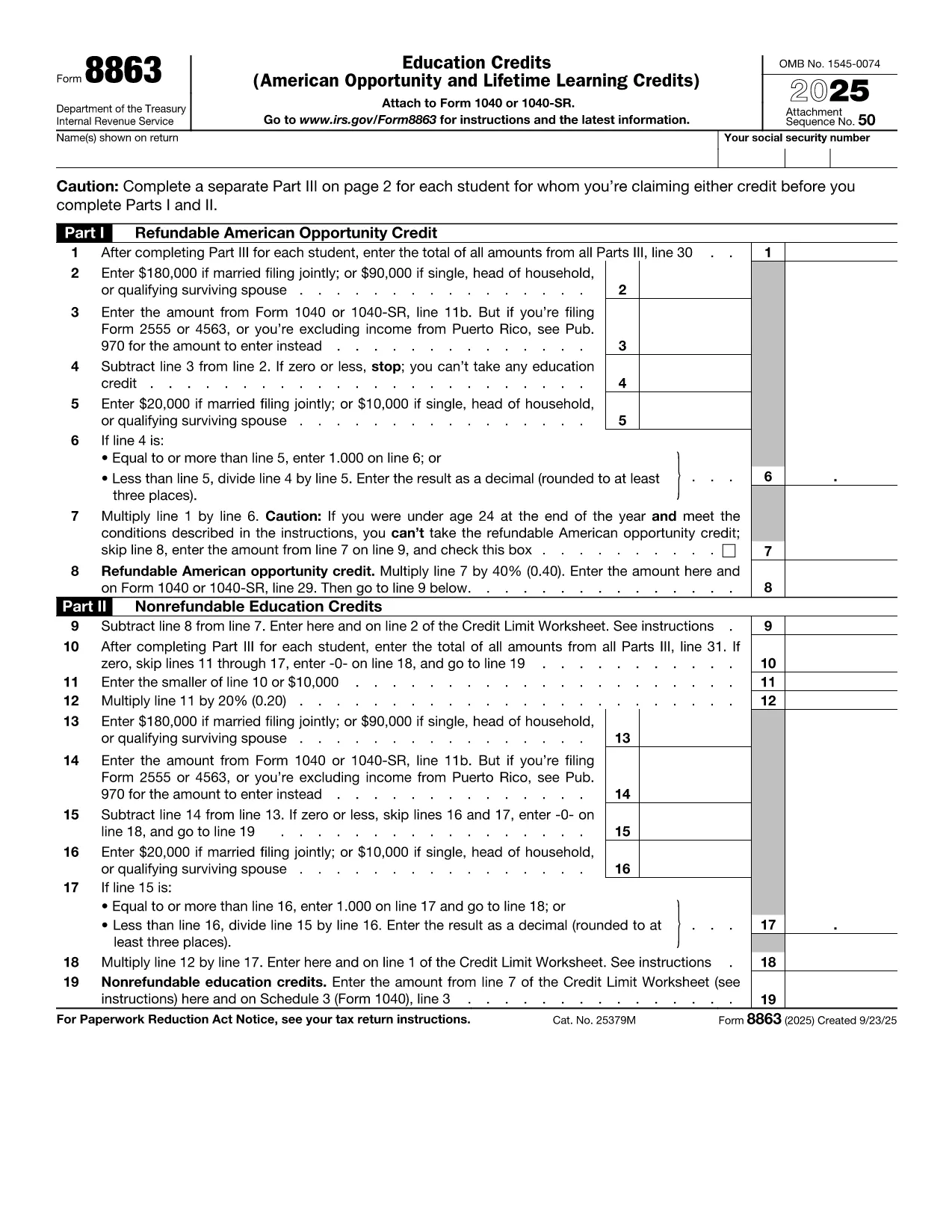
Paying for college can be expensive, but the IRS offers tax credits that can offset those costs. The most common form used to claim education credits is IRS Form 8863 – Education Credits (American Opportunity and Lifetime Learning). On this page you’ll find a fillable PDF version that works directly in the Formize PDF Filler app, so you never need a separate editor.

What Is the College Tuition Tax Form?

Form 8863 is used to claim the American Opportunity Credit and the Lifetime Learning Credit. You’ll need information from your Form 1098‑T (Tuition Statement) supplied by your school. The fillable PDF mirrors the official IRS layout, ensuring your submission meets all formatting requirements.

How to Fill Out the Form Using Formize

Instead of downloading the PDF and opening it in a separate editor, simply click the “Fill out this form” button below. The Formize PDF Filler app loads in your browser, letting you complete every field instantly.

Common Mistakes to Avoid

  • Incorrect Tax Year: The form must reflect the calendar year you paid tuition.
  • Missing 1098‑T Data: Double‑check the amounts in boxes 1 and 5 of your 1098‑T.
  • Eligibility Errors: The American Opportunity Credit is limited to the first four years of post‑secondary education.
  • Signature Omission: Even though the form is electronic, you still need to sign before filing.

Where to Submit the Completed Form

After you finish, download the completed PDF and attach it to your Form 1040 when you file your federal tax return. If you e‑file, you can upload the PDF directly through your tax‑software provider.

FAQs About the Tuition Tax Form

Below are quick answers to the most common questions. For any additional guidance, consult the IRS instructions for Form 8863.

FAQ
  • Who can claim the American Opportunity Credit?

    The credit is available to eligible students who are pursuing their first four years of post‑secondary education and who meet income limits.

  • Can I claim both the American Opportunity and Lifetime Learning credits on the same return?

    No. You must choose one credit per student per tax year.

  • Do I need a 1098‑T to complete Form 8863?

    Yes. The 1098‑T provides the tuition amounts you’ll report on Form 8863.

  • What is the maximum credit I can receive?

    The American Opportunity Credit can be up to $2,500 per student; the Lifetime Learning Credit can be up to $2,000 per return.

  • Is the fillable PDF accepted by the IRS?

    Yes. As long as the PDF retains the official IRS layout and includes your signature, it is accepted.

  • Can I amend the form after I’ve downloaded it?

    You can re‑open the saved PDF in Formize, make changes, and re‑download. Do not edit the file with non‑PDF software.

  • What if I make a mistake on the form?

    Correct the error in the Formize app, then re‑download. If you’ve already filed, you may need to file an amended return (Form 1040‑X).

  • Do I need to attach Form 8863 if I’m e‑filing?

    Most tax‑software programs automatically include Form 8863 when you answer the education‑credit questions. If not, you can manually upload the PDF.

ЯК

Як безкоштовно заповнити college tuition tax form онлайн за 5 простих кроків:

  1. 1
    Click the Fill‑Out Button
    Press the “Fill out this form” button on the page. The Formize PDF Filler app will open in a new tab.
  2. 2
    Wait for the App to Load
    The filler loads in seconds. A loading bar lets you know when the form is ready.
  3. 3
    Enter Your Information
    Complete each field – student name, SSN, tuition amounts, and credit calculations. The app validates numbers as you type.
  4. 4
    Review and Sign
    Use the built‑in review tool to check for missing data, then add your electronic signature.
  5. 5
    Download or Email the Completed PDF
    When you’re satisfied, click “Download PDF” or “Email to yourself.” Attach the file to your tax return.
Програма Formize PDF Filler
ПРО

Податкові форми

college tuition tax form – це одна з податкових форм, які є документами, які використовуються для подання відомостей про податки до відповідного податкового органу. Існують різні типи податкових форм, у тому числі федеральні, штатні та місцеві податкові форми, які можуть відрізнятися залежно від обставин і місцезнаходження платника податків.

ОСОБЛИВОСТІ

Наповнювач PDF

Найпростіший спосіб заповнювати PDF-форми онлайн

  • Швидко заповніть college tuition tax form
    Шукаєте спосіб швидко заповнити college tuition tax form онлайн? За допомогою нашого безкоштовного онлайн-заповнювача PDF-форм ви знатимете, як редагувати та заповнювати цей PDF-документ менш ніж за хвилину.
  • Простий у використанні онлайн-редактор PDF
    Набридло роздруковувати PDF-файли, щоб ви могли їх редагувати, перш ніж сканувати повторно та надсилати назад? Безкоштовно редагуйте PDF-документи онлайн. Використовуйте наш онлайн-редактор PDF, щоб заощадити час і папір.
  • Чудові інструменти, усі платформи
    Хочете знати, як заповнити college tuition tax form на комп’ютері Mac або, можливо, як використовувати PDF-заповнювач безкоштовно? Наші онлайн-інструменти PDF працюють на всіх платформах.
  • Безпечне зберігання файлів
    Завершені файли "college tuition tax form" зберігаються в захищеній базі даних, якою керує хостинг Amazon Cloud. Ви можете будь-коли видалити свої файли з нашої системи. У будь-якому випадку ці файли автоматично видаляються через 24 години.
  • Чат із college tuition tax form
    Спілкуйтеся з "college tuition tax form" у Chatize, який є безкоштовним помічником для читання PDF. Ставте запитання та отримуйте відповіді від "college tuition tax form". Просто натисніть кнопку Chat With Document вище.

Видалити сеанс заповнення

Видалити вибраний сеанс заповнення? В цьому випадку ваш прогрес у заповненні форми буде втрачений.

Видалити сеанс редагування

Видалити вибраний сеанс редагування? У цьому випадку ваш прогрес у створенні та редагуванні форми буде втрачено.