
Оберіть мову

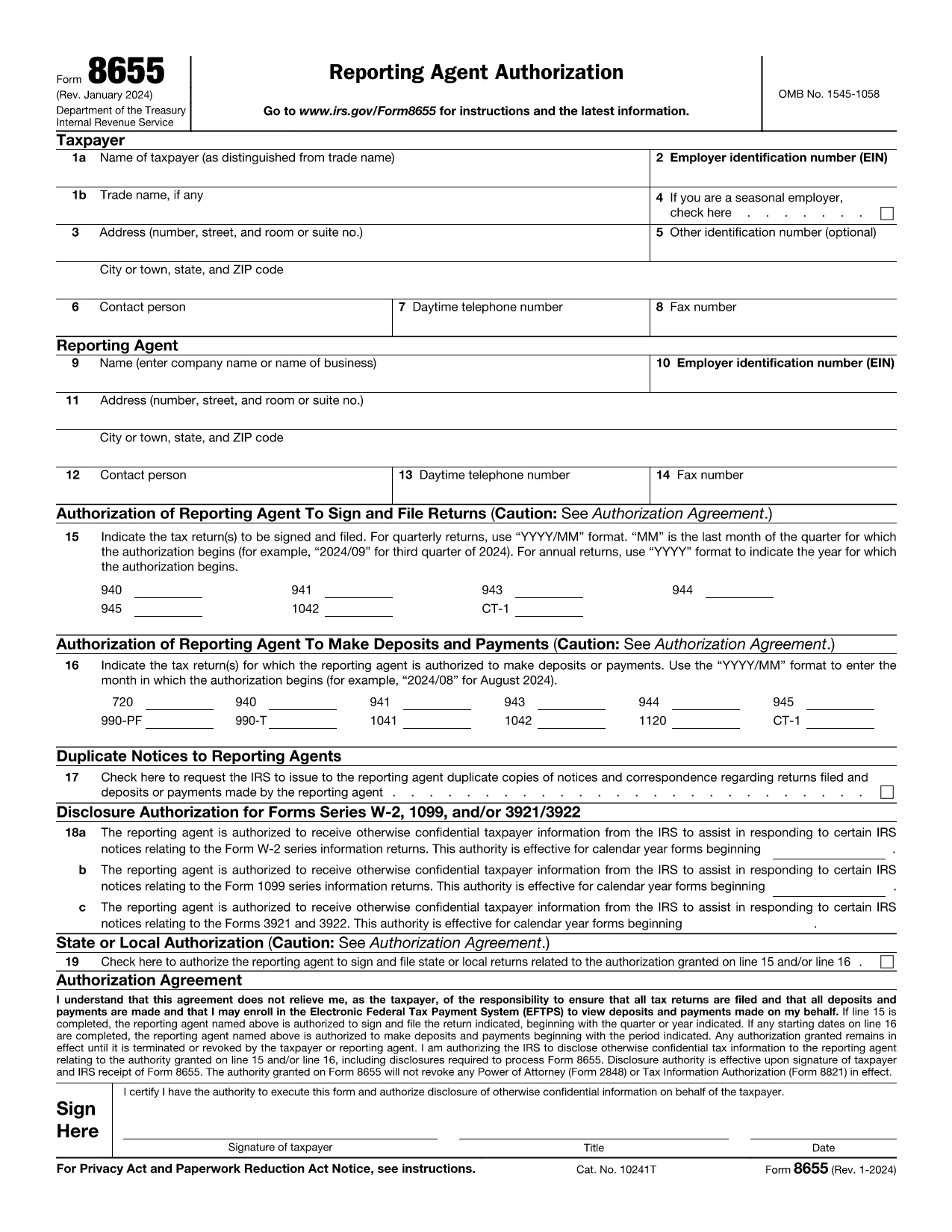
IRS Form 8655 – Automatic Extension for Exempt Organizations (Fillable PDF)

  1. Країна США
  2. Мова англійська
  3. діяльність податки
  4. відділ IRS
IRS Form 8655 – Automatic Extension for Exempt Organizations (Fillable PDF)

What Is Form 8655?

Form 8655, Application for Automatic Extension of Time To File an Exempt Organization Return, is used by tax‑exempt organizations to request an automatic six‑month filing extension for their annual return (Form 990, 990‑EZ, or 990‑PF). The IRS grants the extension automatically when the form is filed correctly and on time.

How to Complete Form 8655 Online

Instead of downloading the PDF and opening it in a desktop editor, you can fill the form directly on this page:

  1. Click the blue "Fill out this form" button below.
  2. Wait a few seconds while the Formize PDF Filler app loads securely in your browser.
  3. Enter the required information in the fillable fields. The app saves your data automatically.
  4. When you’re done, click Save & Download to get a completed PDF that you can print or e‑file.

All data stays on your device; Formize does not store personal information.

Common Mistakes to Avoid

  • Incorrect EIN: Double‑check the Employer Identification Number; a typo will delay the extension.
  • Missing Signature: The authorized officer must sign the form. The online filler lets you add a digital signature.
  • Wrong Tax Year: Ensure the tax year you are extending matches the year on your original return.
  • Late Submission: File the form before the original due date (including any extensions) to qualify for the automatic extension.

Where to Submit the Form

After completing Form 8655, mail or fax it to the address listed in the instructions for your type of return. Most organizations mail it to:

Internal Revenue Service
P.O. Box 7604
Ben Franklin Station
Washington, DC 20044-7604

Or fax to: 855‑214‑7520 (if applicable). Keep a copy for your records.

Ready to start? Click the button below and fill out Form 8655 instantly.

FAQ
  • Who can use Form 8655?

    Any tax‑exempt organization that files Form 990, 990‑EZ, or 990‑PF and needs a six‑month extension.

  • Do I need to attach Form 8655 to my original return?

    No. Form 8655 is filed separately. It must be submitted before the original due date of the return.

  • Can I e‑file Form 8655?

    Yes. After completing the fillable PDF you can upload the file through the IRS e‑file system for exempt organizations.

  • What happens if I miss the extension deadline?

    The IRS will not grant an automatic extension, and penalties may apply for late filing of the original return.

  • Is a digital signature accepted on Form 8655?

    A handwritten signature is preferred, but a clear electronic signature created in the Formize filler is accepted by the IRS.

  • Do I need to pay a fee to use Formize’s PDF filler?

    No. The online filler is free for this form and does not require any subscription.

  • Can I edit the form after I download it?

    Yes, but you must keep the completed version as the official record. Any further edits would require a new submission.

  • Where can I find the official instructions for Form 8655?

    The IRS provides detailed instructions on the same page as the PDF: https://www.irs.gov/instructions/i8655

  • What is the filing deadline for Form 8655?

    Form 8655 must be filed on or before the original due date (including extensions) of the organization’s annual return.

  • Do I need to include any supporting documents?

    No additional documents are required with Form 8655, but keep your return and supporting records handy in case the IRS requests them.

ЯК

Як безкоштовно заповнити Form 8655 онлайн за 5 простих кроків:

  1. 1
    Click the Fill Out Button
    Press the "Fill out this form" button on the page to launch the Formize PDF Filler.
  2. 2
    Wait for the Filler to Load
    A few seconds later the fillable form appears in your browser—no download needed.
  3. 3
    Enter Your Information
    Complete all required fields. The app validates data in real time.
  4. 4
    Add a Signature
    Use the built‑in signature field to sign electronically.
  5. 5
    Save and Download
    Click "Save & Download" to get a completed PDF you can print or e‑file.
Програма Formize PDF Filler
ПРО

Податкові форми

Form 8655 – це одна з податкових форм, які є документами, які використовуються для подання відомостей про податки до відповідного податкового органу. Існують різні типи податкових форм, у тому числі федеральні, штатні та місцеві податкові форми, які можуть відрізнятися залежно від обставин і місцезнаходження платника податків.

ОСОБЛИВОСТІ

Наповнювач PDF

Найпростіший спосіб заповнювати PDF-форми онлайн

  • Швидко заповніть Form 8655
    Шукаєте спосіб швидко заповнити Form 8655 онлайн? За допомогою нашого безкоштовного онлайн-заповнювача PDF-форм ви знатимете, як редагувати та заповнювати цей PDF-документ менш ніж за хвилину.
  • Простий у використанні онлайн-редактор PDF
    Набридло роздруковувати PDF-файли, щоб ви могли їх редагувати, перш ніж сканувати повторно та надсилати назад? Безкоштовно редагуйте PDF-документи онлайн. Використовуйте наш онлайн-редактор PDF, щоб заощадити час і папір.
  • Чудові інструменти, усі платформи
    Хочете знати, як заповнити Form 8655 на комп’ютері Mac або, можливо, як використовувати PDF-заповнювач безкоштовно? Наші онлайн-інструменти PDF працюють на всіх платформах.
  • Безпечне зберігання файлів
    Завершені файли "Form 8655" зберігаються в захищеній базі даних, якою керує хостинг Amazon Cloud. Ви можете будь-коли видалити свої файли з нашої системи. У будь-якому випадку ці файли автоматично видаляються через 24 години.
  • Чат із Form 8655
    Спілкуйтеся з "Form 8655" у Chatize, який є безкоштовним помічником для читання PDF. Ставте запитання та отримуйте відповіді від "Form 8655". Просто натисніть кнопку Chat With Document вище.

Видалити сеанс заповнення

Видалити вибраний сеанс заповнення? В цьому випадку ваш прогрес у заповненні форми буде втрачений.

Видалити сеанс редагування

Видалити вибраний сеанс редагування? У цьому випадку ваш прогрес у створенні та редагуванні форми буде втрачено.