
Chọn ngôn ngữ

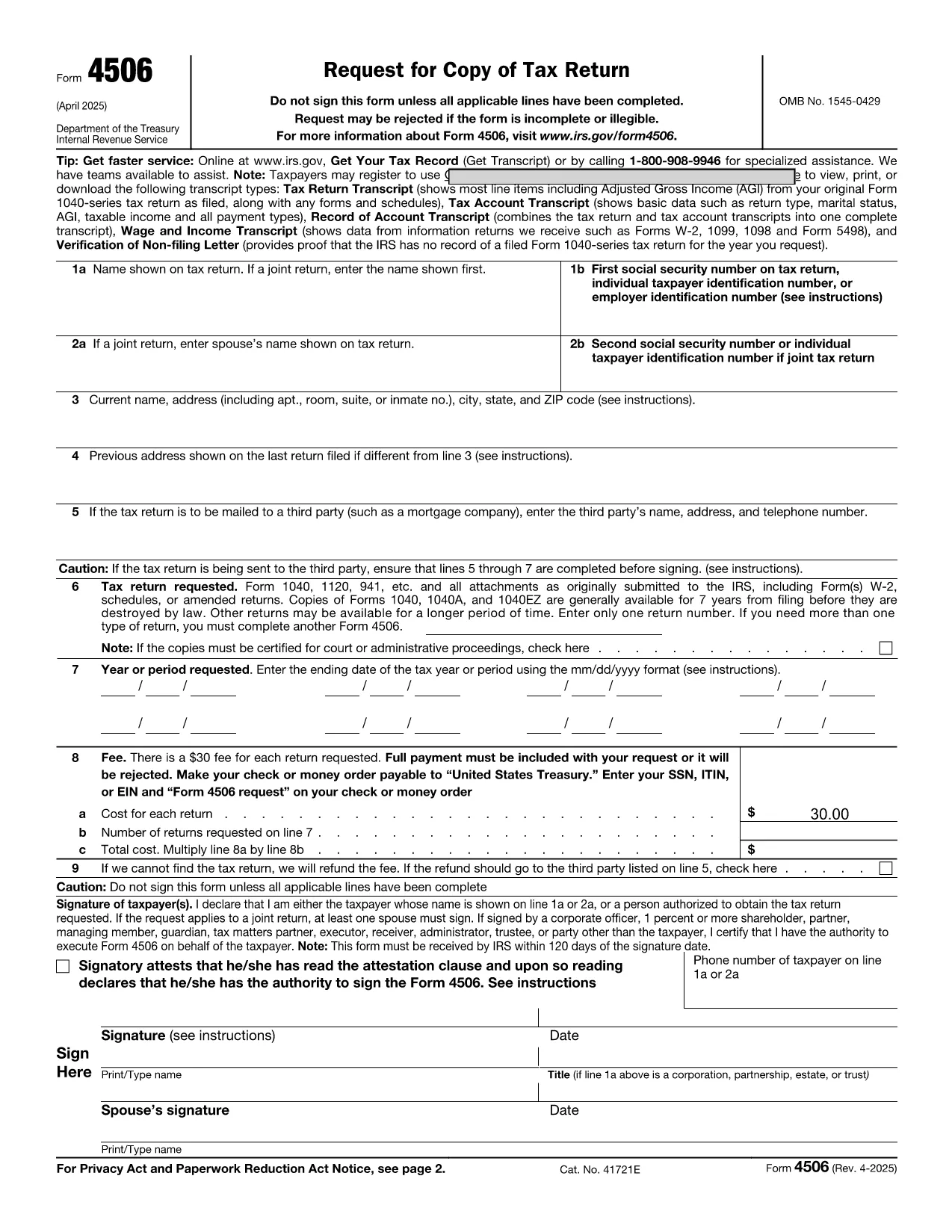
Fillable IRS Form 4506 – Request Your Tax Transcript Online

  1. Quốc gia Hoa Kỳ
  2. Ngôn ngữ Tiếng Anh
  3. Hoạt động thuế
  4. Phòng IRS
Fillable IRS Form 4506 – Request Your Tax Transcript Online

Looking for a fast, secure way to request a copy of your tax transcript? The IRS Form 4506 is the official request form for a tax return transcript, and with Formize you can fill it out directly in your browser—no PDF editor needed.

Why Choose the Online Fillable Form 4506?

Our fillable PDF version is:

  • Instantly accessible—no download or installation.
  • Auto‑save as you type, so you never lose data.
  • Validated fields that flag missing or incorrect entries before you submit.
  • Secure—your information stays encrypted while you work.

Step‑by‑Step Guide to Completing the Form

Follow the simple steps below to fill out Form 4506 online and have it ready for printing or electronic submission.

Common Mistakes & How to Avoid Them

Even a small typo can delay processing. Watch out for:

  • Incorrect Social Security Number or EIN.
  • Missing tax year selection.
  • Unsigned form – the signature field is required.
  • Using an outdated address.

The Formize filler highlights these issues in real‑time, so you can correct them before you finish.

Where to Get Help After Submitting

If you need assistance, the IRS provides phone support for transcript requests (1‑800‑829‑1040). For technical questions about the online filler, refer to the Formize Help Center for troubleshooting tips.

Ready to start? Click the button below, fill out the form in seconds, and print or email it directly to the IRS.

CÂU HỎI THƯỜNG GẶP
  • Do I need to download the PDF to fill out Form 4506?

    No. With Formize you can fill the form directly in your browser. Just click the "Fill out this form" button and the online filler loads automatically.

  • Is the online filler secure?

    Yes. All data is encrypted during the session, and the filler does not store your information after you close the tab.

  • Can I save my progress and continue later?

    The Formize filler offers an auto‑save feature. You can download a partially completed PDF and resume editing later.

  • What if I make a mistake after I’ve printed the form?

    If you notice an error after printing, simply go back to the online filler, correct the mistake, and download a new PDF.

  • How long does the IRS take to process Form 4506?

    Processing typically takes 10‑15 business days after the IRS receives the completed form.

  • Do I need a signature on the online form?

    Yes. The filler includes an electronic signature field that meets IRS requirements for printed submissions.

  • Can I submit the PDF electronically to the IRS?

    The IRS currently accepts mailed paper copies for Form 4506. Keep the PDF for your records after printing.

  • What if I have a question about the form’s instructions?

    Refer to the instruction page attached to the PDF or call the IRS at 1‑800‑829‑1040 for help.

LÀM THẾ NÀO ĐỂ

Cách điền request form online miễn phí, trực tuyến trong 5 bước đơn giản:

  1. 1
    Click the Fillable Form Button
    Press the "Fill out this form" button on the page. The Formize PDF Filler app will open in a new tab.
  2. 2
    Enter Your Information
    Type directly into each field. The filler validates entries in real time, ensuring all required data is captured.
  3. 3
    Review and Sign
    Use the built‑in signature field to sign electronically, then double‑check for any highlighted errors.
  4. 4
    Download or Print
    When you’re satisfied, click "Download PDF" to save a copy or "Print" to send a hard copy to the IRS.
  5. 5
    Submit to the IRS
    Mail the printed form to the address listed in the instructions, or attach the PDF to an online request if the IRS permits.
Định dạng ứng dụng PDF Filler
TRONG KHOẢNG

Đơn thuế

request form online là một trong những Biểu mẫu khai thuế là văn bản dùng để khai báo các thông tin liên quan đến thuế với cơ quan thuế liên quan. Có nhiều loại biểu mẫu thuế khác nhau, bao gồm biểu mẫu thuế liên bang, tiểu bang và địa phương, có thể khác nhau tùy thuộc vào hoàn cảnh và địa điểm của người nộp thuế.

ĐẶC TRƯNG

Trình điền PDF

Cách dễ nhất để điền vào các mẫu PDF trực tuyến

  • Nhanh chóng điền vào request form online
    Bạn đang tìm cách điền nhanh request form online trực tuyến? Với trình điền biểu mẫu PDF miễn phí trực tuyến của chúng tôi, bạn sẽ biết cách chỉnh sửa và điền vào tài liệu pdf này trong vòng chưa đầy một phút.
  • Trình chỉnh sửa PDF trực tuyến dễ sử dụng
    Chán nản với việc in ra các tệp PDF để bạn có thể chỉnh sửa chúng trước khi quét lại và gửi lại? Chỉnh sửa tài liệu PDF trực tuyến miễn phí. Sử dụng trình chỉnh sửa pdf trực tuyến của chúng tôi để tiết kiệm thời gian và giấy.
  • Công cụ tuyệt vời, tất cả các nền tảng
    Bạn muốn biết cách điền request form online trên máy Mac hoặc có thể là cách sử dụng trình điền PDF miễn phí? Các công cụ PDF trực tuyến của chúng tôi hoạt động trên tất cả các nền tảng.
  • Lưu trữ tệp an toàn
    Các tệp "request form online" đã hoàn thành được lưu trữ trong cơ sở dữ liệu bảo mật do dịch vụ lưu trữ Amazon Cloud quản lý. Bạn có thể xóa các tệp của mình khỏi hệ thống của chúng tôi bất cứ lúc nào. Trong mọi trường hợp, các tệp này sẽ tự động bị xóa sau 24 giờ.
  • Trò chuyện với request form online
    Trò chuyện với "request form online" trên Trò chuyện, một trợ lý đọc PDF miễn phí. Đặt câu hỏi và nhận câu trả lời từ "request form online". Chỉ cần nhấp vào nút Trò chuyện với tài liệu ở trên.

Xóa phiên điền

Xóa phiên điền đã chọn? Trong trường hợp này, tiến độ của bạn trong việc hoàn thành biểu mẫu sẽ bị mất.

Xóa phiên chỉnh sửa

Xóa phiên chỉnh sửa đã chọn? Trong trường hợp này, tiến trình tạo và chỉnh sửa biểu mẫu của bạn sẽ bị mất.