
Chọn ngôn ngữ

IRS Form 2106 – Fillable Vehicle Interest Tax Form

  1. Quốc gia Hoa Kỳ
  2. Ngôn ngữ Tiếng Anh
  3. Hoạt động thuế
  4. Phòng IRS
IRS Form 2106 – Fillable Vehicle Interest Tax Form

If you paid interest on a vehicle loan for business or employment purposes, IRS Form 2106 is the official document you need to claim that deduction. With Formize’s Fill out this form button, you can complete the form directly in your browser—no PDF editor required.

What Is IRS Form 2106?

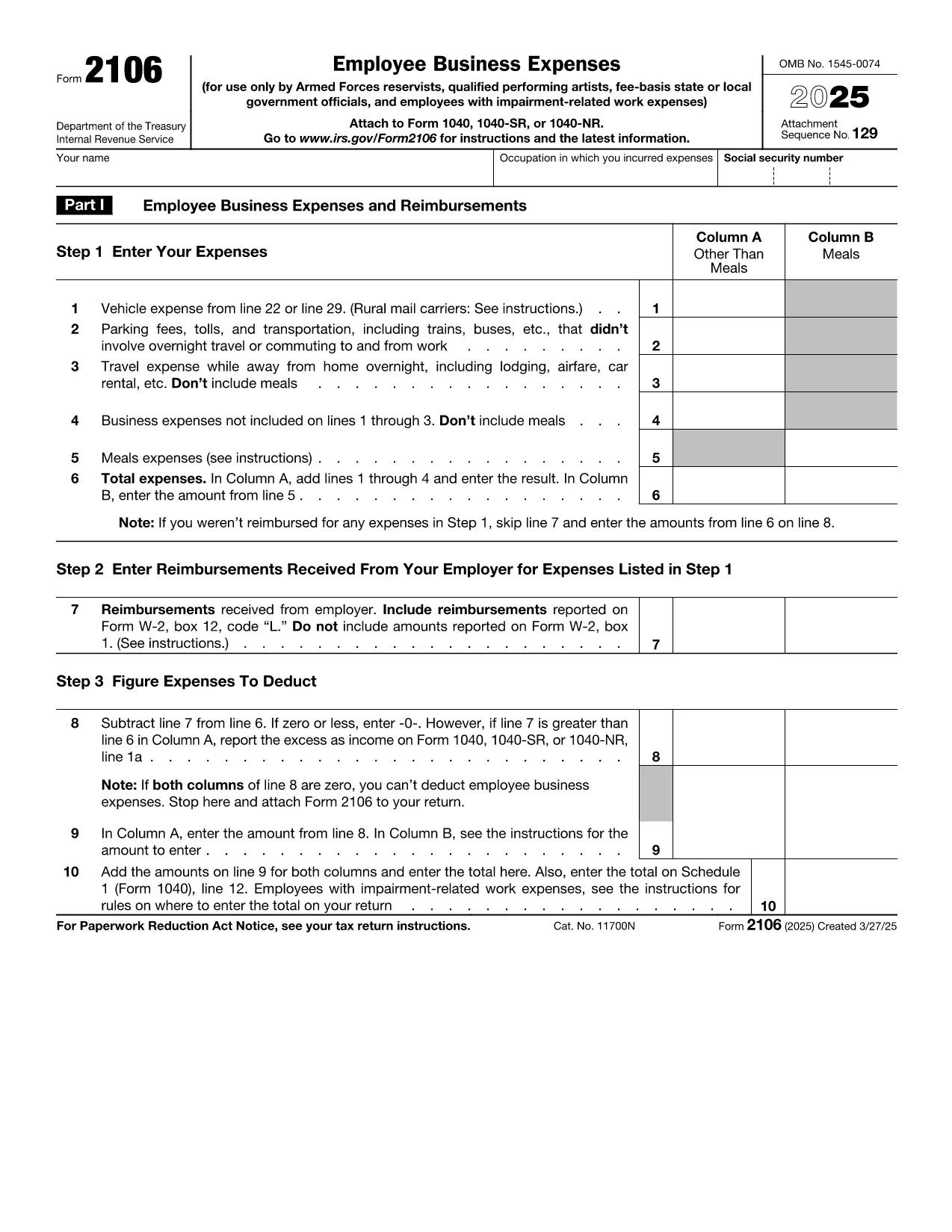
Form 2106, Employee Business Expenses, allows employees to deduct ordinary and necessary expenses incurred while performing their job. The Vehicle Interest line (Part II, line 22) captures interest paid on a car loan used for work‑related travel.

How to Complete the Vehicle Interest Section

Follow these simple steps after clicking the “Fill out this form” button:

  1. Enter your name, Social Security Number, and employer’s EIN in the header.
  2. In Part II, locate Line 22 – Vehicle loan interest. Input the total interest paid during the tax year (see your loan statement).
  3. Provide a brief description of the vehicle’s business use (mileage, percentage, etc.).
  4. Attach supporting documentation (loan statements) when you file your return.

Common Mistakes & Tips for Accuracy

  • Don’t mix personal interest with business interest—only the portion attributable to business use is deductible.
  • Ensure the interest amount matches the figure on your lender’s year‑end statement.
  • Round mileage to the nearest whole number; the IRS does not accept fractions.
  • Double‑check that the form is signed and dated before submission.

Where to Submit the Completed Form

Attach Form 2106 to your Form 1040 when filing your individual tax return. If you e‑file, upload the PDF through your tax‑software’s “Supporting Documents” section.

Need a quick start? Click the button below, wait for the Formize PDF Filler app to load, and begin entering your information instantly.

CÂU HỎI THƯỜNG GẶP
  • Can I deduct interest on a personal vehicle?

    Only the portion of interest that relates to business use is deductible on Form 2106. Personal use interest is not allowed.

  • Do I need a separate form for vehicle expenses?

    Vehicle expenses (mileage, lease payments, interest, etc.) are all reported on Form 2106. Use the appropriate lines for each expense type.

  • What documentation should I keep?

    Keep loan statements showing interest paid, a mileage log, and any receipts that support the business‑use percentage.

  • Is Form 2106 still required for 2024?

    Yes. Employees who claim unreimbursed business expenses, including vehicle interest, must file Form 2106 with their 2024 Form 1040.

  • Can I e‑file Form 2106?

    Most tax software allows you to upload the completed Form 2106 PDF as a supporting document when you e‑file your return.

  • What if my employer reimburses my vehicle costs?

    Reimbursed amounts are not deductible. Only unreimbursed interest you actually paid can be claimed.

  • Is there a limit to the amount of vehicle interest I can deduct?

    The deduction is limited to the amount of interest actually paid and the percentage of business use. There is no separate dollar cap.

  • Do I need to file Form 2106 if I’m self‑employed?

    Self‑employed individuals report vehicle interest on Schedule C, not Form 2106.

  • How long should I keep the form and supporting documents?

    The IRS recommends retaining tax records, including Form 2106 and supporting documents, for at least three years after the filing date.

  • Will Formize store my completed form?

    Formize does not store your data. After you complete the form, you can download it to your device or upload it directly to your tax software.

LÀM THẾ NÀO ĐỂ

Cách điền vehicle interest tax form miễn phí, trực tuyến trong 5 bước đơn giản:

  1. 1
    Open the Fillable Form
    Click the “Fill out this form” button on the page. The Formize PDF Filler will load in your browser.
  2. 2
    Enter Personal Information
    Fill in your name, SSN, and employer’s EIN in the header fields.
  3. 3
    Add Vehicle Interest Details
    Navigate to Part II, line 22. Type the total interest paid on your business vehicle loan and indicate the business‑use percentage.
  4. 4
    Review and Sign
    Check all entries for accuracy, then add your electronic signature and date.
  5. 5
    Save or Submit
    Download the completed PDF or submit it directly through your tax‑software’s attachment feature.
Định dạng ứng dụng PDF Filler
TRONG KHOẢNG

Biểu mẫu thuế liên bang

vehicle interest tax form là một trong những biểu mẫu thuế Liên bang là tài liệu dùng để báo cáo và nộp thuế thu nhập liên bang với Sở Thuế vụ (IRS) tại Hoa Kỳ. Những biểu mẫu này được các cá nhân, doanh nghiệp và tổ chức sử dụng để báo cáo thu nhập, các khoản khấu trừ và thông tin liên quan khác cần thiết để tính nghĩa vụ thuế liên bang của họ.

Biểu mẫu thuế liên bang được sử dụng phổ biến nhất là Biểu mẫu 1040, được cá nhân nộp thuế sử dụng để báo cáo thuế thu nhập cá nhân của họ. Các biểu mẫu thường được sử dụng khác bao gồm Biểu mẫu 1065 dành cho quan hệ đối tác, Biểu mẫu 1120 dành cho các công ty và Mẫu 990 dành cho các tổ chức được miễn thuế.

Các biểu mẫu thuế liên bang thường yêu cầu người nộp thuế báo cáo nhiều nguồn thu nhập khác nhau, chẳng hạn như tiền lương, tiền lương và tiền boa, cũng như thu nhập từ đầu tư, tài sản cho thuê và các nguồn khác. Các biểu mẫu này cũng cho phép người nộp thuế yêu cầu các khoản khấu trừ và tín dụng cho các chi phí khác nhau, chẳng hạn như đóng góp từ thiện, lãi suất thế chấp và chi phí chăm sóc sức khỏe.

Điều quan trọng là phải nộp các biểu mẫu thuế liên bang một cách chính xác và đúng hạn, vì nếu không làm như vậy có thể bị IRS phạt và tính lãi.

ĐẶC TRƯNG

Trình điền PDF

Cách dễ nhất để điền vào các mẫu PDF trực tuyến

  • Nhanh chóng điền vào vehicle interest tax form
    Bạn đang tìm cách điền nhanh vehicle interest tax form trực tuyến? Với trình điền biểu mẫu PDF miễn phí trực tuyến của chúng tôi, bạn sẽ biết cách chỉnh sửa và điền vào tài liệu pdf này trong vòng chưa đầy một phút.
  • Trình chỉnh sửa PDF trực tuyến dễ sử dụng
    Chán nản với việc in ra các tệp PDF để bạn có thể chỉnh sửa chúng trước khi quét lại và gửi lại? Chỉnh sửa tài liệu PDF trực tuyến miễn phí. Sử dụng trình chỉnh sửa pdf trực tuyến của chúng tôi để tiết kiệm thời gian và giấy.
  • Công cụ tuyệt vời, tất cả các nền tảng
    Bạn muốn biết cách điền vehicle interest tax form trên máy Mac hoặc có thể là cách sử dụng trình điền PDF miễn phí? Các công cụ PDF trực tuyến của chúng tôi hoạt động trên tất cả các nền tảng.
  • Lưu trữ tệp an toàn
    Các tệp "vehicle interest tax form" đã hoàn thành được lưu trữ trong cơ sở dữ liệu bảo mật do dịch vụ lưu trữ Amazon Cloud quản lý. Bạn có thể xóa các tệp của mình khỏi hệ thống của chúng tôi bất cứ lúc nào. Trong mọi trường hợp, các tệp này sẽ tự động bị xóa sau 24 giờ.
  • Trò chuyện với vehicle interest tax form
    Trò chuyện với "vehicle interest tax form" trên Trò chuyện, một trợ lý đọc PDF miễn phí. Đặt câu hỏi và nhận câu trả lời từ "vehicle interest tax form". Chỉ cần nhấp vào nút Trò chuyện với tài liệu ở trên.

Xóa phiên điền

Xóa phiên điền đã chọn? Trong trường hợp này, tiến độ của bạn trong việc hoàn thành biểu mẫu sẽ bị mất.

Xóa phiên chỉnh sửa

Xóa phiên chỉnh sửa đã chọn? Trong trường hợp này, tiến trình tạo và chỉnh sửa biểu mẫu của bạn sẽ bị mất.