
选择语言

Fillable IRS Form 1065 – LLC Tax Return PDF

  1. 国家 美国
  2. 语言 英语
  3. 活动 税收
  4. 部门 IRS
Fillable IRS Form 1065 – LLC Tax Return PDF

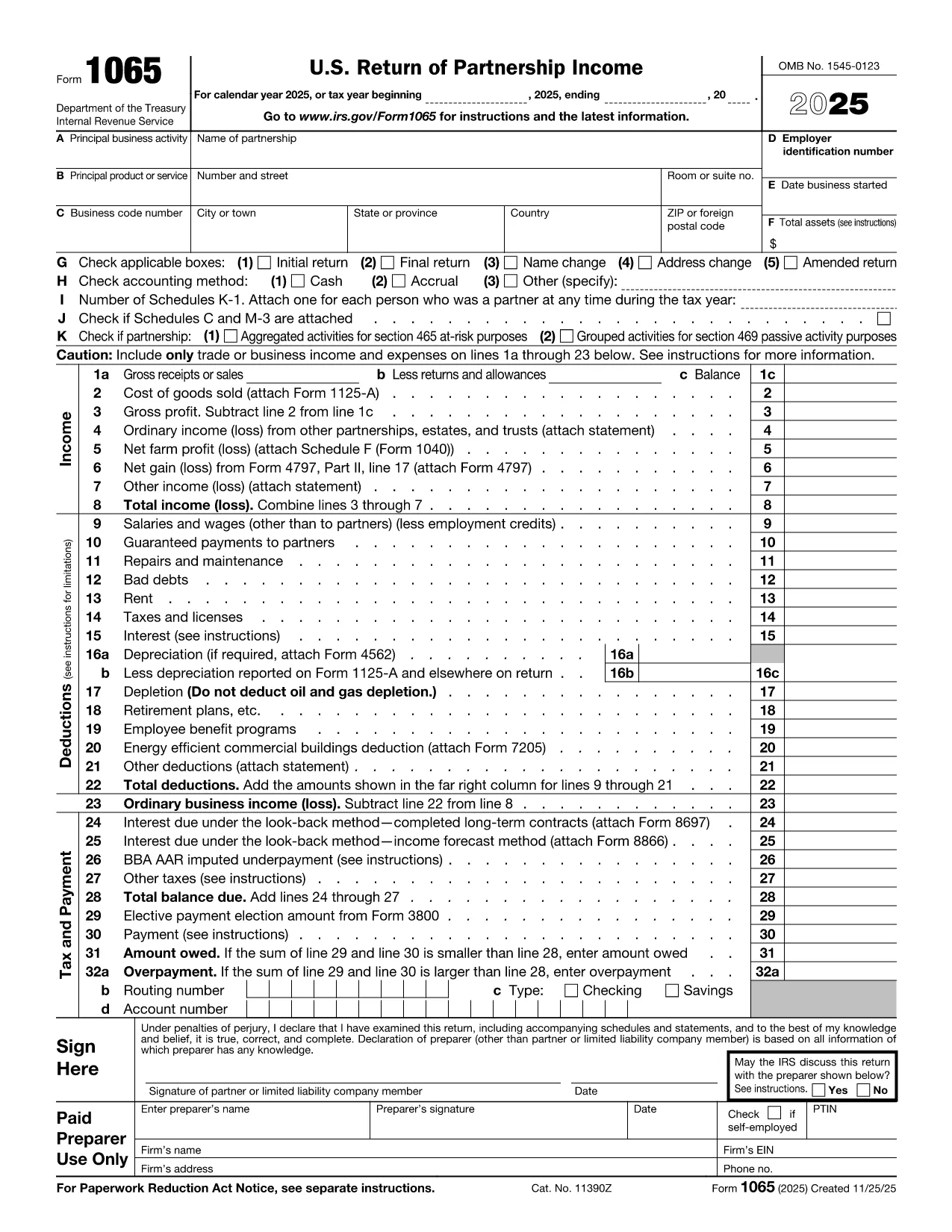
Running an LLC that is taxed as a partnership? You’ll need to file IRS Form 1065, the U.S. Return of Partnership Income. This fillable PDF lets you complete the form online, save time, and avoid the hassle of traditional PDF editors.

What Is IRS Form 1065 and Who Needs It?

Form 1065 reports the income, deductions, gains, and losses of a partnership or an LLC filing as a partnership. Each member receives a Schedule K‑1 that reports their share of profits or losses for personal tax filing.

How to Fill Out the Form Directly on Formize

Instead of downloading the PDF and opening a separate editor, simply click the "Fill out this form" button on this page. The Formize PDF Filler app will load in your browser, letting you type, save, and download the completed form in seconds.

Common Mistakes & Tips for a Smooth Submission

  • Incorrect EIN: Double‑check the Employer Identification Number before submitting.
  • Missing Schedule K‑1: Ensure every member’s K‑1 is attached.
  • Wrong filing year: The top of the form shows the tax year; make sure it matches your LLC’s fiscal year.
  • Signature errors: The form must be signed by a general partner or LLC managing member.

Follow the step‑by‑step guide below to avoid these pitfalls and file with confidence.

常问问题
  • Do I need a software license to use the Formize PDF Filler?

    No. The filler runs in your web browser, so there’s no download or license required.

  • Can I save my progress and return later?

    Yes. Use the "Save" button to download a draft PDF, then reopen it later with the Formize filler.

  • Is Form 1065 required for a single‑member LLC?

    A single‑member LLC taxed as a disregarded entity files Schedule C, not Form 1065. Use Form 1065 only for multi‑member LLCs taxed as partnerships.

  • What is the filing deadline for Form 1065?

    Generally, the deadline is March 15th for calendar‑year partnerships, with extensions available until September 15th.

  • How do I correct an error after filing?

    File Form 1065‑X, Amended Return, and attach a corrected Schedule K‑1 for each member.

  • Is there a fee to submit the form online?

    The Formize filler is free to use. You still need to mail or e‑file the completed PDF to the IRS, which may have a filing fee depending on your state.

如何

如何通过 5 个简单步骤在线免费填写 LLC tax form:

  1. 1
    Click the Fill‑out Button
    Press the "Fill out this form" button on the page. The Formize PDF Filler loads instantly in your browser.
  2. 2
    Enter Your LLC Information
    Type the LLC name, EIN, address, and tax year directly into the highlighted fields.
  3. 3
    Complete Income & Deductions
    Fill in lines for total income, cost of goods sold, and deductible expenses. Use the built‑in calculator for totals.
  4. 4
    Add Schedule K‑1 for Each Member
    Click "Add Schedule K‑1" and enter each member’s share of profit, loss, and capital.
  5. 5
    Review, Sign, and Download
    Check all entries, add the authorized signature, then download the completed PDF to submit to the IRS.
Formize PDF Filler 应用程序
关于

联邦税表

LLC tax form 是联邦税表之一,用于向美国国税局 (IRS) 报告和提交联邦所得税。个人、企业和组织使用这些表格来报告他们的收入、扣除额以及计算联邦纳税义务所需的其他相关信息。

最常用的联邦税表是1040表,个人纳税人用它来申报个人所得税。其他常用表格包括用于合作伙伴关系的表格 1065适用于公司的表格 1120,适用于免税组织的表格 990

联邦税表通常要求纳税人报告各种收入来源,例如工资、薪水和小费,以及来自投资、租赁房产和其他来源的收入。这些表格还允许纳税人申请各种费用的扣除和抵免,例如慈善捐款、抵押贷款利息和医疗费用。

准确、及时地提交联邦税表非常重要,因为不这样做可能会导致美国国税局的罚款和利息费用。

特征

PDF 填充器

在线填写 PDF 表单的最简单方法

  • 快速填写LLC tax form
    正在寻找一种在线快速填写 LLC tax form 的方法?使用我们的在线免费 PDF 填表工具,您将在不到一分钟的时间内了解如何编辑和填写此 pdf 文档。
  • 易于使用的在线 PDF 编辑器
    是否厌倦了打印 PDF 文件以便在重新扫描并发回之前对其进行编辑?免费在线编辑 PDF 文档。使用我们的在线 pdf 编辑器可以节省时间和纸张。
  • 伟大的工具,所有平台
    想知道如何在 Mac 上填写 LLC tax form,或者如何免费使用 PDF 填充程序?我们的在线 PDF 工具适用于所有平台。
  • 安全文件存储
    完成的“LLC tax form”文件存储在由亚马逊云托管管理的安全数据库中。您可以随时从我们的系统中删除您的文件。在任何情况下,这些文件都会在 24 小时后自动删除。
  • 与 LLC tax form 聊天
    Chatize 上与“LLC tax form”聊天,这是一个免费的 PDF 阅读器助手。提出问题并从“LLC tax form”获得答案。只需点击上面的与文档聊天按钮即可。

删除填充会话

删除选定的填充会话?在这种情况下,您填写表格的进度将丢失。

删除编辑会话

删除选定的编辑会话?在这种情况下,您创建和编辑表单的进度将会丢失。