
选择语言

Request Form Example – Free Fillable PDF

  1. 国家 美国
  2. 语言 英语
  3. 活动 税收
  4. 部门 IRS
Request Form Example – Free Fillable PDF

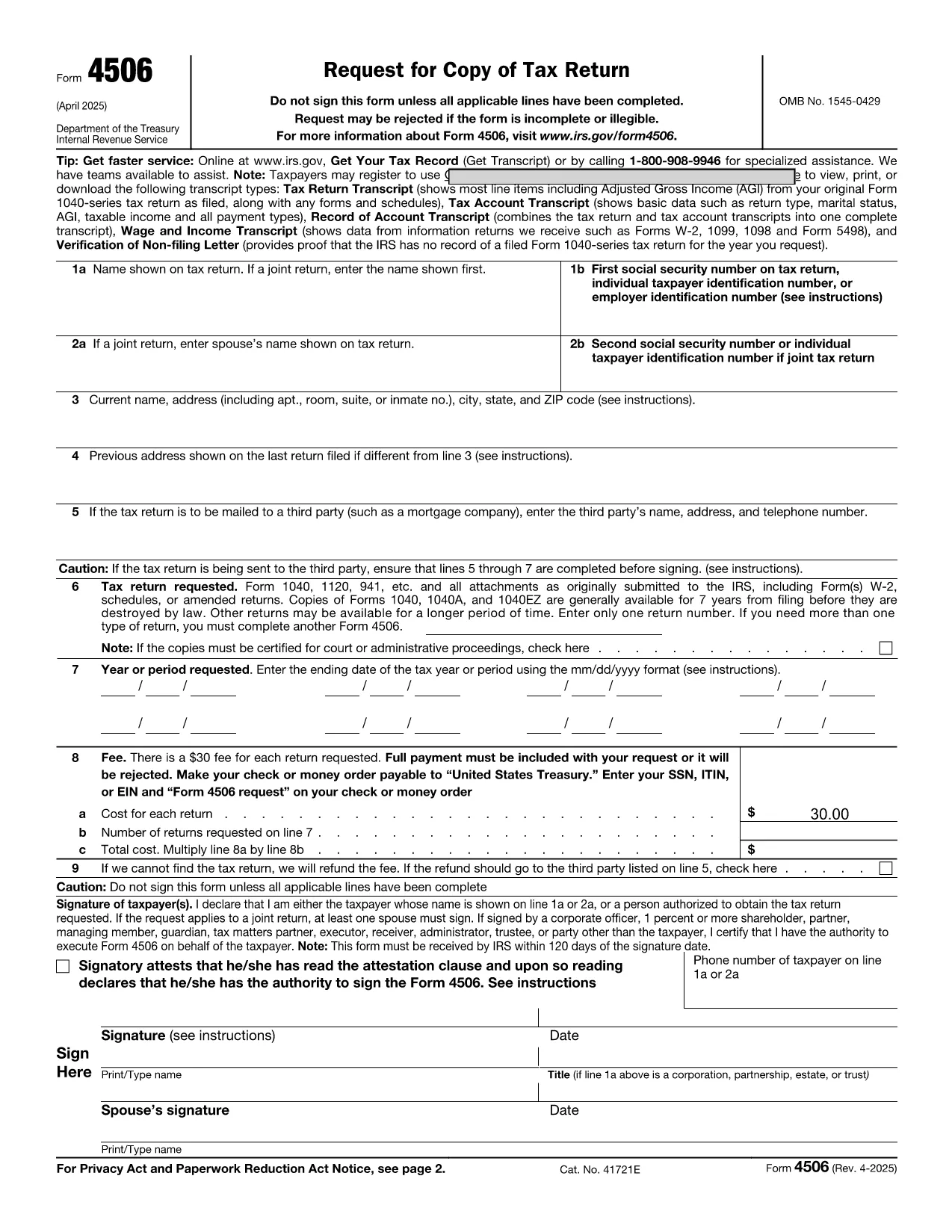
Our online request form example lets you complete the official IRS Form 4506 without installing any software. The form is fully fillable and works on any device, thanks to the Formize PDF Filler.

Below you’ll find everything you need to know about this form, step‑by‑step instructions for filling it out, common pitfalls to watch for, and where to send the finished document.

常问问题
  • Do I need Adobe Acrobat to fill the form?

    No. The Formize PDF Filler works in any modern browser, so you never need to install Acrobat or any other PDF editor.

  • Can I save my progress and finish later?

    Yes. Click the “Save” button at any time to download a partially completed PDF. Re‑upload it later to continue editing.

  • Is my personal information secure?

    Formize uses HTTPS encryption for all data entered in the browser. The information never leaves your device unless you choose to download or submit the file.

  • What if I make a mistake after saving?

    Open the saved PDF again with the Formize filler, correct the error, and re‑save. The original file is not overwritten until you download the new version.

  • Do I still need to sign the form by hand?

    The filler includes a typed signature field that the IRS accepts for most electronic submissions. If a handwritten signature is required, print the completed PDF and sign it manually.

  • Which tax years can I request with Form 4506?

    Form 4506 allows you to request transcripts for any year you have filed a return. Select the appropriate year in the “Tax Year” field.

  • Is there a fee to use Formize?

    No. Formize’s online PDF filler is completely free for all users.

  • Can I use this form outside of the United States?

    Form 4506 is an IRS document, so it’s intended for U.S. taxpayers. International users may need a different request form specific to their country’s tax authority.

如何

如何通过 5 个简单步骤在线免费填写 request form example:

  1. 1
    Click the Fill‑out Button
    Locate the blue “Fill out this form” button on this page and click it. The Formize PDF Filler will open in a new browser tab.
  2. 2
    Wait for the Filler to Load
    The app loads the fillable version of IRS Form 4506. This only takes a few seconds.
  3. 3
    Enter Your Information
    Type directly into each field – name, SSN, tax year, and signature. The filler validates formats in real time.
  4. 4
    Review and Save
    Use the “Preview” button to double‑check all entries. When you’re satisfied, click “Save” to download a completed PDF or “Submit” if your organization accepts electronic submissions.
  5. 5
    Print or Email (Optional)
    If you need a hard copy, print the saved PDF. You can also attach the file to an email and send it to the IRS or your tax professional.
Formize PDF Filler 应用程序
关于

税务表格

request form example 是一种税务表格,用于向相关税务机关报告有关个人或企业的收入、扣除额和纳税义务的信息。这些表格对于遵守税法和履行纳税义务是必要的。税表因国家/地区和具体税收要求而异。以下是一些常见的税表类型:

个人纳税表:个人纳税人使用这些表格报告其个人收入并申请扣除、抵免和免税。例如,美国的 1040 表格或英国的自我评估纳税申报表。

营业税表:公司、合伙企业或个体经营者使用营业税表来报告其营业收入、费用和其他税务相关信息。示例包括美国的附表 C 表格(业务利润或亏损)或英国的 CT600 表格(公司纳税申报表)。

工资税表:雇主使用这些表格来报告工资、薪水和从雇员的工资中预扣的税款。示例包括美国的 W-2 表格或英国的 P60 表格。

销售税表:企业使用销售税表来报告和汇缴应税商品或服务征收的销售税。具体的销售税形式因司法管辖区而异。

增值税 (VAT) 表格:增值税表格用于征收增值税的国家/地区,用于报告和汇出销售中收取的增值税以及申请购买时的增值税抵免。示例包括许多国家/地区使用的增值税申报表。

预估税表:预估税表用于报告和缴纳无需预扣税的收入(例如自营职业收入或投资收入)的预估税款。

这些只是可能存在的众多税收形式的几个例子。所需的具体表格取决于您所在国家或司法管辖区的税务法律和法规。请务必咨询税务机关的指南或寻求专业建议,以确定哪些表格适用于您的情况。

特征

PDF 填充器

在线填写 PDF 表单的最简单方法

  • 快速填写request form example
    正在寻找一种在线快速填写 request form example 的方法?使用我们的在线免费 PDF 填表工具,您将在不到一分钟的时间内了解如何编辑和填写此 pdf 文档。
  • 易于使用的在线 PDF 编辑器
    是否厌倦了打印 PDF 文件以便在重新扫描并发回之前对其进行编辑?免费在线编辑 PDF 文档。使用我们的在线 pdf 编辑器可以节省时间和纸张。
  • 伟大的工具,所有平台
    想知道如何在 Mac 上填写 request form example,或者如何免费使用 PDF 填充程序?我们的在线 PDF 工具适用于所有平台。
  • 安全文件存储
    完成的“request form example”文件存储在由亚马逊云托管管理的安全数据库中。您可以随时从我们的系统中删除您的文件。在任何情况下,这些文件都会在 24 小时后自动删除。
  • 与 request form example 聊天
    Chatize 上与“request form example”聊天,这是一个免费的 PDF 阅读器助手。提出问题并从“request form example”获得答案。只需点击上面的与文档聊天按钮即可。

删除填充会话

删除选定的填充会话?在这种情况下,您填写表格的进度将丢失。

删除编辑会话

删除选定的编辑会话?在这种情况下,您创建和编辑表单的进度将会丢失。