
选择语言

Fillable IRS Schedule 2 (Form 1040) – Free PDF

  1. 国家 美国
  2. 语言 英语
  3. 活动 税收
  4. 部门 IRS
Fillable IRS Schedule 2 (Form 1040) – Free PDF

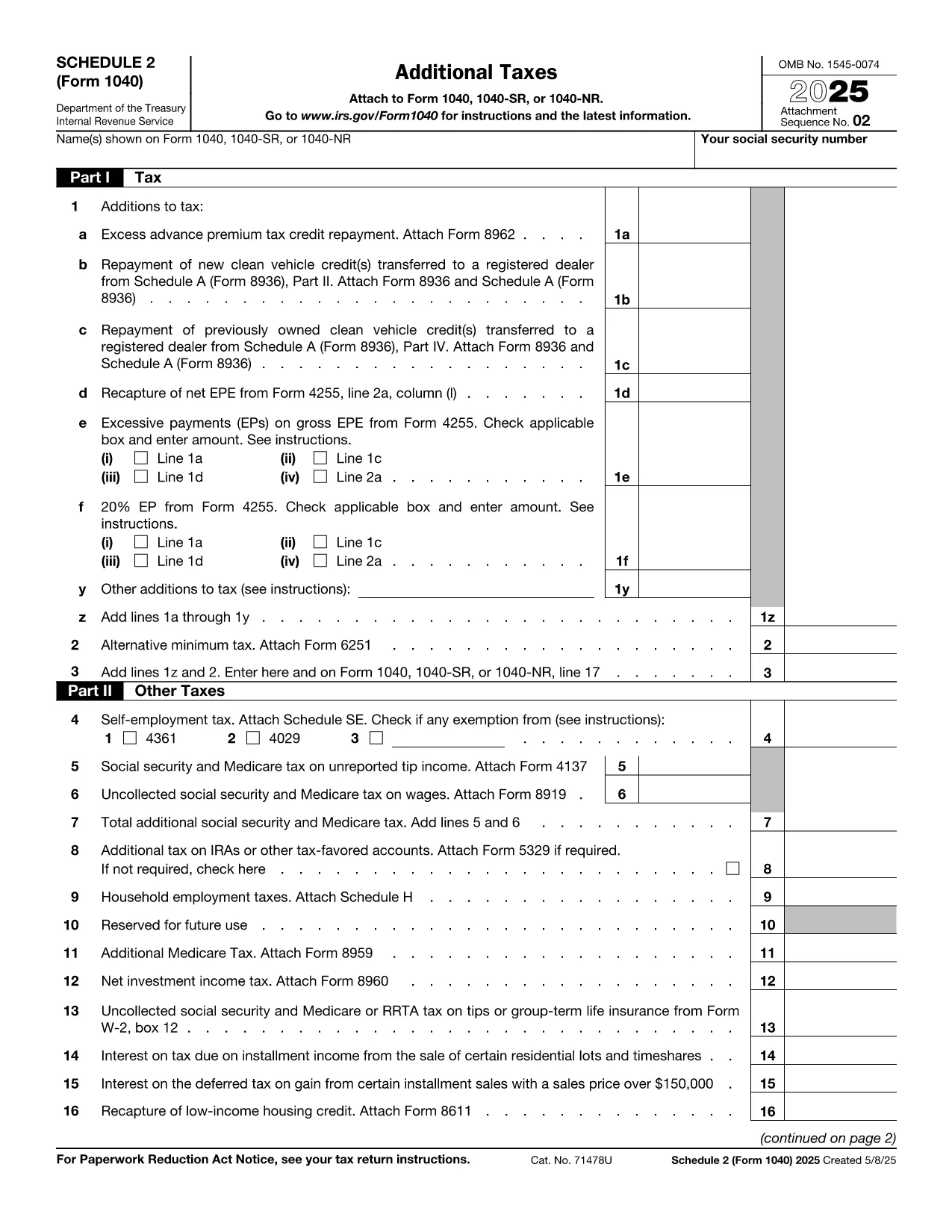
Schedule 2 (Form 1040) is the supplemental tax form used to report additional taxes such as the alternative minimum tax and certain tax credits. Whether you’re an individual taxpayer, a freelancer, or a small‑business owner, completing Schedule 2 correctly can prevent processing delays and potential penalties.

Our fillable PDF version lets you enter data directly in your browser. No need to download a PDF editor—just click the Fill out this form button, and the Formize PDF Filler app will load instantly.

What Is Schedule 2 and Who Needs It?

Schedule 2 is attached to the standard Form 1040. You’ll need it if you have:

  • Alternative Minimum Tax (AMT) liability
  • Excess advance premium tax credit repayment
  • Other taxes such as self‑employment tax, additional Medicare tax, or household employment taxes

How to Fill Out Schedule 2 With Formize

Follow the simple steps below. The Formize PDF Filler automatically saves your entries, so you can review or export the completed form at any time.

Common Mistakes & Tips for Accurate Completion

Avoid these pitfalls:

  • Leaving fields blank – Even if a line does not apply, enter “0” to keep the form balanced.
  • Mismatched totals – Double‑check that the sum of lines 1‑5 matches the total shown on line 6.
  • Wrong tax year – Ensure you are using the Schedule 2 for the correct filing year (e.g., 2023 version).

Where to Submit Your Completed Schedule 2

After filling the form, download the PDF and attach it to your electronic Form 1040 filing through approved tax‑software, or mail it with your paper return to the IRS address listed in the Form 1040 instructions.

Need more help? Review the official IRS instructions linked below or consult a tax professional.

常问问题
  • Do I need Schedule 2 if I only have regular income tax?

    No. Schedule 2 is only required if you have additional taxes such as AMT, self‑employment tax, or excess premium tax credit repayment.

  • Can I edit Schedule 2 after I download it?

    Yes. The Formize PDF Filler lets you save and reopen the file, so you can make changes any time before final submission.

  • Is the fillable PDF version accepted by the IRS?

    Absolutely. As long as the final PDF is printed or submitted electronically with all fields completed, the IRS accepts it.

  • What if I make a mistake after filing?

    You can file an amended return (Form 1040‑X) and include a corrected Schedule 2. Keep a copy of both the original and amended PDFs.

  • Is there a fee to use Formize PDF Filler?

    No. The fillable Schedule 2 is provided free of charge on Formize.com.

  • Do I need special software to open the downloaded PDF?

    No special software is required. Any standard PDF viewer (Adobe Reader, Chrome, Edge) can open the file.

  • How do I know which version of Schedule 2 to use?

    Use the version that matches the tax year you are filing for. This page always links to the latest IRS‑published PDF.

  • Can I fill out Schedule 2 on a mobile device?

    Yes. The Formize PDF Filler works on most modern smartphones and tablets.

如何

如何通过 5 个简单步骤在线免费填写 Schedule 2 PDF:

  1. 1
    Open the Fillable Form
    Click the bright “Fill out this form” button on this page. The Formize PDF Filler app will launch in a new tab.
  2. 2
    Enter Your Information
    Use your keyboard to type directly into each field. The form automatically saves your progress.
  3. 3
    Review & Validate
    Check each section for accuracy. The built‑in validator highlights missing or mismatched totals.
  4. 4
    Download or Export
    When you are satisfied, click “Download PDF” to save a completed copy, or export to your cloud storage.
  5. 5
    Submit with Your Tax Return
    Attach the completed Schedule 2 to your Form 1040 filing—either electronically via tax software or by mailing a paper return.
Formize PDF Filler 应用程序
关于

税务表格

Schedule 2 PDF 是一种税表,是用于向相关税务机关报告与税收相关的信息的文件。有多种类型的税表,包括联邦、州和地方税表,它们可能因纳税人的情况和地点而异。

特征

PDF 填充器

在线填写 PDF 表单的最简单方法

  • 快速填写Schedule 2 PDF
    正在寻找一种在线快速填写 Schedule 2 PDF 的方法?使用我们的在线免费 PDF 填表工具,您将在不到一分钟的时间内了解如何编辑和填写此 pdf 文档。
  • 易于使用的在线 PDF 编辑器
    是否厌倦了打印 PDF 文件以便在重新扫描并发回之前对其进行编辑?免费在线编辑 PDF 文档。使用我们的在线 pdf 编辑器可以节省时间和纸张。
  • 伟大的工具,所有平台
    想知道如何在 Mac 上填写 Schedule 2 PDF,或者如何免费使用 PDF 填充程序?我们的在线 PDF 工具适用于所有平台。
  • 安全文件存储
    完成的“Schedule 2 PDF”文件存储在由亚马逊云托管管理的安全数据库中。您可以随时从我们的系统中删除您的文件。在任何情况下,这些文件都会在 24 小时后自动删除。
  • 与 Schedule 2 PDF 聊天
    Chatize 上与“Schedule 2 PDF”聊天,这是一个免费的 PDF 阅读器助手。提出问题并从“Schedule 2 PDF”获得答案。只需点击上面的与文档聊天按钮即可。

删除填充会话

删除选定的填充会话?在这种情况下,您填写表格的进度将丢失。

删除编辑会话

删除选定的编辑会话?在这种情况下,您创建和编辑表单的进度将会丢失。