
Pilih bahasa

IRS Form 1095‑B – Fillable Medical Insurance Tax Form

  1. Negara Amerika Serikat
  2. Bahasa Bahasa inggris
  3. Aktivitas Pajak
  4. Departemen IRS
IRS Form 1095‑B – Fillable Medical Insurance Tax Form

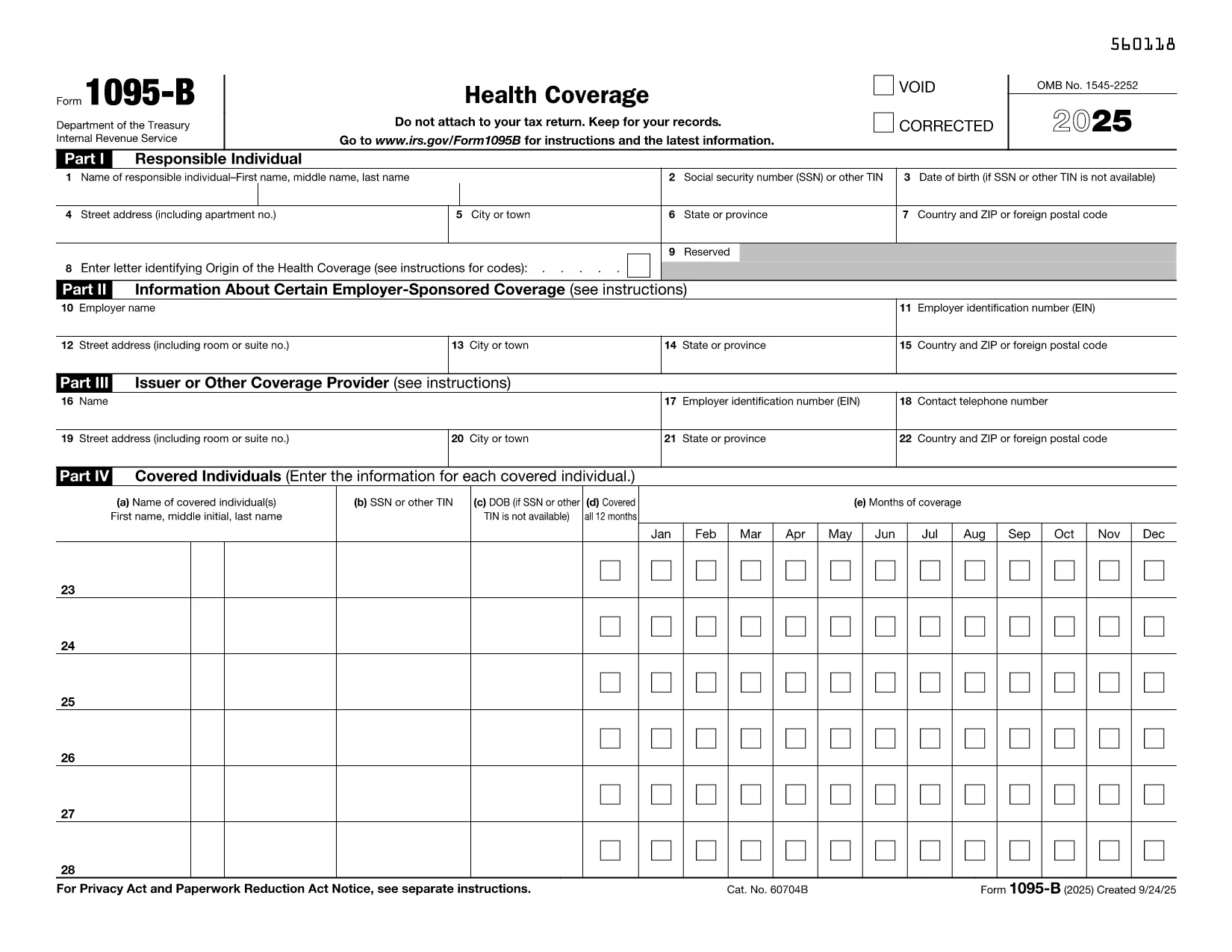
IRS Form 1095‑B is the official medical insurance tax form used to report health coverage provided by insurance companies, government programs, or other entities. Employers and insurers must furnish this form to individuals so they can prove they had minimum essential coverage for the tax year.

Instead of printing, printing‑editing, and scanning a PDF, you can complete the form directly in your browser with Formize’s Fill out this form button. The Formize PDF Filler loads instantly, lets you type, select dates, and add signatures, then saves a clean, fillable PDF ready for tax filing.

What Is IRS Form 1095‑B?

This form details the type of health insurance you received, the months you were covered, and the insurer’s information. It is essential for:

  • Claiming the Premium Tax Credit
  • Proving compliance with the Affordable Care Act’s individual mandate (when applicable)
  • Supporting IRS audits or inquiries about health coverage

How to Fill Out the Form Online

Follow the simple steps below – no PDF editor needed.

Common Mistakes to Avoid

Even a small error can delay your tax return. Watch out for:

  • Incorrect Social Security Number or Taxpayer Identification Number
  • Mismatched coverage dates (the form must show the exact months you were covered)
  • Leaving required signature fields blank
  • Using the wrong tax year version of the form

Where to Submit the Completed Form

Form 1095‑B is typically attached to your individual tax return (Form 1040) when filing electronically or mailed with a paper return. Keep a copy for your records in case the IRS requests verification.

Ready to start? Click the button below, let Formize load the filler, and finish the form in minutes.

FAQ
  • Do I need a PDF editor to fill out Form 1095‑B?

    No. Formize’s online filler lets you complete the form directly in the browser without any additional software.

  • Is Form 1095‑B required for every taxpayer?

    Only individuals who received health coverage from an insurer, government program, or other entity that issues Form 1095‑B need to keep it for their records.

  • Can I submit the form electronically with my tax return?

    Yes. When filing electronically, the completed Form 1095‑B is attached automatically to your e‑filed return.

  • What should I do if I receive a blank Form 1095‑B?

    Contact the insurer or entity that issued the form. A blank form is an error and must be corrected before filing.

  • How long should I keep Form 1095‑B?

    Keep the form for at least three years from the date you filed your tax return, in case the IRS requests proof of coverage.

  • Is there a fee to use Formize’s PDF filler?

    Formize offers a free fillable version for IRS forms like 1095‑B. No payment is required to complete or download the form.

  • What if I make a mistake after saving the PDF?

    Open the saved PDF again with Formize’s filler, correct the error, and re‑save. The filler preserves all previous entries.

  • Do I need to attach Form 1095‑B to a paper tax return?

    Only if the IRS specifically requests it. Generally, you keep the form for your records and provide it only if asked.

BAGAIMANA CARANYA

Cara mengisi tax form medical insurance gratis secara online dalam 5 langkah mudah:

  1. 1
    Click the Fill‑out Button
    Press the bright “Fill out this form” button on the page. The Formize PDF Filler app will open in a new tab.
  2. 2
    Wait for the Filler to Load
    The filler loads in seconds. You’ll see the PDF with editable fields highlighted.
  3. 3
    Enter Your Information
    Type directly into each field, select dates from the calendar picker, and use the drop‑down menus where applicable.
  4. 4
    Review and Sign
    Double‑check every entry, then add your electronic signature in the designated box.
  5. 5
    Save or Download
    When finished, click “Save” to store the completed PDF in your browser or “Download” to save a copy on your computer.
Bentuk aplikasi Pengisi PDF
TENTANG

Formulir pajak

tax form medical insurance adalah salah satu formulir Pajak yang merupakan dokumen yang digunakan untuk melaporkan informasi terkait pajak kepada otoritas pajak terkait. Ada berbagai jenis formulir pajak, termasuk formulir pajak federal, negara bagian, dan lokal, yang dapat bervariasi tergantung pada keadaan dan lokasi pembayar pajak.

FITUR

Pengisi PDF

Cara termudah untuk mengisi formulir PDF secara online

  • Isi tax form medical insurance dengan cepat
    Mencari cara mengisi tax form medical insurance dengan cepat secara online? Dengan pengisi formulir PDF online gratis kami, Anda akan tahu cara mengedit dan mengisi dokumen pdf ini dalam waktu kurang dari satu menit.
  • Editor PDF online yang mudah digunakan
    Muak dengan mencetak file PDF sehingga Anda dapat mengeditnya, sebelum memindai ulang dan mengirimnya kembali? Edit dokumen PDF secara online gratis. Gunakan editor pdf online kami untuk menghemat waktu dan kertas.
  • Alat hebat, semua platform
    Ingin tahu cara mengisi tax form medical insurance di Mac, atau mungkin cara menggunakan pengisi PDF gratis? Alat PDF online kami berfungsi di semua platform.
  • Penyimpanan file yang aman
    File "tax form medical insurance" yang telah selesai disimpan dalam database aman yang dikelola oleh hosting Amazon Cloud. Anda dapat menghapus file Anda dari sistem kami kapan saja. Bagaimanapun, file-file ini secara otomatis dihapus setelah 24 jam.
  • Ngobrol dengan tax form medical insurance
    Ngobrol dengan "tax form medical insurance" di Chatize yang merupakan asisten pembaca PDF gratis. Ajukan pertanyaan dan dapatkan jawaban dari "tax form medical insurance". Cukup klik tombol Chat Dengan Dokumen di atas.

Hapus sesi pengisian

Hapus sesi pengisian yang dipilih? Dalam hal ini, kemajuan Anda dalam menyelesaikan formulir akan hilang.

Hapus sesi pengeditan

Hapus sesi pengeditan yang dipilih? Dalam hal ini, kemajuan Anda dalam membuat dan mengedit formulir akan hilang.