
言語を選択する

IRS Form 1065 – Fillable PDF for LLC Tax Processing

  1. アメリカ合衆国
  2. 言語 英語
  3. アクティビティ 税金
  4. デパートメント IRS
IRS Form 1065 – Fillable PDF for LLC Tax Processing

IRS Form 1065 – Fillable PDF for LLC Tax Processing

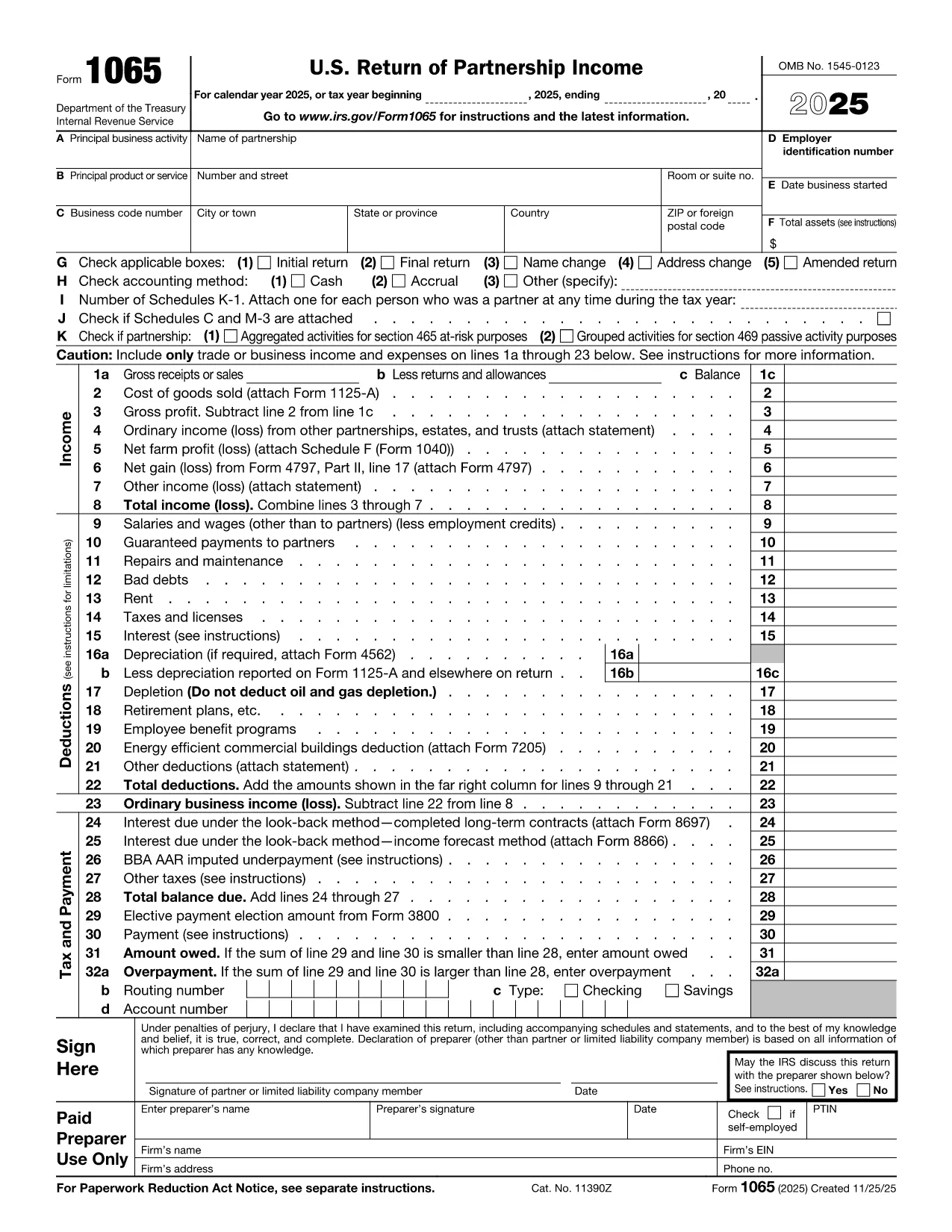
Running an LLC that is taxed as a partnership? The IRS Form 1065 is the core document you need to report income, deductions, and credits. With Formize's Fillable PDF you can complete the form online, avoid manual errors, and save time.

Why Use a Fillable PDF for LLC Tax Processing

A fillable PDF combines the official IRS layout with interactive fields. You get the benefits of:

  • Automatic calculations for Schedule K‑1 totals.
  • Instant validation that prevents common entry mistakes.
  • Secure cloud‑based storage via Formize PDF Filler.

Key Sections of IRS Form 1065

Understanding the main blocks helps you gather the right information before you start:

  1. Header Information – LLC name, EIN, tax year, and address.
  2. Income – Total revenue, cost of goods sold, and other income.
  3. Deductions – Salaries, rent, depreciation, and other expenses.
  4. Tax and Payments – Tax due, estimated payments, and credits.
  5. Schedule K – Summary of partnership items.
  6. Schedule K‑1 (Form 1065) – Individual partner allocations.

Step‑by‑Step Guide to Completing the Form

Instead of downloading the PDF and opening a separate editor, simply click the "Fill out this form" button below. The Formize PDF Filler app will load in seconds. Follow the on‑screen prompts:

  1. Click **Fill out this form**.
  2. Wait for the Formize PDF Filler to initialize (usually < 5 seconds).
  3. Enter your LLC’s information in each highlighted field.
  4. Use the built‑in calculator for Schedule K totals.
  5. Review the auto‑validation warnings and correct any issues.
  6. When finished, click **Save & Download** to get a completed PDF copy.

Common Mistakes to Avoid

  • Incorrect EIN – Verify the nine‑digit number with your IRS notice.
  • Mismatched tax year – The form must reflect the exact fiscal year of the LLC.
  • Omitting Schedule K‑1 data – Each partner’s share must be reported.
  • Failing to sign – The electronic signature feature in Formize satisfies IRS requirements.

Submit and Store Your Completed Form

After downloading the filled PDF, you can:

  • Electronically file via your tax software (most accept PDF uploads).
  • Print and mail to the IRS address indicated in the form’s instructions.
  • Store a secure copy in Formize’s cloud vault for future reference.

Ready to start? Click the button below and let Formize handle the heavy lifting.

よくある質問
  • Do I need special software to fill IRS Form 1065?

    No. The Formize PDF Filler runs in any modern browser, so you can complete the form without installing Adobe Acrobat or other PDF editors.

  • Can I file the form electronically after using Formize?

    Yes. Most tax preparation software accepts the completed PDF from Formize for electronic filing. Just upload the saved file.

  • Is the fillable PDF version identical to the official IRS form?

    Absolutely. The PDF is a direct copy of the IRS’s official Form 1065, with added interactive fields that do not alter the layout or required signatures.

  • What if I make a mistake after I’ve saved the PDF?

    Open the saved PDF again with Formize, make the correction, and re‑save. The cloud version also keeps a version history for easy rollback.

  • Is my data secure while using Formize?

    Formize uses SSL encryption for data in transit and stores files in a secure, GDPR‑compliant cloud. Your tax information remains private.

  • Do I need to print and sign the form?

    Formize includes an electronic signature field that meets IRS e‑signature standards. If you prefer a handwritten signature, you can print the final PDF and sign it before mailing.

  • How often should I file Form 1065 for my LLC?

    Form 1065 is an annual return. It must be filed by the 15th day of the third month after the LLC’s tax year ends (typically March 15 for calendar‑year filers).

  • Can I use this form for an LLC taxed as a corporation?

    No. LLCs taxed as corporations should use IRS Form 1120. Form 1065 is only for partnerships and LLCs taxed as partnerships.

方法

オンラインで 5 回の簡単なステップで tax form processing LLC を無料で入力する方法:

  1. 1
    Open the Fillable Form
    Click the **Fill out this form** button on the page. The Formize PDF Filler app will launch in a new window.
  2. 2
    Load the Form
    Wait a few seconds while the fillable IRS Form 1065 loads. All fields will become interactive.
  3. 3
    Enter Your LLC Information
    Fill in each highlighted section—header, income, deductions, Schedule K, and Schedule K‑1. Use the built‑in calculator for totals.
  4. 4
    Validate and Review
    Formize automatically checks for missing or inconsistent data. Resolve any warnings before proceeding.
  5. 5
    Save and Download
    When every field is complete, click **Save & Download**. A final PDF copy of your completed Form 1065 will be saved to your device or Formize cloud.
Formize PDF Filler アプリ
だいたい

納税フォーム

tax form processing LLC は、税金に関する情報を関連する税務当局に報告するために使用される文書である納税申告書の 1 つです。納税者の状況や場所によって、連邦税、州税、地方税など、さまざまな種類の納税申告書があります。

特徴

PDFフィラー

オンラインで PDF フォームに記入する最も簡単な方法

  • tax form processing LLC をすばやく入力してください
    tax form processing LLC をオンラインですばやく入力する方法をお探しですか?オンラインの無料 PDF フォーム フィラーを使用すると、この PDF ドキュメントを 1 分以内に編集して入力する方法がわかります。
  • 使いやすいオンライン PDF エディター
    再スキャンして返送する前に、編集できるように PDF ファイルを印刷することにうんざりしていませんか? PDFドキュメントをオンラインで無料で編集.当社のオンライン PDF エディターを使用して、時間と紙を節約してください。
  • 優れたツール、すべてのプラットフォーム
    Mac で tax form processing LLC を入力する方法や、PDF フィラーを無料で使用する方法を知りたいですか?当社のオンライン PDF ツールは、すべてのプラットフォームで動作します。
  • 安全なファイル ストレージ
    完成した「tax form processing LLC」ファイルは、Amazon クラウド ホスティングが管理する安全なデータベースに保存されます。いつでもシステムからファイルを削除できます。いずれにせよ、これらのファイルは 24 時間後に自動的に削除されます。
  • {キーワード} とチャットする
    無料の PDF リーダー アシスタントである Chatize で「tax form processing LLC」とチャットします。質問すると、「tax form processing LLC」から回答が得られます。上の [ドキュメントとチャット] ボタンをクリックするだけです。

フィルセッションを削除

選択したフィルセッションを削除しますか?この場合、フォームへの記入の進捗状況は失われます。

編集セッションを削除する

選択した編集セッションを削除しますか?この場合、フォームの作成および編集の進行状況は失われます。