Pasirinkite kalbą

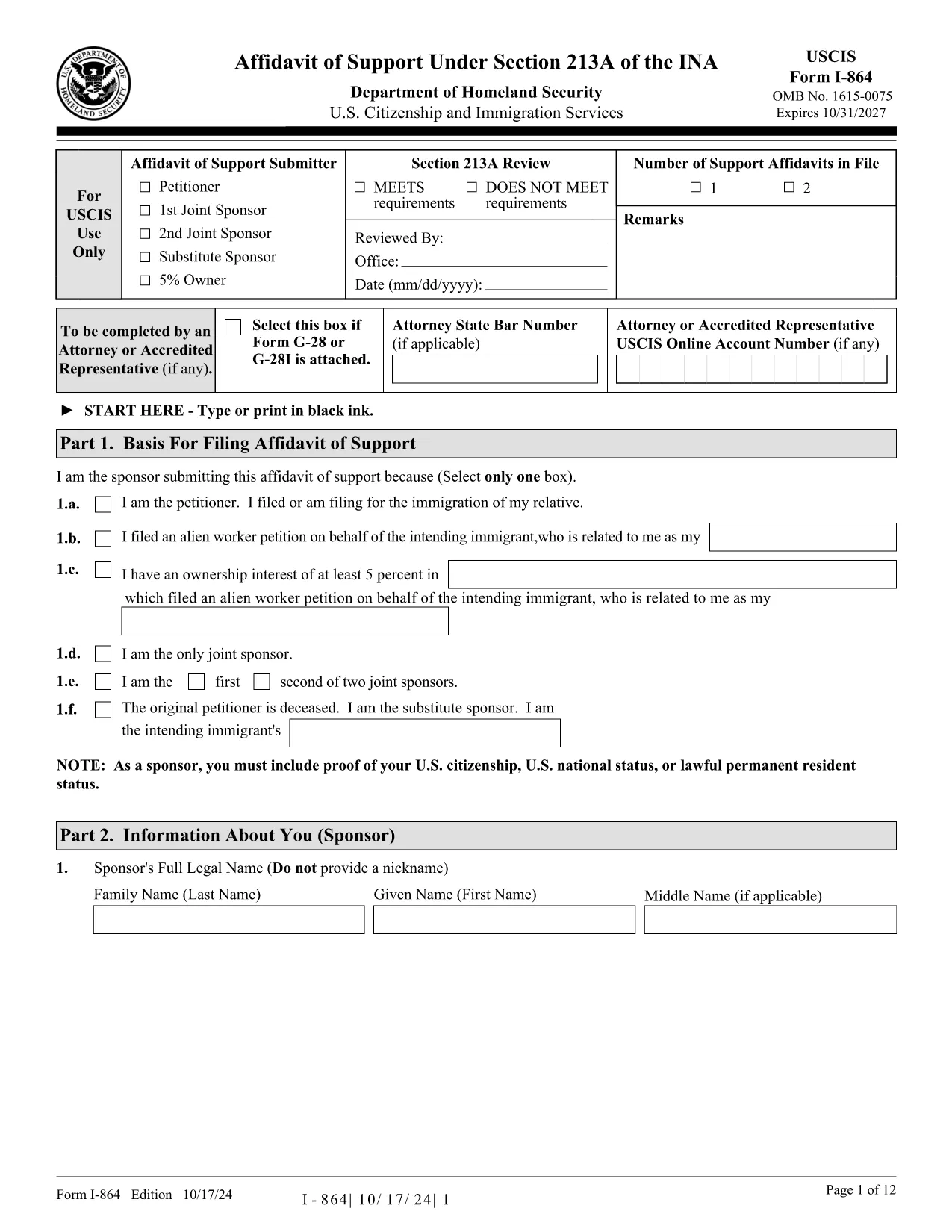
Fillable I‑864 Affidavit of Support PDF Form

  1. Šalis JAV
  2. Kalba Anglų
  3. skyrius JAV pilietybės ir imigracijos tarnybos
Fillable I‑864 Affidavit of Support PDF Form

The I‑864 Affidavit of Support is the United States Citizenship and Immigration Services (USCIS) form that a sponsor must submit to prove they have adequate financial resources to support an immigrant. Our fillable PDF version lets you complete the form directly in your browser—no Adobe Acrobat or other editor required.

What Is the I‑864 Affidavit of Support?

The I‑864 is used for most family‑based immigrant visas and adjustment‑of‑status applications. It guarantees that the intending immigrant will not become a public charge. The sponsor must meet the income requirements based on the Federal Poverty Guidelines.

How to Fill Out the I‑864 Online with Formize

Instead of downloading the PDF and opening it in a separate editor, simply click the "Fill out this form" button on this page. The Formize PDF Filler app loads in seconds, and you can type, check boxes, and sign directly on the page.

  • Click Fill out this form.
  • Wait for the Formize PDF Filler to load (usually < 5 seconds).
  • Enter your information in each field. Required fields are highlighted in red.
  • Use the Save button to download a completed copy or the Submit option if your organization accepts direct uploads.

Common Mistakes & Tips for a Successful Submission

  • Incorrect income figures: Use the most recent tax year and include all sources of household income.
  • Missing signatures: Both the sponsor and the interpreter (if used) must sign.
  • Leaving blanks: If a field does not apply, write "N/A" instead of leaving it empty.
  • Wrong household size: Count every dependent, including the applicant, children, and any other relatives listed on the form.

Where to Submit the Completed I‑864

After completing the form, download the PDF and attach it to your visa or adjustment‑of‑status packet. If you are filing online through USCIS’s myUSCIS portal, you can upload the file directly.

Need More Help?

Review the official USCIS instructions linked above, or consult an immigration attorney for complex cases. The Formize filler ensures the PDF is correctly formatted, but it does not replace legal advice.

DUK
  • Do I need Adobe Acrobat to complete the I‑864?

    No. With Formize you can fill, sign, and save the form entirely in your web browser.

  • Can I edit the form after I’ve saved it?

    Yes. Open the saved PDF in Formize again or any PDF editor to make changes before final submission.

  • What income sources count toward the poverty guideline?

    All earned income, self‑employment, interest, dividends, rental income, and certain public benefits can be included. Refer to the USCIS instructions for the full list.

  • Is a digital signature accepted?

    USCIS accepts a clear electronic signature on the I‑864 when the form is submitted electronically. For paper filings, you must print and sign by hand.

  • How many sponsors can I list on one I‑864?

    Only one primary sponsor is allowed, but you can add a joint sponsor on a separate I‑864 form if the primary sponsor does not meet the income threshold.

  • What if my household size changes after I submit the form?

    You must submit a new I‑864 reflecting the updated household size and income before the immigrant’s interview.

  • Is there a fee to use Formize’s PDF filler?

    No. The filler is free for completing and downloading the I‑864 form.

  • Can I submit the I‑864 directly through Formize?

    Formize only provides the fillable PDF. You still need to attach the completed form to your USCIS application or upload it via myUSCIS.

KAIP

Kaip nemokamai užpildyti I-864 PDF internete, atlikdami 5 paprastus veiksmus:

  1. 1
    Click the Fill‑out Button
    Press the "Fill out this form" button on the page. The Formize PDF Filler app will open in a new tab.
  2. 2
    Wait for the Filler to Load
    The app loads in under five seconds. You’ll see a fully interactive version of the I‑864.
  3. 3
    Enter Your Information
    Type directly into each field, select check‑boxes, and upload a digital signature if you have one.
  4. 4
    Review and Save
    Use the built‑in review tool to check for missing data, then click "Save" to download the completed PDF.
  5. 5
    Submit with Your Application
    Attach the saved PDF to your visa or adjustment‑of‑status packet, or upload it via the myUSCIS portal.
Formuokite PDF užpildymo programą
APIE

I-864 PDF šabloną

Naudodami tradicinį PDF dokumento peržiūros ir pildymo funkcijų rinkinį, žiniatinklio programos pranašumus ir interaktyvų išdėstymą, galite užbaigti I-864 PDF per kelias minutes.

FUNKCIJOS

PDF užpildas

Lengviausias būdas užpildyti I-864 PDF internete

  • Greitai užpildykite I-864 PDF
    Ieškote būdo greitai užpildyti I-864 PDF internete? Naudodami internetinį nemokamą PDF formų užpildą sužinosite, kaip redaguoti ir užpildyti šį pdf dokumentą greičiau nei per minutę.
  • Lengva naudoti internetinį PDF redaktorių
    Atsibodo spausdinti PDF failus, kad galėtumėte juos redaguoti prieš nuskaitydami iš naujo ir siųsdami atgal? Redaguoti PDF dokumentus internete nemokamai. Norėdami sutaupyti laiko ir popieriaus, naudokite mūsų internetinį pdf redaktorių.
  • Puikūs įrankiai, visos platformos
    Svarstote, kaip užpildyti I-864 PDF „Mac“ kompiuteryje, o gal kaip nemokamai naudoti PDF užpildą? Mūsų internetiniai PDF įrankiai veikia visose platformose.
  • Saugi failų saugykla
    Užbaigti „I-864 PDF“ failai saugomi saugioje duomenų bazėje, kurią valdo „Amazon Cloud“ priegloba. Galite bet kada ištrinti failus iš mūsų sistemos. Bet kokiu atveju šie failai automatiškai ištrinami po 24 valandų.
  • Kalbėkitės su I-864 PDF
    Kalbėkite su „I-864 PDF“ naudodami Chatize, kuri yra nemokama PDF skaitymo priemonė. Užduokite klausimų ir gaukite atsakymus iš „I-864 PDF“. Tiesiog spustelėkite aukščiau esantį mygtuką Kalbėtis su dokumentu.

Ištrinti užpildymo seansą

Ištrinti pasirinktą pildymo seansą? Tokiu atveju jūsų pažanga pildant formą bus prarasta.

Ištrinti redagavimo sesiją

Ištrinti pasirinktą redagavimo sesiją? Tokiu atveju jūsų pažanga kuriant ir redaguojant formą bus prarasta.