
hamburger-menu icon
Აირჩიეთ ენა

IRS Form 4506‑T – Request for Tax Return Transcript (Fillable PDF)

  1. ქვეყანა აშშ
  2. Ენა ინგლისური
  3. აქტივობა Გადასახადები
  4. დეპარტამენტი IRS
IRS Form 4506‑T – Request for Tax Return Transcript (Fillable PDF)

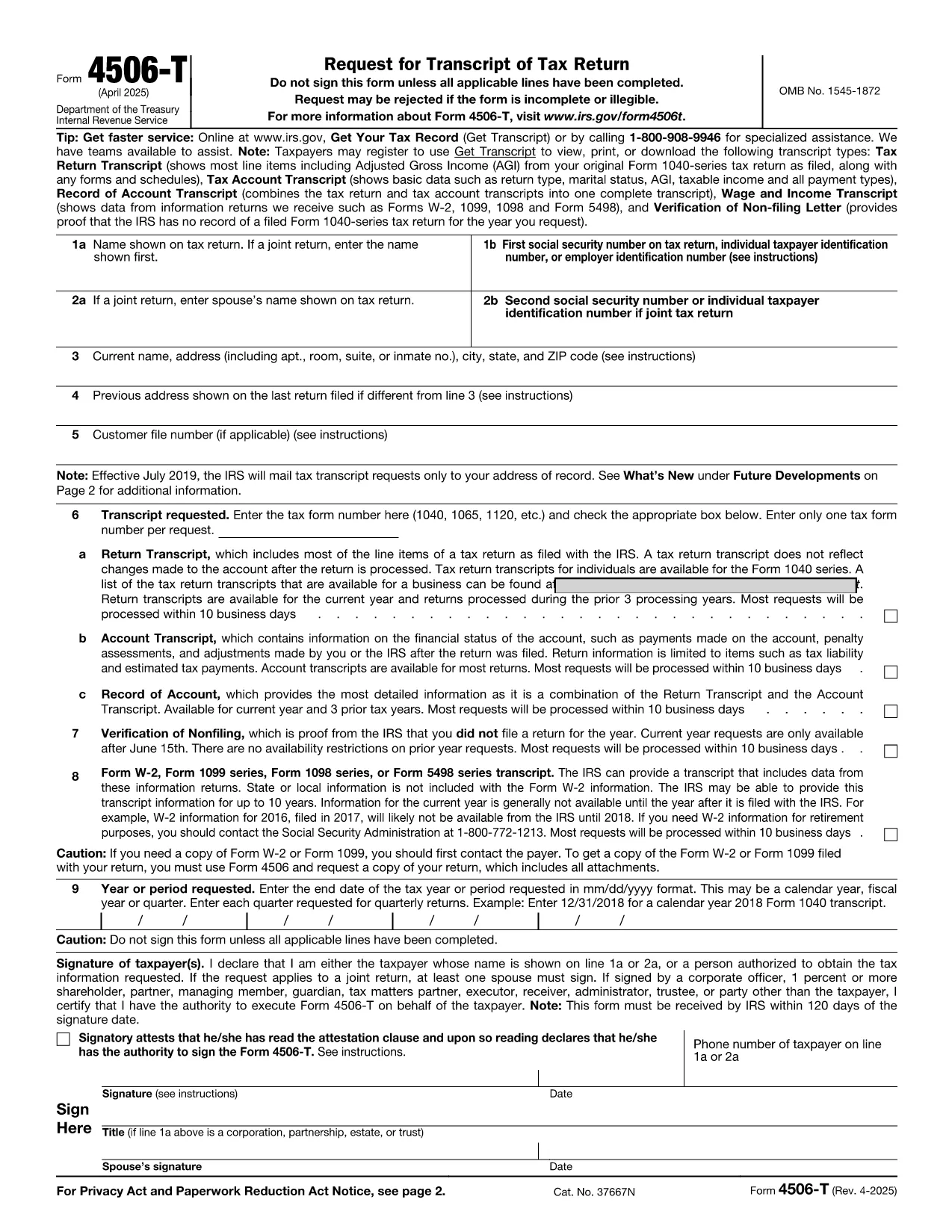
IRS Form 4506‑T is the standard request form of a tax return transcript. It allows individuals, businesses, and tax professionals to obtain a free transcript of a previously filed return, which is often required for loan applications, mortgage approvals, or verification of income.

What Is IRS Form 4506‑T?

This fillable PDF is issued by the Internal Revenue Service (IRS). The form asks for basic identifying information, the tax year(s) you need, and the type of transcript you are requesting (e.g., Return Transcript, Account Transcript, Record of Account).

How to Fill Out the Form Online with Formize

Instead of downloading the PDF and opening it in a separate editor, you can complete the form directly on our page:

  1. Click the "Fill out this form" button below.
  2. Wait a few seconds while the Formize PDF Filler app loads.
  3. Enter your information in the highlighted fields. The filler validates dates, SSN/EIN formats, and required fields in real time.
  4. Review the completed form, add an electronic signature if needed, and click Submit to download or email the finished PDF.

Common Mistakes to Avoid

  • Incorrect SSN or EIN: Double‑check the nine‑digit number; a single digit off will cause the IRS to reject the request.
  • Missing Signature: The form must be signed. Use the built‑in e‑signature tool in Formize.
  • Wrong Tax Year: Specify the exact year(s) you need. Selecting the wrong year can delay processing.
  • Incomplete Address: Provide a complete mailing address; PO boxes are acceptable but must be exact.

Where to Submit the Completed Form

After you download the filled PDF, you can:

  • Mail it to the IRS address listed in the form’s instructions.
  • Fax it to the appropriate IRS fax number (if you have one).
  • Submit it through an authorized tax professional who can forward it on your behalf.

Frequently Asked Questions

Below are the most common questions about IRS Form 4506‑T and how to use our online filler.

FAQ
  • Do I need a PDF editor to use Form 4506‑T?

    No. The Formize PDF Filler works in your browser, so you can fill, sign, and download the form without installing any software.

  • How long does the IRS take to process a transcript request?

    Standard processing usually takes 5–10 business days after the IRS receives the completed Form 4506‑T.

  • Can I request transcripts for multiple years on one form?

    Yes. Use the “Multiple Years” section of the form to list each tax year you need.

  • Is there a fee for a tax return transcript?

    No. The IRS provides free transcripts for most requests, though there is a small processing fee for certain paid services.

  • What if I make a mistake after submitting?

    Correct the error on a new copy of the form and resend it. The IRS does not accept handwritten corrections on the original PDF.

  • Can I submit the form electronically to the IRS?

    The IRS currently accepts Form 4506‑T only by mail or fax. Electronic submission is not yet available.

  • Do I need a notary for the signature?

    No. An electronic signature is sufficient for IRS processing, provided it is clear and legible.

  • What if I don’t have a Social Security Number?

    You must provide an Individual Taxpayer Identification Number (ITIN) or Employer Identification Number (EIN) instead.

ᲠᲝᲒᲝᲠ

როგორ შეავსოთ IRS Form 4506-T უფასოდ, ონლაინ 5 მარტივი ნაბიჯებით:

  1. 1
    Click the Fill‑out Button
    Press the “Fill out this form” button on the page to launch the Formize PDF Filler.
  2. 2
    Wait for the Filler to Load
    A short loading screen appears while the secure filler app prepares the fillable PDF.
  3. 3
    Enter Your Information
    Complete each highlighted field – the filler will automatically validate dates, SSN/EIN, and required entries.
  4. 4
    Add an Electronic Signature
    Use the built‑in e‑signature tool to sign the form; no printer or scanner needed.
  5. 5
    Download or Email the Completed Form
    When you’re satisfied, click “Submit” to download the PDF or send it directly to your email for printing or mailing.
PDF შემავსებლის აპლიკაციის ფორმირება
ᲨᲔᲡᲐᲮᲔᲑ

საგადასახადო ფორმები

IRS Form 4506-T არის ერთ-ერთი საგადასახადო ფორმა, რომელიც წარმოადგენს დოკუმენტებს, რომლებიც გამოიყენება გადასახადებთან დაკავშირებული ინფორმაციის შესაბამის საგადასახადო ორგანოში მოსახსენებლად. არსებობს სხვადასხვა სახის საგადასახადო ფორმები, მათ შორის ფედერალური, სახელმწიფო და ადგილობრივი საგადასახადო ფორმები, რომლებიც შეიძლება განსხვავდებოდეს გადასახადის გადამხდელის გარემოებებისა და ადგილმდებარეობის მიხედვით.

ᲛᲐᲮᲐᲡᲘᲐᲗᲔᲑᲚᲔᲑᲘ

PDF შემავსებელი

ონლაინ IRS Form 4506-T-ის შევსების უმარტივესი გზა

  • სწრაფად შეავსეთ IRS Form 4506-T
    ეძებთ გზას სწრაფად შეავსოთ IRS Form 4506-T ონლაინ? ჩვენი ონლაინ უფასო PDF ფორმის შემავსებლით, თქვენ გეცოდინებათ როგორ შეცვალოთ და შეავსოთ ეს pdf დოკუმენტი ერთ წუთზე ნაკლებ დროში.
  • მარტივი გამოსაყენებელი ონლაინ PDF რედაქტორი
    მოგბეზრდათ PDF ფაილების დაბეჭდვა, რათა მათი რედაქტირება შეძლოთ, ხელახლა სკანირებამდე და უკან გაგზავნამდე? შეცვალეთ PDF დოკუმენტები უფასოდ ონლაინ. გამოიყენეთ ჩვენი ონლაინ pdf რედაქტორი დროისა და ქაღალდის დაზოგვისთვის.
  • შესანიშნავი ხელსაწყოები, ყველა პლატფორმა
    გაინტერესებთ როგორ შეავსოთ IRS Form 4506-T Mac-ზე, ან იქნებ როგორ გამოიყენოთ PDF შემავსებელი უფასოდ? ჩვენი ონლაინ PDF ინსტრუმენტები მუშაობს ყველა პლატფორმაზე.
  • ფაილების უსაფრთხო შენახვა
    დასრულებული „IRS Form 4506-T“ ფაილები ინახება დაცულ მონაცემთა ბაზაში, რომელსაც მართავს Amazon Cloud ჰოსტინგი. თქვენ შეგიძლიათ წაშალოთ თქვენი ფაილები ჩვენი სისტემიდან ნებისმიერ დროს. ნებისმიერ შემთხვევაში, ეს ფაილები ავტომატურად იშლება 24 საათის შემდეგ.
  • ჩატი IRS Form 4506-T-ით
    ესაუბრეთ „IRS Form 4506-T“-ს Chatize-ზე, რომელიც არის PDF წამკითხველის უფასო ასისტენტი. დასვით კითხვები და მიიღეთ პასუხები „IRS Form 4506-T“-დან. უბრალოდ დააწკაპუნეთ ღილაკზე ჩატი დოკუმენტთან ზემოთ.

შევსების სესიის წაშლა

წაშალოთ არჩეული შევსების სესია? ამ შემთხვევაში, თქვენი პროგრესი ფორმის შევსებაში დაიკარგება.

რედაქტირების სესიის წაშლა

წაშალოთ არჩეული რედაქტირების სესია? ამ შემთხვევაში, თქვენი პროგრესი ფორმის შექმნასა და რედაქტირებაში დაიკარგება.