
Selecteaza limba

IRS Schedule B (Form 1040SB) – Fillable PDF

  1. Țară STATELE UNITE ALE AMERICII
  2. Limba Engleză
  3. Activitate Impozite
  4. Departament IRS
IRS Schedule B (Form 1040SB) – Fillable PDF

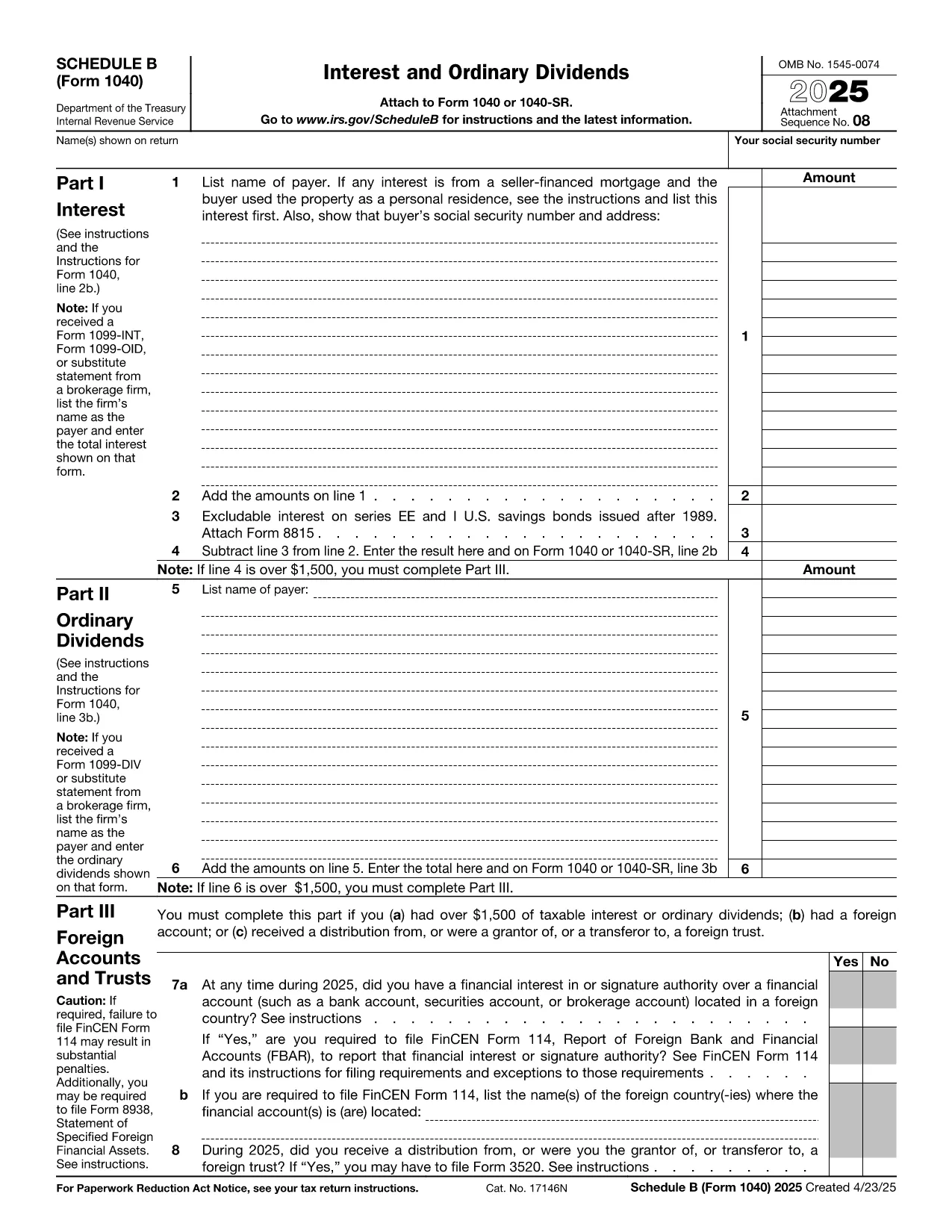
Schedule B, officially known as Form 1040SB – Interest and Ordinary Dividends, is an essential attachment to the U.S. Individual Income Tax Return (Form 1040). Whether you receive interest from a bank account, a brokerage, or dividends from stocks, you’ll need to report those amounts on Schedule B.

What Is Schedule B?

Schedule B helps the Internal Revenue Service (IRS) track taxable interest and ordinary dividend income. The form includes sections for:

  • Interest income details
  • Ordinary dividend details
  • Foreign accounts and trusts disclosure

Accurately completing Schedule B can prevent processing delays and ensure you receive any refunds you’re entitled to.

How to Fill Schedule B Online

Instead of downloading the PDF, opening a PDF editor, and wrestling with form fields, simply click the "Fill out this form" button on this page. The Formize PDF Filler app will load in seconds, presenting a clean, fillable interface:

  1. Click Fill out this form below.
  2. Wait a moment while the Formize PDF Filler loads the Schedule B PDF.
  3. Enter your interest and dividend information in the highlighted fields.
  4. Save your progress, download the completed PDF, or export it directly to your tax software.

The entire process is browser‑based, secure, and requires no additional software.

Common Mistakes to Avoid

  • Leaving the foreign account question blank – Even a “No” answer must be entered.
  • Mismatching totals – Ensure the sum of lines 1‑4 matches the total shown on line 5.
  • Using the wrong tax year PDF – This page always provides the latest version (2023).
  • Hand‑writing on the PDF – The Formize filler forces typed entries, keeping the file IRS‑ready.

Where to Submit Your Completed Form

Once you’ve saved the filled‑out Schedule B, attach it to your Form 1040 when filing electronically or include it with your paper return. If you e‑file through a commercial tax preparer, simply upload the PDF when prompted.

Need Help? Quick Resources

For detailed IRS instructions, see the IRS Schedule B Instructions. If you have questions about specific line items, the IRS FAQ is a great place to start.

Fill out this form

FAQ
  • Do I need Schedule B if I earned less than $1,500 in interest?

    No. The IRS requires Schedule B only if your total interest and ordinary dividends exceed $1,500, or if you have foreign accounts.

  • Can I edit the PDF after I download it?

    Yes. The PDF downloaded from Formize remains fully fillable, so you can reopen it in any PDF reader and make changes before final submission.

  • Is the Formize filler secure?

    Absolutely. All data is processed locally in your browser; Formize does not store any personal information on its servers.

  • What if I make a mistake after I’ve submitted?

    If you e‑file, you can amend your return using Form 1040X. For paper filings, attach a corrected Schedule B and clearly label it as an amendment.

  • Do I need to report foreign bank accounts on Schedule B?

    Yes. If you have a financial interest in or signature authority over a foreign account, you must answer “Yes” on Schedule B, line 7, and may need to file FinCEN Form 114 (FBAR).

  • Is there a fee to use the Formize PDF Filler?

    No. Formize offers a free, no‑registration filler for standard IRS forms like Schedule B.

CUM SĂ

Cum să completați IRS Schedule B gratuit, online, în 4 pași simpli:

  1. 1
    Open the Formize PDF Filler
    Click the "Fill out this form" button on this page. The Formize PDF Filler app will load the Schedule B PDF directly in your browser.
  2. 2
    Enter Your Information
    Type your interest and dividend amounts into the highlighted fields. The filler validates numeric entries and shows totals automatically.
  3. 3
    Save or Export
    When you’re done, click "Save" to download the completed PDF, or export it straight to your tax software for e‑filing.
  4. 4
    Submit with Your Tax Return
    Attach the saved Schedule B to your Form 1040 when filing electronically or include it with your paper return.
Aplicația Formize PDF Filler
DESPRE

Formulare fiscale

IRS Schedule B este unul dintre formularele fiscale care sunt documente utilizate pentru a raporta informații legate de taxe către autoritatea fiscală relevantă. Există diferite tipuri de formulare fiscale, inclusiv formulare fiscale federale, de stat și locale, care pot varia în funcție de circumstanțele și locația contribuabilului.

CARACTERISTICI

Filler PDF

Cel mai simplu mod de a completa IRS Schedule B online

  • Completați rapid IRS Schedule B
    Căutați o modalitate de a completa rapid IRS Schedule B online? Cu ajutorul nostru online gratuit de completare a formularelor PDF, veți ști cum să editați și să completați acest document pdf în mai puțin de un minut.
  • Editor PDF online ușor de utilizat
    Sătul de tipărirea fișierelor PDF pentru a le putea edita, înainte de a le rescana și a le trimite înapoi? Editați documente PDF gratuit online. Utilizați editorul nostru online de pdf pentru a economisi timp și hârtie.
  • Instrumente grozave, toate platformele
    Vă întrebați cum să completați IRS Schedule B pe un Mac sau poate cum să utilizați un fișier PDF gratuit? Instrumentele noastre PDF online funcționează pe toate platformele.
  • Stocare securizată a fișierelor
    Fișierele „IRS Schedule B” finalizate sunt stocate într-o bază de date securizată gestionată de Amazon Cloud hosting. Puteți șterge oricând fișierele din sistemul nostru. În orice caz, aceste fișiere sunt șterse automat după 24 de ore.
  • Chat cu IRS Schedule B
    Conversați cu „IRS Schedule B” pe Chatize, care este un asistent de citire PDF gratuit. Puneți întrebări și obțineți răspunsuri de la „IRS Schedule B”. Doar faceți clic pe butonul Conversați cu documentul de mai sus.

Ștergeți sesiunea de umplere

Ștergeți sesiunea de umplere selectată? În acest caz, progresul dumneavoastră în completarea formularului se va pierde.

Ștergeți sesiunea de editare

Ștergeți sesiunea de editare selectată? În acest caz, progresul dvs. în crearea și editarea formularului se va pierde.