
hamburger-menu icon
Აირჩიეთ ენა

IRS Schedule E – Fillable PDF for Investment Property Tax Reporting

  1. ქვეყანა აშშ
  2. Ენა ინგლისური
  3. აქტივობა Გადასახადები
  4. დეპარტამენტი IRS
IRS Schedule E – Fillable PDF for Investment Property Tax Reporting

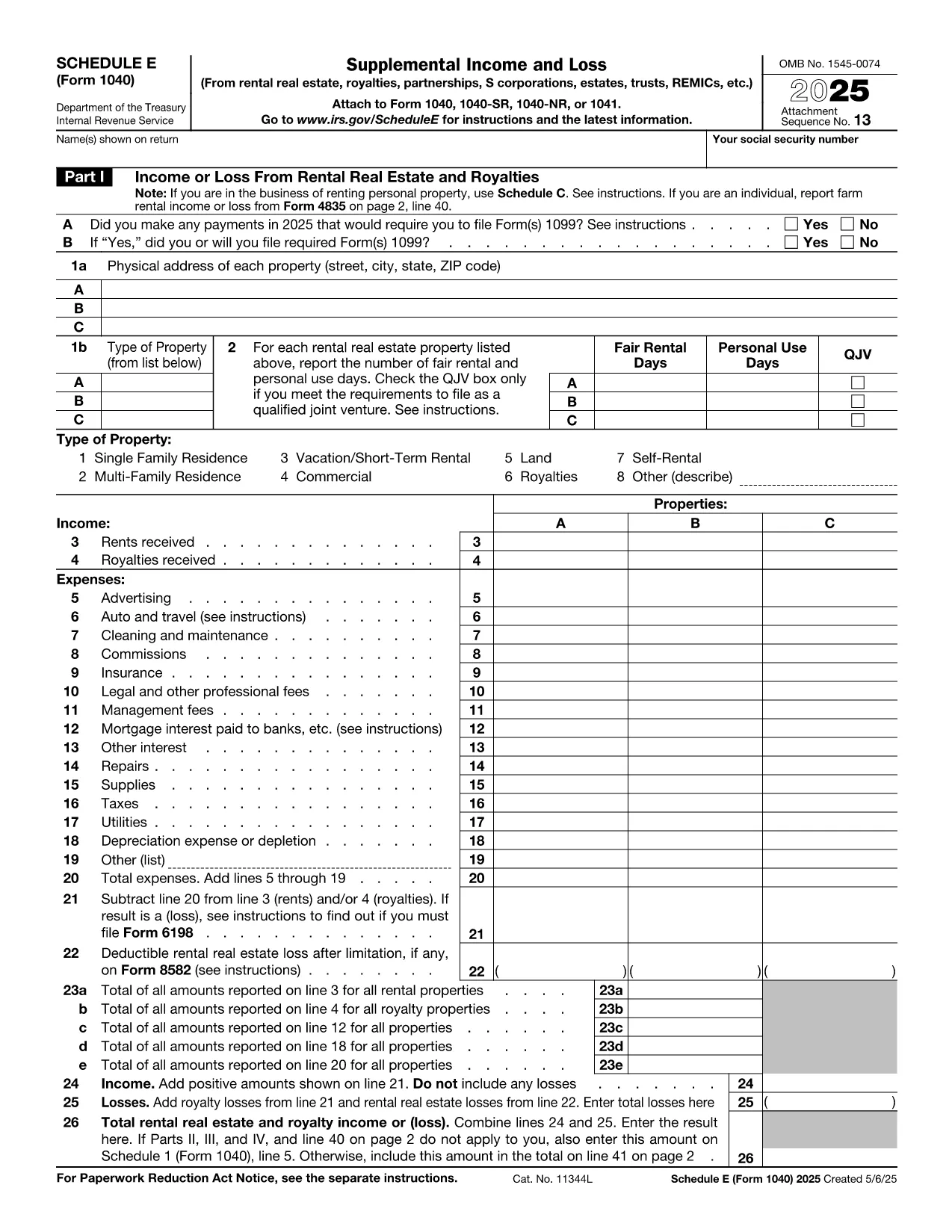
Investing in rental or other real‑estate assets? The IRS Schedule E (Form 1040) is the essential tax form for reporting income, expenses, and depreciation on investment properties. Our fillable PDF version lets you complete the form quickly, accurately, and without any extra software.

Whether you own a single‑family rental, a multi‑unit building, or a commercial investment property, Schedule E captures the financial details you need to claim deductions and calculate taxable rental income.

Below you’ll find a concise guide to each part of the form, tips for avoiding costly errors, and a simple, one‑click way to start filling it out directly on Formize.

What Is Schedule E and Who Needs It?

Schedule E is part of the U.S. Individual Income Tax Return (Form 1040). It is required for anyone who receives income from:

  • Rental real estate
  • Royalties
  • Partnerships, S corporations, estates, and trusts (via Schedule K‑1)

If you own an investment property that generates rent or other passive income, you must file Schedule E each year.

Key Sections of the Investment Property Tax Form

The form is divided into clear sections:

  • Part I – Income: Report gross rents, royalties, and other income.
  • Part II – Expenses: Deduct mortgage interest, property taxes, insurance, repairs, utilities, and management fees.
  • Part III – Depreciation & Amortization: Calculate depreciation using IRS Publication 946.
  • Part IV – Summary: Net rental income or loss that flows to Form 1040.

How to Complete Schedule E Online with Formize

Skip the download‑and‑edit workflow. Just click the button below, wait for the Formize PDF Filler to load, and start typing directly into the fields.

Common Mistakes to Avoid

  • Mixing personal and rental expenses – keep receipts separate.
  • Forgetting to include all sources of rental income, such as security deposits that are not returned.
  • Incorrectly calculating depreciation – use the correct recovery period (27.5 years for residential, 39 years for non‑residential).
  • Leaving required fields blank – the Formize filler highlights missing entries before you save.

Where to Get Help and Additional Resources

Need clarification? The IRS provides detailed instructions for Schedule E here. For depreciation tables, see Publication 946. If you have specific tax questions, consider consulting a qualified CPA or tax professional.

FAQ
  • Do I need Schedule E if I only rent out a single property?

    Yes. Any rental income, even from one property, must be reported on Schedule E.

  • Can I claim home‑office expenses on Schedule E?

    Home‑office deductions belong on Form 8829, not Schedule E, unless the space is part of a rental property you own.

  • How do I calculate depreciation for my investment property?

    Use the Modified Accelerated Cost Recovery System (MACRS). Residential rental property is depreciated over 27.5 years; non‑residential over 39 years. See IRS Publication 946 for tables.

  • What if I have a loss on Schedule E?

    Passive activity loss rules may limit the amount you can deduct against other income. Review IRS Form 8582 instructions for details.

  • Is the Formize filler secure for my personal tax data?

    Yes. Formize uses SSL encryption and does not store your completed PDF on our servers after you download it.

  • Can I edit the PDF after I’ve saved it?

    Absolutely. Open the saved file in any PDF editor or re‑upload it to Formize for additional changes.

  • Do I need a separate form for each rental property?

    Schedule E allows you to list up to three properties per page. Add additional pages if you own more than three.

  • Where can I find the official IRS instructions for Schedule E?

    The official instructions are available at https://www.irs.gov/instructions/i1040se.

ᲠᲝᲒᲝᲠ

როგორ შეავსოთ investment property tax form უფასოდ, ონლაინ 5 მარტივი ნაბიჯებით:

  1. 1
    Click the Fill‑out Button
    Press the “Fill out this form” button on the page. The Formize PDF Filler app will open in a new tab.
  2. 2
    Wait for the Filler to Load
    The fillable PDF loads automatically. All interactive fields become editable within seconds.
  3. 3
    Enter Your Information
    Type directly into each highlighted field—income, expenses, depreciation, and summary data.
  4. 4
    Validate and Save
    Use the built‑in validator to check for missing entries, then click “Save” to download the completed PDF.
  5. 5
    Attach to Your Tax Return
    Include the saved Schedule E with your Form 1040 when you file electronically or by mail.
PDF შემავსებლის აპლიკაციის ფორმირება
ᲨᲔᲡᲐᲮᲔᲑ

საგადასახადო ფორმები

investment property tax form არის ერთ-ერთი საგადასახადო ფორმა, რომელიც წარმოადგენს დოკუმენტებს, რომლებიც გამოიყენება შემოსავლის, გამოქვითვისა და საგადასახადო ვალდებულების შესატყობინებლად შესაბამის საგადასახადო ორგანოში. ეს ფორმები წარმოადგენს საგადასახადო შეტანის პროცესის არსებით ნაწილს და გამოიყენება იმისთვის, რომ უზრუნველყონ ფიზიკური პირები და ბიზნესი შეასრულონ საგადასახადო კანონმდებლობა და ზუსტად გამოთვალონ თავიანთი საგადასახადო ვალდებულებები.

საჭირო კონკრეტული საგადასახადო ფორმები შეიძლება განსხვავდებოდეს ისეთი ფაქტორების მიხედვით, როგორიცაა პიროვნების განაცხადის სტატუსი, შემოსავლის წყარო და ქვეყნის საგადასახადო კანონმდებლობა. თუმცა, აქ მოცემულია საგადასახადო ფორმების რამდენიმე გავრცელებული ტიპი:

ინდივიდუალური საშემოსავლო გადასახადის ფორმები: ეს ფორმები, როგორიცაა 1040 სერია შეერთებულ შტატებში გამოიყენება ფიზიკური პირების მიერ თავიანთი შემოსავალის შესახებ, გამოქვითვებისა და კრედიტების მოთხოვნით და მათი საგადასახადო ვალდებულების გამოთვლა.

ბიზნესის საგადასახადო ფორმები: ბიზნესებს, მათ შორის ინდივიდუალურ მეწარმეებს, ამხანაგობებს, კორპორაციებს და თვითდასაქმებულ პირებს, შეიძლება მოუწიონ სხვადასხვა ფორმის წარდგენა თავიანთი შემოსავლის, ხარჯებისა და გადასახადების შესახებ. მაგალითებია განრიგი C (მოგება ან ზარალი ბიზნესიდან) და ფორმა 1120 (აშშ კორპორაციის საშემოსავლო გადასახადის დეკლარაცია).

დასაქმების საგადასახადო ფორმები: დამსაქმებლებს მოეთხოვებათ შეატყობინონ თანამშრომელთა ხელფასები და დააკავონ და გადაიხადონ სახელფასო გადასახადები. ამ მიზნით გამოიყენება ისეთი ფორმები, როგორიცაა W-2 (ხელფასი და საგადასახადო განცხადება) და 941 (დამსაქმებლის კვარტალური ფედერალური საგადასახადო დეკლარაცია).

ინვესტიციისა და საპენსიო ანგარიშის ფორმები: ეს ფორმები გამოიყენება საინვესტიციო შემოსავლების, კაპიტალის მოგებისა და ზარალის, აგრეთვე საპენსიო ანგარიშებიდან შენატანებისა და განაწილების შესახებ. მაგალითებია ფორმა 1099-DIV (დივიდენდები და დისტრიბუციები) და ფორმა 5498 (IRA კონტრიბუციის ინფორმაცია).

ქონებისა და საჩუქრების გადასახადის ფორმები: როდესაც ადამიანი გარდაიცვალა ან აკეთებს მნიშვნელოვან საჩუქრებს, კონკრეტული ფორმები, როგორიცაა ფორმა 706 (შეერთებული შტატების ქონების (და თაობის გამოტოვების) საგადასახადო დეკლარაცია) და ფორმა 709 (შეერთებული შტატების საჩუქარი (და თაობა- გადარიცხვის გამოტოვება) საგადასახადო დეკლარაცია) გამოიყენება ნებისმიერი მოქმედი ქონების ან საჩუქრის გადასახადის დასაანგარიშებლად და გამოსათვლელად.

მნიშვნელოვანია აღინიშნოს, რომ საგადასახადო კანონები და ფორმები შეიძლება შეიცვალოს დროთა განმავლობაში, ამიტომ ფიზიკურმა და ბიზნესმა უნდა მიმართონ შესაბამის საგადასახადო ორგანოს ან მოიძიონ პროფესიული საგადასახადო რჩევა მიმდინარე მოთხოვნებთან შესაბამისობის უზრუნველსაყოფად.

ᲛᲐᲮᲐᲡᲘᲐᲗᲔᲑᲚᲔᲑᲘ

PDF შემავსებელი

ონლაინ investment property tax form-ის შევსების უმარტივესი გზა

  • სწრაფად შეავსეთ investment property tax form
    ეძებთ გზას სწრაფად შეავსოთ investment property tax form ონლაინ? ჩვენი ონლაინ უფასო PDF ფორმის შემავსებლით, თქვენ გეცოდინებათ როგორ შეცვალოთ და შეავსოთ ეს pdf დოკუმენტი ერთ წუთზე ნაკლებ დროში.
  • მარტივი გამოსაყენებელი ონლაინ PDF რედაქტორი
    მოგბეზრდათ PDF ფაილების დაბეჭდვა, რათა მათი რედაქტირება შეძლოთ, ხელახლა სკანირებამდე და უკან გაგზავნამდე? შეცვალეთ PDF დოკუმენტები უფასოდ ონლაინ. გამოიყენეთ ჩვენი ონლაინ pdf რედაქტორი დროისა და ქაღალდის დაზოგვისთვის.
  • შესანიშნავი ხელსაწყოები, ყველა პლატფორმა
    გაინტერესებთ როგორ შეავსოთ investment property tax form Mac-ზე, ან იქნებ როგორ გამოიყენოთ PDF შემავსებელი უფასოდ? ჩვენი ონლაინ PDF ინსტრუმენტები მუშაობს ყველა პლატფორმაზე.
  • ფაილების უსაფრთხო შენახვა
    დასრულებული „investment property tax form“ ფაილები ინახება დაცულ მონაცემთა ბაზაში, რომელსაც მართავს Amazon Cloud ჰოსტინგი. თქვენ შეგიძლიათ წაშალოთ თქვენი ფაილები ჩვენი სისტემიდან ნებისმიერ დროს. ნებისმიერ შემთხვევაში, ეს ფაილები ავტომატურად იშლება 24 საათის შემდეგ.
  • ჩატი investment property tax form-ით
    ესაუბრეთ „investment property tax form“-ს Chatize-ზე, რომელიც არის PDF წამკითხველის უფასო ასისტენტი. დასვით კითხვები და მიიღეთ პასუხები „investment property tax form“-დან. უბრალოდ დააწკაპუნეთ ღილაკზე ჩატი დოკუმენტთან ზემოთ.

შევსების სესიის წაშლა

წაშალოთ არჩეული შევსების სესია? ამ შემთხვევაში, თქვენი პროგრესი ფორმის შევსებაში დაიკარგება.

რედაქტირების სესიის წაშლა

წაშალოთ არჩეული რედაქტირების სესია? ამ შემთხვევაში, თქვენი პროგრესი ფორმის შექმნასა და რედაქტირებაში დაიკარგება.