
Pilih Bahasa

IRS Schedule E – Fillable PDF for Investment Property Tax Reporting

  1. Negara USA
  2. Bahasa Inggeris
  3. Aktiviti Cukai
  4. Jabatan IRS
Isi borang ini
IRS Schedule E – Fillable PDF for Investment Property Tax Reporting

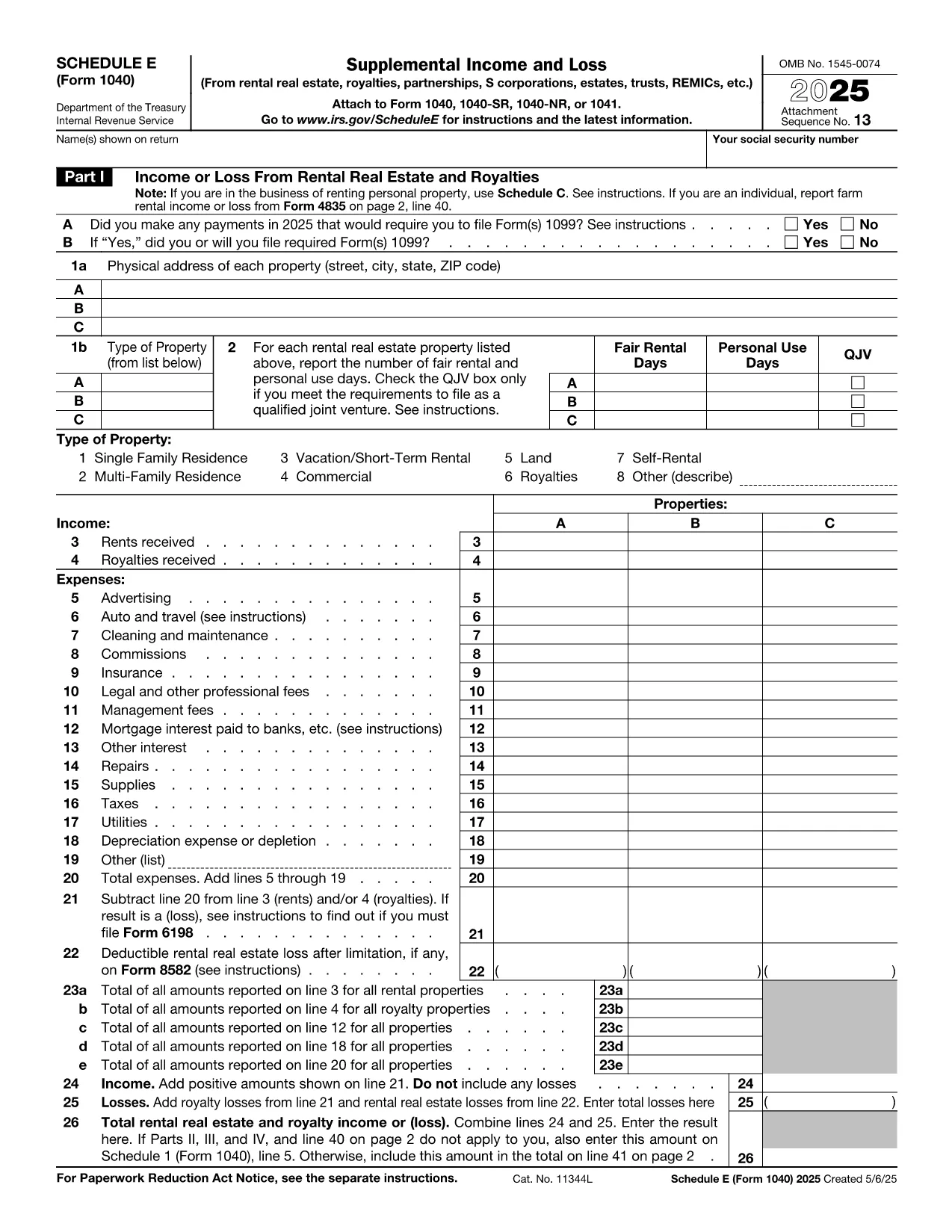
Investing in rental or other real‑estate assets? The IRS Schedule E (Form 1040) is the essential tax form for reporting income, expenses, and depreciation on investment properties. Our fillable PDF version lets you complete the form quickly, accurately, and without any extra software.

Whether you own a single‑family rental, a multi‑unit building, or a commercial investment property, Schedule E captures the financial details you need to claim deductions and calculate taxable rental income.

Below you’ll find a concise guide to each part of the form, tips for avoiding costly errors, and a simple, one‑click way to start filling it out directly on Formize.

What Is Schedule E and Who Needs It?

Schedule E is part of the U.S. Individual Income Tax Return (Form 1040). It is required for anyone who receives income from:

  • Rental real estate
  • Royalties
  • Partnerships, S corporations, estates, and trusts (via Schedule K‑1)

If you own an investment property that generates rent or other passive income, you must file Schedule E each year.

Key Sections of the Investment Property Tax Form

The form is divided into clear sections:

  • Part I – Income: Report gross rents, royalties, and other income.
  • Part II – Expenses: Deduct mortgage interest, property taxes, insurance, repairs, utilities, and management fees.
  • Part III – Depreciation & Amortization: Calculate depreciation using IRS Publication 946.
  • Part IV – Summary: Net rental income or loss that flows to Form 1040.

How to Complete Schedule E Online with Formize

Skip the download‑and‑edit workflow. Just click the button below, wait for the Formize PDF Filler to load, and start typing directly into the fields.

Common Mistakes to Avoid

  • Mixing personal and rental expenses – keep receipts separate.
  • Forgetting to include all sources of rental income, such as security deposits that are not returned.
  • Incorrectly calculating depreciation – use the correct recovery period (27.5 years for residential, 39 years for non‑residential).
  • Leaving required fields blank – the Formize filler highlights missing entries before you save.

Where to Get Help and Additional Resources

Need clarification? The IRS provides detailed instructions for Schedule E here. For depreciation tables, see Publication 946. If you have specific tax questions, consider consulting a qualified CPA or tax professional.

SOALAN LAZIM
  • Do I need Schedule E if I only rent out a single property?

    Yes. Any rental income, even from one property, must be reported on Schedule E.

  • Can I claim home‑office expenses on Schedule E?

    Home‑office deductions belong on Form 8829, not Schedule E, unless the space is part of a rental property you own.

  • How do I calculate depreciation for my investment property?

    Use the Modified Accelerated Cost Recovery System (MACRS). Residential rental property is depreciated over 27.5 years; non‑residential over 39 years. See IRS Publication 946 for tables.

  • What if I have a loss on Schedule E?

    Passive activity loss rules may limit the amount you can deduct against other income. Review IRS Form 8582 instructions for details.

  • Is the Formize filler secure for my personal tax data?

    Yes. Formize uses SSL encryption and does not store your completed PDF on our servers after you download it.

  • Can I edit the PDF after I’ve saved it?

    Absolutely. Open the saved file in any PDF editor or re‑upload it to Formize for additional changes.

  • Do I need a separate form for each rental property?

    Schedule E allows you to list up to three properties per page. Add additional pages if you own more than three.

  • Where can I find the official IRS instructions for Schedule E?

    The official instructions are available at https://www.irs.gov/instructions/i1040se.

BAGAIMANA UNTUK

Cara mengisi investment property tax form secara percuma, dalam talian dalam 5 langkah mudah:

  1. 1
    Click the Fill‑out Button
    Press the “Fill out this form” button on the page. The Formize PDF Filler app will open in a new tab.
  2. 2
    Wait for the Filler to Load
    The fillable PDF loads automatically. All interactive fields become editable within seconds.
  3. 3
    Enter Your Information
    Type directly into each highlighted field—income, expenses, depreciation, and summary data.
  4. 4
    Validate and Save
    Use the built‑in validator to check for missing entries, then click “Save” to download the completed PDF.
  5. 5
    Attach to Your Tax Return
    Include the saved Schedule E with your Form 1040 when you file electronically or by mail.
Bentuk apl Pengisi PDF
TENTANG

Borang cukai persekutuan

investment property tax form ialah salah satu borang cukai Persekutuan yang merupakan dokumen yang digunakan untuk melaporkan dan memfailkan cukai pendapatan persekutuan dengan Perkhidmatan Hasil Dalam Negeri (IRS) di Amerika Syarikat. Borang ini digunakan oleh individu, perniagaan dan organisasi untuk melaporkan pendapatan mereka, potongan dan maklumat lain yang berkaitan yang diperlukan untuk mengira liabiliti cukai persekutuan mereka.

Borang cukai persekutuan yang paling biasa digunakan ialah Borang 1040, yang digunakan oleh pembayar cukai individu untuk melaporkan cukai pendapatan peribadi mereka. Borang lain yang biasa digunakan termasuk Borang 1065 untuk perkongsian, Borang 1120 untuk syarikat dan Borang 990 untuk organisasi yang dikecualikan cukai.

Borang cukai persekutuan biasanya memerlukan pembayar cukai melaporkan pelbagai sumber pendapatan, seperti gaji, gaji dan petua, serta pendapatan daripada pelaburan, hartanah sewaan dan sumber lain. Borang tersebut juga membenarkan pembayar cukai menuntut potongan dan kredit untuk pelbagai perbelanjaan, seperti sumbangan amal, faedah gadai janji dan perbelanjaan penjagaan kesihatan.

Adalah penting untuk memfailkan borang cukai persekutuan dengan tepat dan tepat pada masanya, kerana kegagalan untuk berbuat demikian boleh mengakibatkan penalti dan caj faedah daripada IRS.

CIRI-CIRI

Pengisi PDF

Cara paling mudah untuk mengisi investment property tax form dalam talian

  • Cepat isi investment property tax form
    Mencari cara untuk mengisi investment property tax form dengan cepat dalam talian? Dengan pengisi borang PDF percuma dalam talian kami, anda akan tahu cara mengedit dan mengisi dokumen pdf ini dalam masa kurang daripada satu minit.
  • Mudah untuk menggunakan editor PDF dalam talian
    Bosan dengan mencetak fail PDF supaya anda boleh mengeditnya, sebelum mengimbas semula dan menghantarnya semula? Edit dokumen PDF secara percuma dalam talian. Gunakan editor pdf dalam talian kami untuk menjimatkan masa dan kertas.
  • Alat yang hebat, semua platform
    Tertanya-tanya cara mengisi investment property tax form pada Mac, atau mungkin cara menggunakan pengisi PDF secara percuma? Alat PDF dalam talian kami berfungsi pada semua platform.
  • Simpanan fail selamat
    Fail "investment property tax form" yang lengkap disimpan dalam pangkalan data selamat yang diuruskan oleh pengehosan Amazon Cloud. Anda boleh memadamkan fail anda daripada sistem kami pada bila-bila masa. Walau apa pun, fail ini dipadamkan secara automatik selepas 24 jam.
  • Sembang dengan investment property tax form
    Sembang dengan "investment property tax form" di Chatize yang merupakan pembantu pembaca PDF percuma. Tanya soalan dan dapatkan jawapan daripada "investment property tax form". Cuma klik pada butang Sembang Dengan Dokumen di atas.

Padamkan sesi pengisian

Padamkan sesi pengisian yang dipilih? Dalam kes ini, kemajuan anda dalam melengkapkan borang akan hilang.

Padamkan sesi penyuntingan

Padamkan sesi penyuntingan yang dipilih? Dalam kes ini, kemajuan anda dalam membuat dan mengedit borang akan hilang.