
hamburger-menu icon
เลือกภาษา

Fillable Form K‑2 PDF – Complete Your Partnership Tax Schedule Online

  1. ประเทศ สหรัฐอเมริกา
  2. ภาษา ภาษาอังกฤษ
  3. กิจกรรม ภาษี
  4. แผนก สรรพากรพื้นที่
Fillable Form K‑2 PDF – Complete Your Partnership Tax Schedule Online

Fillable Form K‑2 PDF – Complete Your Partnership Tax Schedule Online

What Is IRS Form K‑2?

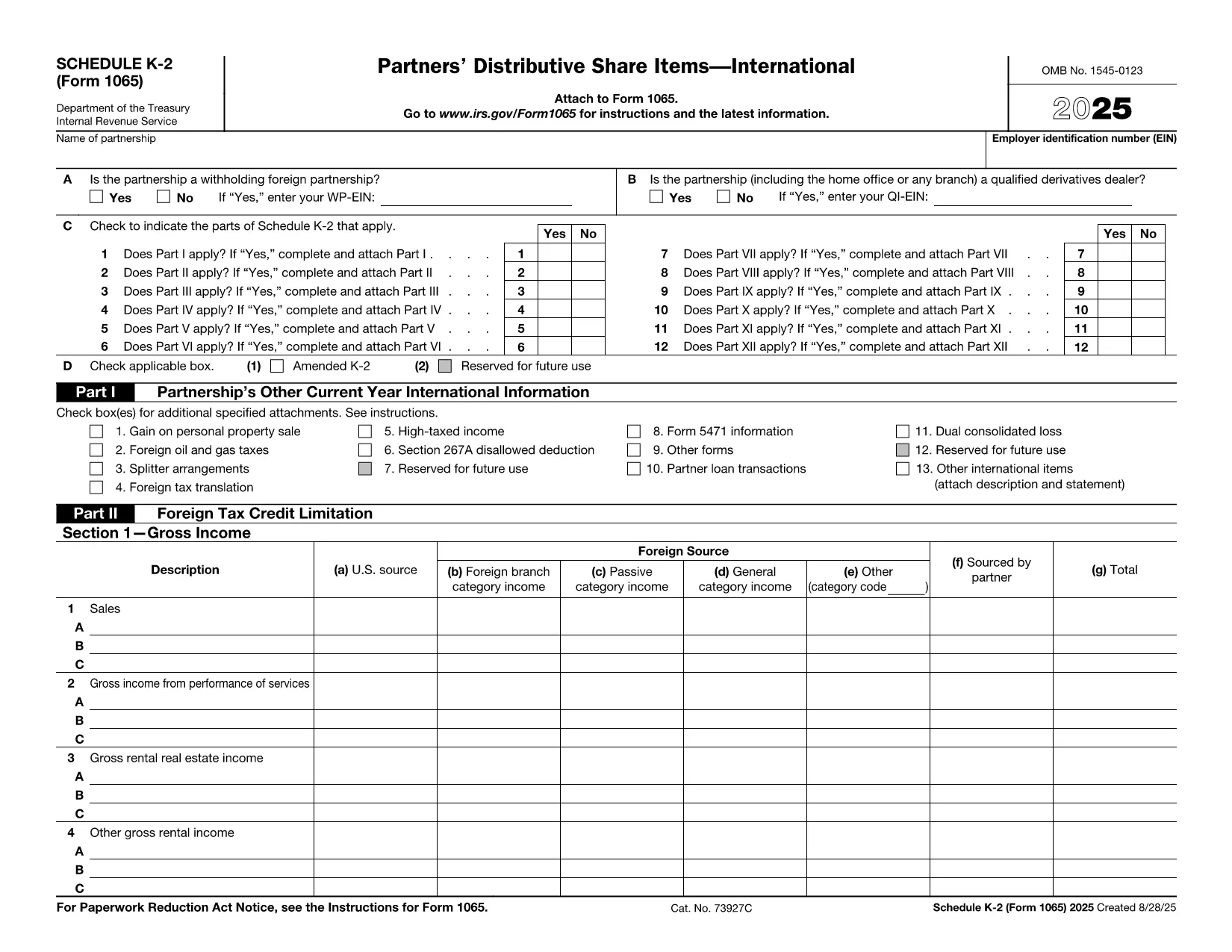
Form K‑2 (Schedule K‑2) is part of the U.S. partnership return (Form 1065) and reports international tax items that flow through to the partners. It is required for partnerships with foreign income, assets, or activities and must be filed together with Schedule K‑1.

How to Fill Out Form K‑2 with Formize

Instead of downloading the PDF and opening it in a separate editor, simply click the "Fill out this form" button on this page. The Formize PDF Filler app will load in your browser, giving you a fully fillable PDF form that you can complete in minutes.

Common Mistakes to Avoid on Form K‑2

  • Entering U.S. dollar amounts in foreign currency fields – always use the correct currency conversion column.
  • Omitting the required foreign tax credit details on Part III.
  • Leaving any schedule reference boxes blank; the IRS rejects incomplete schedules.

Where to Submit the Completed Form

After you finish, download the completed PDF and attach it to your Form 1065 filing in the e‑file system or mail it with the paper return to the IRS Service Center indicated in the Form 1065 instructions.

Benefits of Using the Formize PDF Filler

• No software installation – works in any modern browser.
• Automatic saving, so you never lose entered data.
• Built‑in validation helps you avoid common errors.
• Download or print the final PDF instantly.

Ready to start? Click the button below and let Formize handle the rest.

คำแนะนำ

คำถามที่พบบ่อย
  • Do I need to install any software to use the Formize PDF Filler?

    No. The filler runs entirely in your web browser, so there’s nothing to install.

  • Is the Form K‑2 PDF on Formize secure?

    Yes. All data is processed locally in your browser and is not stored on our servers unless you choose to save it.

  • Can I edit the form after I download it?

    Absolutely. The downloaded PDF remains fully editable with any standard PDF editor if you need to make changes later.

  • What if I make a mistake while filling out the form?

    Use the "Undo" button or simply edit the field again. Formize also highlights fields that fail validation.

  • Do I need a separate Schedule K‑1 for each partner?

    Yes. Schedule K‑2 reports partnership‑level international items, while each partner receives a Schedule K‑1 reflecting their share.

  • Is there a fee to use the Formize filler for Form K‑2?

    Filling out the form on Formize is free for standard PDF forms like Form K‑2.

  • Can I submit the form directly to the IRS from Formize?

    Formize creates a finished PDF that you can upload to the IRS e‑file portal or attach to a paper return.

ทำอย่างไร

วิธีกรอก Form K-2 PDF ฟรีทางออนไลน์ใน 5 ขั้นตอนง่ายๆ:

  1. 1
    Open the Fillable Form
    Click the "Fill out this form" button on the page. The Formize PDF Filler will open directly in your browser.
  2. 2
    Load the Form
    Wait a few seconds while the Form K‑2 PDF loads into the online editor.
  3. 3
    Complete Each Field
    Enter the required information in every highlighted field. Use the built‑in help icons for guidance on complex items.
  4. 4
    Review and Validate
    Click the "Validate" button to let Formize check for missing or incorrectly formatted data.
  5. 5
    Save or Download
    When you’re satisfied, download the completed PDF or save it to your cloud storage for later submission.
สร้างแอป PDF Filler
เกี่ยวกับ

แบบฟอร์มภาษี

Form K-2 PDF เป็นหนึ่งในแบบฟอร์มภาษีที่เป็นเอกสารที่ใช้ในการรายงานข้อมูลที่เกี่ยวข้องกับภาษีไปยังหน่วยงานด้านภาษีที่เกี่ยวข้อง มีแบบฟอร์มภาษีหลายประเภท รวมถึงแบบฟอร์มภาษีของรัฐบาลกลาง รัฐ และท้องถิ่น ซึ่งอาจแตกต่างกันไปขึ้นอยู่กับสถานการณ์และสถานที่ของผู้เสียภาษี

คุณสมบัติ

PDF ฟิลเลอร์

วิธีที่ง่ายที่สุดในการกรอกแบบฟอร์ม PDF ทางออนไลน์

  • กรอก Form K-2 PDF อย่างรวดเร็ว
    กำลังมองหาวิธีเติม Form K-2 PDF ทางออนไลน์อย่างรวดเร็วอยู่ใช่ไหม ด้วยตัวกรอกแบบฟอร์ม PDF ออนไลน์ฟรีของเรา คุณจะรู้วิธีแก้ไขและกรอกเอกสาร PDF นี้ในเวลาไม่ถึงนาที
  • โปรแกรมแก้ไข PDF ออนไลน์ที่ใช้งานง่าย
    เบื่อกับการพิมพ์ไฟล์ PDF เพื่อให้คุณสามารถแก้ไขได้ก่อนที่จะสแกนซ้ำและส่งกลับหรือไม่? แก้ไขเอกสาร PDF ออนไลน์ฟรี ใช้โปรแกรมแก้ไข PDF ออนไลน์ของเราเพื่อประหยัดเวลาและกระดาษ
  • เครื่องมือที่ยอดเยี่ยมสำหรับทุกแพลตฟอร์ม
    สงสัยวิธีเติม Form K-2 PDF บน Mac หรืออาจใช้ตัวเติม PDF ฟรีได้อย่างไร เครื่องมือ PDF ออนไลน์ของเราทำงานได้บนทุกแพลตฟอร์ม
  • การจัดเก็บไฟล์ที่ปลอดภัย
    ไฟล์ "Form K-2 PDF" ที่เสร็จสมบูรณ์จะถูกจัดเก็บไว้ในฐานข้อมูลที่ปลอดภัยซึ่งจัดการโดย Amazon Cloud hosting คุณสามารถลบไฟล์ของคุณออกจากระบบของเราได้ตลอดเวลา ไม่ว่าในกรณีใด ไฟล์เหล่านี้จะถูกลบโดยอัตโนมัติหลังจากผ่านไป 24 ชั่วโมง
  • สนทนากับ Form K-2 PDF
    แชทกับ "Form K-2 PDF" บน Chatize ที่เป็นผู้ช่วยอ่าน PDF ฟรี ถามคำถามและรับคำตอบจาก "Form K-2 PDF" เพียงคลิกที่ปุ่ม แชทด้วยเอกสาร ด้านบน

ลบเซสชันการบรรจุ

ลบเซสชันการกรอกข้อมูลที่เลือกหรือไม่?ในกรณีนี้ความคืบหน้าในการกรอกแบบฟอร์มจะหายไป

ลบเซสชันการแก้ไข

ลบเซสชันการแก้ไขที่เลือกหรือไม่ ในกรณีนี้ ความคืบหน้าในการสร้างและแก้ไขแบบฟอร์มจะหายไป