
اختار اللغة

Fillable IRS Schedule 2 (Form 1040) – Free PDF

  1. دولة الولايات المتحدة الأمريكية
  2. لغة إنجليزي
  3. نشاط الضرائب
  4. قسم IRS
Fillable IRS Schedule 2 (Form 1040) – Free PDF

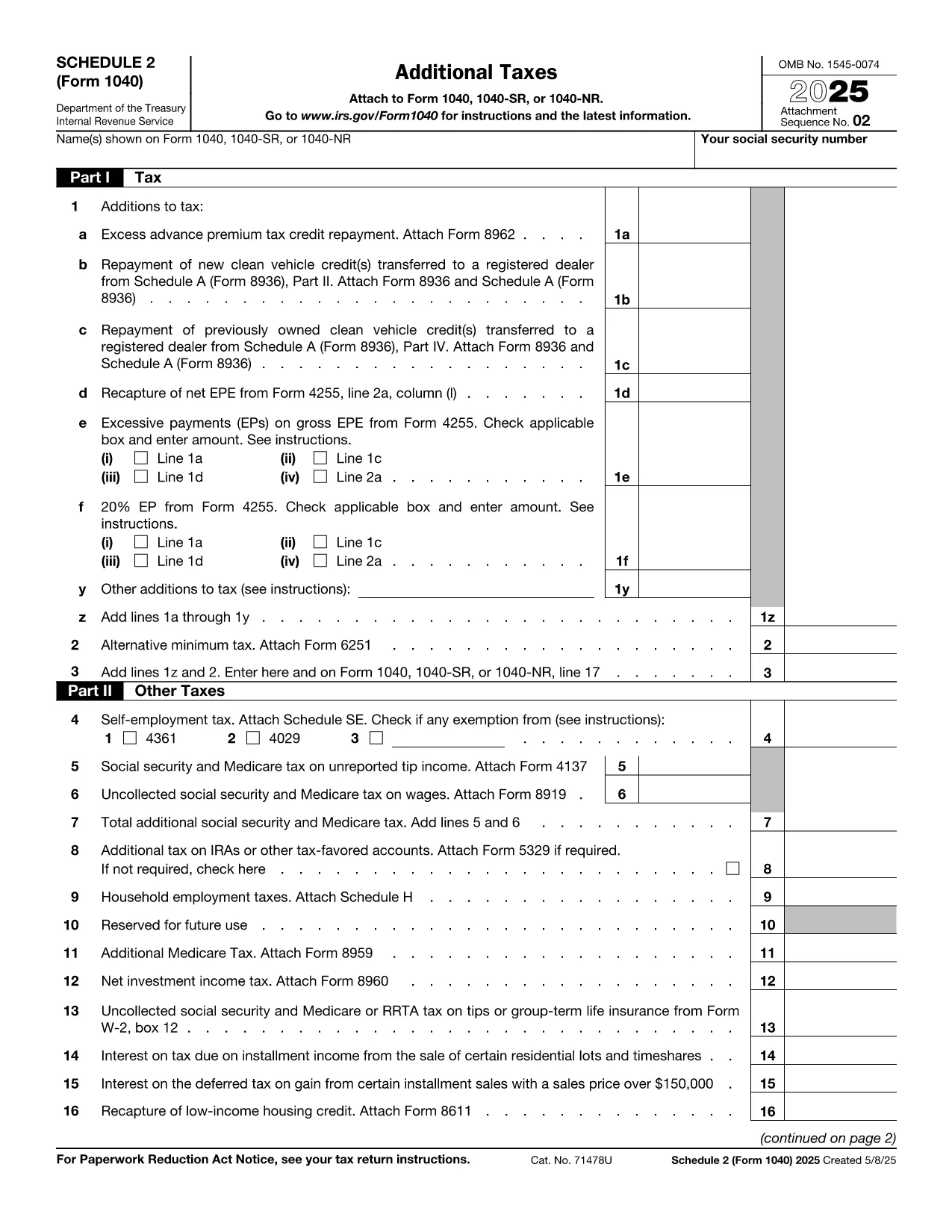
Schedule 2 (Form 1040) is the supplemental tax form used to report additional taxes such as the alternative minimum tax and certain tax credits. Whether you’re an individual taxpayer, a freelancer, or a small‑business owner, completing Schedule 2 correctly can prevent processing delays and potential penalties.

Our fillable PDF version lets you enter data directly in your browser. No need to download a PDF editor—just click the Fill out this form button, and the Formize PDF Filler app will load instantly.

What Is Schedule 2 and Who Needs It?

Schedule 2 is attached to the standard Form 1040. You’ll need it if you have:

  • Alternative Minimum Tax (AMT) liability
  • Excess advance premium tax credit repayment
  • Other taxes such as self‑employment tax, additional Medicare tax, or household employment taxes

How to Fill Out Schedule 2 With Formize

Follow the simple steps below. The Formize PDF Filler automatically saves your entries, so you can review or export the completed form at any time.

Common Mistakes & Tips for Accurate Completion

Avoid these pitfalls:

  • Leaving fields blank – Even if a line does not apply, enter “0” to keep the form balanced.
  • Mismatched totals – Double‑check that the sum of lines 1‑5 matches the total shown on line 6.
  • Wrong tax year – Ensure you are using the Schedule 2 for the correct filing year (e.g., 2023 version).

Where to Submit Your Completed Schedule 2

After filling the form, download the PDF and attach it to your electronic Form 1040 filing through approved tax‑software, or mail it with your paper return to the IRS address listed in the Form 1040 instructions.

Need more help? Review the official IRS instructions linked below or consult a tax professional.

التعليمات
  • Do I need Schedule 2 if I only have regular income tax?

    No. Schedule 2 is only required if you have additional taxes such as AMT, self‑employment tax, or excess premium tax credit repayment.

  • Can I edit Schedule 2 after I download it?

    Yes. The Formize PDF Filler lets you save and reopen the file, so you can make changes any time before final submission.

  • Is the fillable PDF version accepted by the IRS?

    Absolutely. As long as the final PDF is printed or submitted electronically with all fields completed, the IRS accepts it.

  • What if I make a mistake after filing?

    You can file an amended return (Form 1040‑X) and include a corrected Schedule 2. Keep a copy of both the original and amended PDFs.

  • Is there a fee to use Formize PDF Filler?

    No. The fillable Schedule 2 is provided free of charge on Formize.com.

  • Do I need special software to open the downloaded PDF?

    No special software is required. Any standard PDF viewer (Adobe Reader, Chrome, Edge) can open the file.

  • How do I know which version of Schedule 2 to use?

    Use the version that matches the tax year you are filing for. This page always links to the latest IRS‑published PDF.

  • Can I fill out Schedule 2 on a mobile device?

    Yes. The Formize PDF Filler works on most modern smartphones and tablets.

كيف

كيفية ملء Schedule 2 PDF مجانًا عبر الإنترنت في 5 خطوات سهلة:

  1. 1
    Open the Fillable Form
    Click the bright “Fill out this form” button on this page. The Formize PDF Filler app will launch in a new tab.
  2. 2
    Enter Your Information
    Use your keyboard to type directly into each field. The form automatically saves your progress.
  3. 3
    Review & Validate
    Check each section for accuracy. The built‑in validator highlights missing or mismatched totals.
  4. 4
    Download or Export
    When you are satisfied, click “Download PDF” to save a completed copy, or export to your cloud storage.
  5. 5
    Submit with Your Tax Return
    Attach the completed Schedule 2 to your Form 1040 filing—either electronically via tax software or by mailing a paper return.
Formize تطبيق PDF Filler
حول

نماذج الضرائب الفيدرالية

Schedule 2 PDF هو أحد نماذج الضرائب الفيدرالية التي تعد مستندات تُستخدم للإبلاغ عن ضرائب الدخل الفيدرالية وتقديمها إلى دائرة الإيرادات الداخلية (IRS) في الولايات المتحدة. يتم استخدام هذه النماذج من قبل الأفراد والشركات والمنظمات للإبلاغ عن دخلهم وخصوماتهم والمعلومات الأخرى ذات الصلة اللازمة لحساب التزاماتهم الضريبية الفيدرالية.

نموذج الضرائب الفيدرالية الأكثر استخدامًا هو النموذج 1040، والذي يستخدمه دافعو الضرائب الأفراد للإبلاغ عن ضريبة الدخل الشخصي الخاصة بهم. تشمل النماذج الأخرى شائعة الاستخدام نموذج 1065 للشراكات، النموذج 1120 للشركات، والنموذج 990 للمؤسسات المعفاة من الضرائب.

تتطلب نماذج الضرائب الفيدرالية عادةً من دافعي الضرائب الإبلاغ عن مصادر الدخل المختلفة، مثل الأجور والرواتب والإكراميات، بالإضافة إلى الدخل من الاستثمارات وتأجير العقارات ومصادر أخرى. تسمح النماذج أيضًا لدافعي الضرائب بالمطالبة بالخصومات والائتمانات لمختلف النفقات، مثل المساهمات الخيرية وفوائد الرهن العقاري ونفقات الرعاية الصحية.

من المهم تقديم نماذج الضرائب الفيدرالية بدقة وفي الوقت المحدد، لأن عدم القيام بذلك قد يؤدي إلى فرض عقوبات ورسوم فائدة من مصلحة الضرائب الأمريكية.

سمات

حشو PDF

أسهل طريقة لملء نماذج PDF عبر الإنترنت

  • املأ بسرعة Schedule 2 PDF
    هل تبحث عن طريقة لملء كلمة Schedule 2 PDF بسرعة عبر الإنترنت؟ من خلال برنامج تعبئة نماذج PDF المجاني عبر الإنترنت ، ستعرف كيفية تحرير وتعبئة مستند pdf هذا في أقل من دقيقة.
  • محرر PDF سهل الاستخدام عبر الإنترنت
    هل سئمت طباعة ملفات PDF حتى تتمكن من تحريرها قبل إعادة مسحها ضوئيًا وإرسالها مرة أخرى؟ تحرير مستندات PDF مجانًا عبر الإنترنت. استخدم محرر pdf على الإنترنت لتوفير الوقت والورق.
  • أدوات رائعة ، جميع المنصات
    هل تتساءل عن كيفية ملء Schedule 2 PDF على جهاز Mac ، أو ربما كيفية استخدام حشو PDF مجانًا؟ تعمل أدوات PDF الخاصة بنا عبر الإنترنت على جميع الأنظمة الأساسية.
  • تخزين الملفات الآمن
    يتم تخزين ملفات "Schedule 2 PDF" المكتملة في قاعدة بيانات آمنة تديرها استضافة Amazon Cloud. يمكنك حذف ملفاتك من نظامنا في أي وقت. على أي حال ، يتم حذف هذه الملفات تلقائيًا بعد 24 ساعة.
  • الدردشة مع {كلمة رئيسية}
    قم بالدردشة مع "Schedule 2 PDF" على Chatize وهو مساعد مجاني لقارئ PDF. اطرح الأسئلة واحصل على الإجابات من "Schedule 2 PDF". فقط انقر على زر الدردشة مع المستند أعلاه.

حذف جلسة التعبئة

حذف جلسة التعبئة المحددة؟ في هذه الحالة، سيتم فقد تقدمك في إكمال النموذج.

حذف جلسة التحرير

هل تريد حذف جلسة التحرير المحددة؟ في هذه الحالة، سيتم فقدان التقدم الذي أحرزته في إنشاء النموذج وتحريره.