
hamburger-menu icon
भाषा का चयन करें

Fillable IRS Form 8863 – Education Credit (American Opportunity & Lifetime Learning)

  1. देश अमेरीका
  2. भाषा अंग्रेज़ी
  3. गतिविधि करों
  4. विभाग IRS
फार्म को भरो
Fillable IRS Form 8863 – Education Credit (American Opportunity & Lifetime Learning)

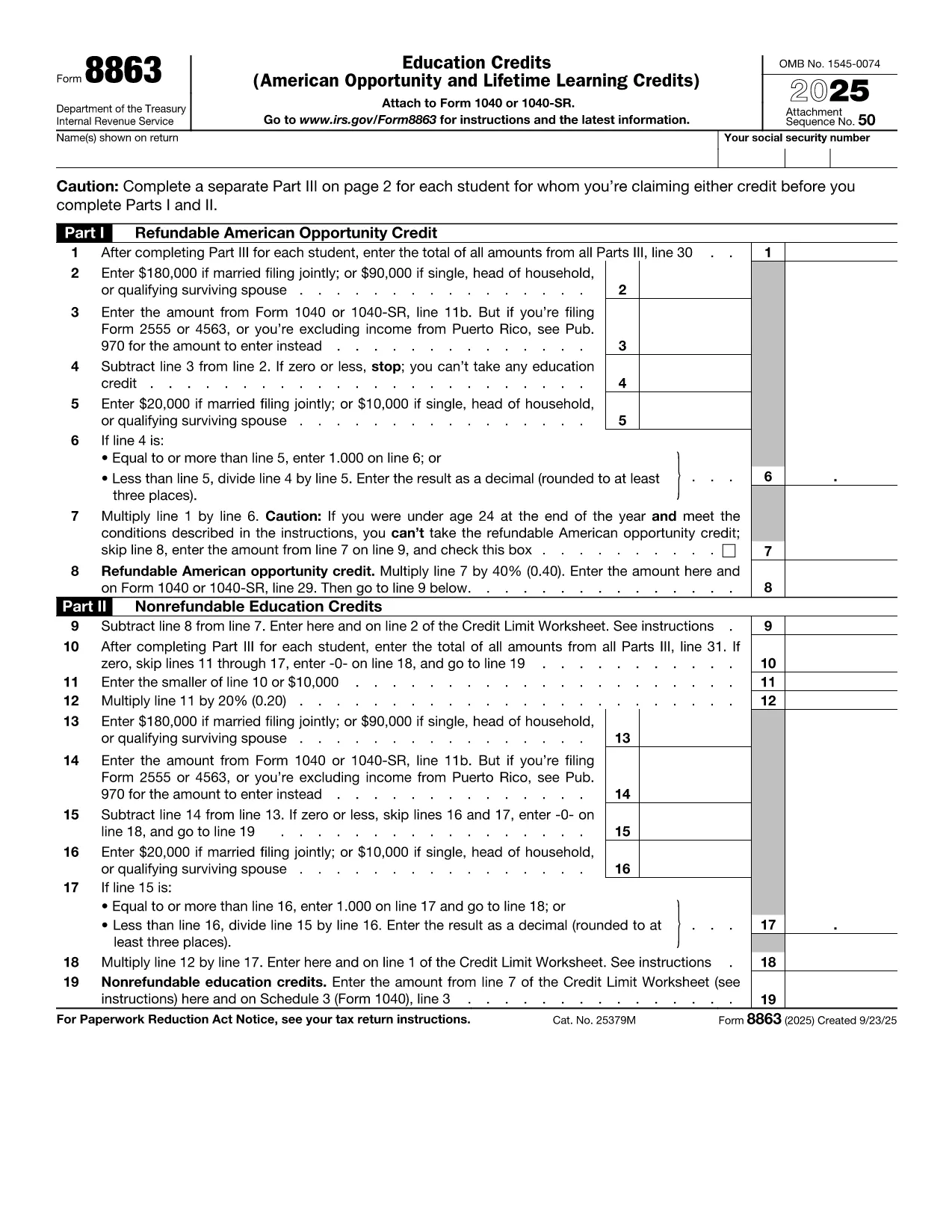
IRS Form 8863 is the official document used to claim the American Opportunity Credit and the Lifetime Learning Credit. Whether you’re a student, a parent, or a lifelong learner, this fillable PDF lets you enter the required information directly in your browser—no extra software needed.

What Is IRS Form 8863?

Form 8863 calculates the amount of education‑related tax credits you may be eligible for. The credit can reduce your tax bill by up to $2,500 per eligible student. The form is filed with your annual Form 1040 and requires details such as qualified tuition, required fees, and the student's enrollment status.

How to Complete the Form Using Formize

Instead of downloading the PDF and opening a separate editor, simply click the **"Fill out this form"** button below. The Formize PDF Filler app loads instantly, allowing you to type, save, and export the completed form in seconds.

Common Mistakes & Tips for a Smooth Submission

  • Incorrect Social Security Numbers: Double‑check each SSN; a single digit error can cause processing delays.
  • Missing Tuition Receipts: Keep Form 1098‑T or school statements handy while you fill out the credit sections.
  • Eligibility Overlap: You cannot claim both the American Opportunity Credit and the Lifetime Learning Credit for the same student in the same year.
  • Signature Requirement: The form must be signed. Use Formize’s electronic signature feature before downloading the final PDF.

When you’re ready, click the button, fill out each field, and download the completed PDF. Attach it to your tax return and enjoy the credit you deserve!

Fill out this form

सामान्य प्रश्न
  • Can I claim both the American Opportunity Credit and the Lifetime Learning Credit for the same student?

    No. You must choose one credit per student per tax year. The American Opportunity Credit generally offers a higher amount, but the Lifetime Learning Credit can be used for a broader range of courses.

  • Do I need to attach Form 8863 if I’m filing electronically?

    When you e‑file, the information from Form 8863 is entered directly into the tax software. However, keeping a completed copy for your records is recommended.

  • What qualifies as “qualified tuition and related expenses”?

    Qualified expenses include tuition, required enrollment fees, and course materials needed for attendance. Room, board, and transportation are not eligible.

  • How many students can I claim credits for on a single Form 8863?

    You can claim credits for multiple eligible students on the same Form 8863, each listed on a separate line in Part I.

  • Is there a deadline to submit Form 8863?

    Form 8863 must be filed with your federal income tax return, typically by April 15 of the filing year, unless you obtain an extension.

  • What if I made a mistake after filing?

    You can file an amended return using Form 1040‑X and attach a corrected Form 8863.

कैसे करें

education tax credit form को मुफ़्त में, ऑनलाइन 3 आसान स्टेप्स में कैसे भरें:

  1. 1
    Open the Fillable Form
    Click the **"Fill out this form"** button above. The Formize PDF Filler app will load directly in your browser.
  2. 2
    Enter Your Information
    Type in all required fields—student details, tuition amounts, and credit calculations. Use the navigation tabs to move between sections.
  3. 3
    Save, Sign, and Download
    When all fields are complete, add your electronic signature, then click **Download PDF**. Save the file and attach it to your tax return.
पीडीएफ फिलर एप तैयार करें
के बारे में

कर प्रपत्र

education tax credit form कर प्रपत्रों में से एक है, जो प्रासंगिक कर प्राधिकरण को करों से संबंधित जानकारी की रिपोर्ट करने के लिए उपयोग किए जाने वाले दस्तावेज़ हैं। संघीय, राज्य और स्थानीय कर रूपों सहित विभिन्न प्रकार के टैक्स फॉर्म हैं, जो करदाता की परिस्थितियों और स्थान के आधार पर भिन्न हो सकते हैं।

विशेषताएं

पीडीएफ भराव

पीडीएफ फॉर्म ऑनलाइन भरने का सबसे आसान तरीका

  • जल्दी से education tax credit form भरें
    education tax credit form को जल्दी से ऑनलाइन भरने का कोई तरीका खोज रहे हैं? हमारे ऑनलाइन नि:शुल्क पीडीएफ फॉर्म फिलर के साथ, आप एक मिनट से भी कम समय में इस पीडीएफ दस्तावेज़ को संपादित करने और भरने का तरीका जानेंगे।
  • ऑनलाइन पीडीएफ संपादक का उपयोग करना आसान है
    पीडीएफ फाइलों को प्रिंट करने से तंग आ गए हैं ताकि आप उन्हें फिर से स्कैन करने और उन्हें वापस भेजने से पहले संपादित कर सकें? PDF दस्तावेज़ों को निःशुल्क ऑनलाइन संपादित करें। समय और कागज बचाने के लिए हमारे ऑनलाइन पीडीएफ संपादक का प्रयोग करें।
  • महान उपकरण, सभी प्लेटफार्म
    आश्चर्य है कि मैक पर education tax credit form कैसे भरें, या शायद पीडीएफ फिलर का मुफ्त में उपयोग कैसे करें? हमारे ऑनलाइन पीडीएफ टूल सभी प्लेटफॉर्म पर काम करते हैं।
  • सुरक्षित फ़ाइल भंडारण
    पूर्ण की गई "education tax credit form" फ़ाइलें Amazon क्लाउड होस्टिंग द्वारा प्रबंधित एक सुरक्षित डेटाबेस में संग्रहीत की जाती हैं। आप कभी भी अपनी फाइलों को हमारे सिस्टम से हटा सकते हैं। किसी भी स्थिति में, ये फ़ाइलें 24 घंटे के बाद स्वतः हटा दी जाती हैं।
  • {कीवर्ड} से चैट करें
    Chatize पर "education tax credit form" के साथ चैट करें, जो एक निःशुल्क पीडीएफ रीडर सहायक है। प्रश्न पूछें और "education tax credit form" से उत्तर प्राप्त करें। बस ऊपर दस्तावेज़ के साथ चैट करें बटन पर क्लिक करें।

फ़िलिंग सत्र मिटाएँ

चयनित फ़िलिंग सत्र को मिटाएँ? इस स्थिति में, फ़ॉर्म को पूरा करने में आपकी प्रगति खो जाएगी।

संपादन सत्र हटाएँ

चयनित संपादन सत्र हटाएँ? इस स्थिति में, फ़ॉर्म बनाने और संपादित करने में आपकी प्रगति नष्ट हो जाएगी।