
Pilih bahasa

TurboTax Refund Request Form (IRS Form 843) – Fillable PDF

  1. Negara Amerika Serikat
  2. Bahasa Bahasa inggris
  3. Aktivitas Pajak
  4. Departemen IRS
TurboTax Refund Request Form (IRS Form 843) – Fillable PDF

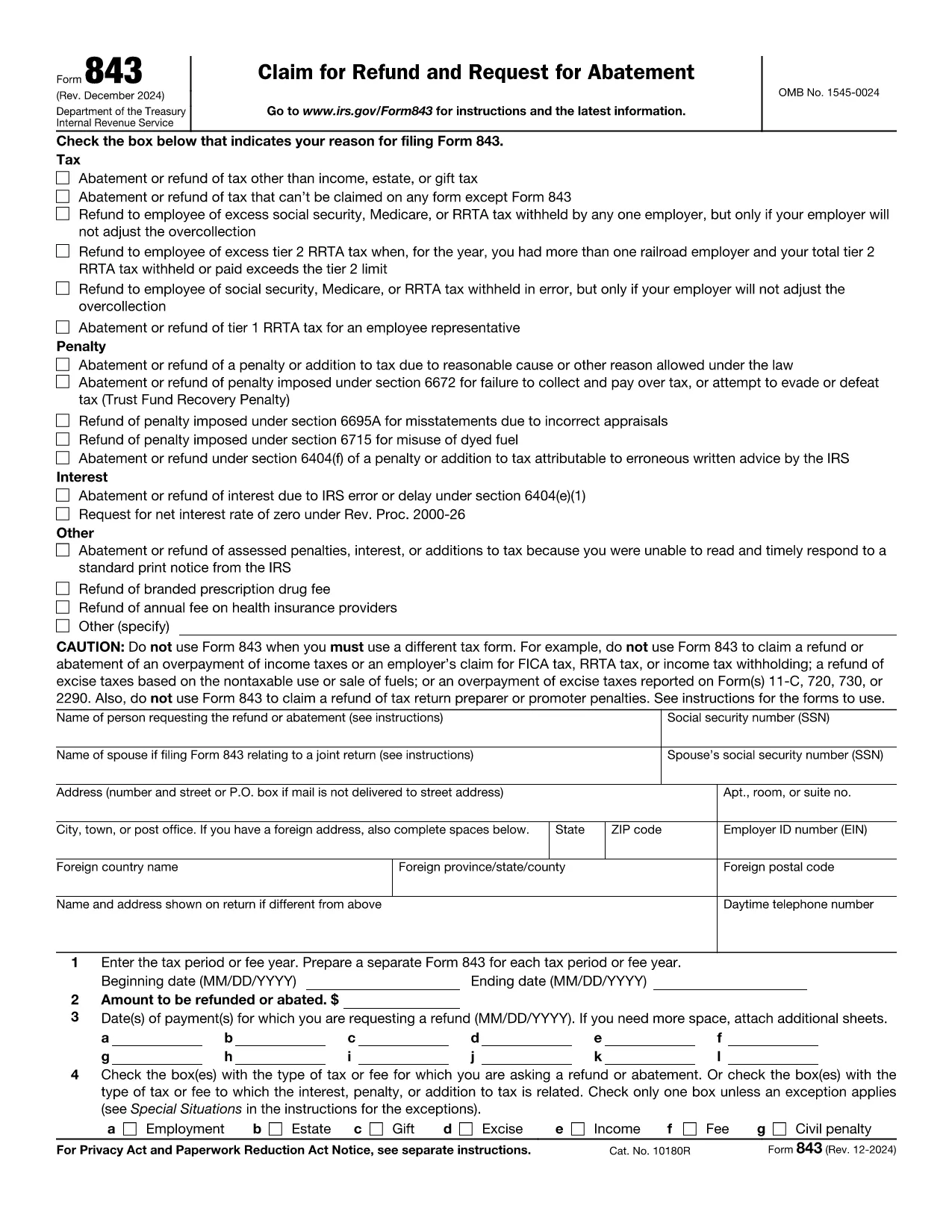
If you filed your taxes with TurboTax and need to claim a refund, the official document you’ll use is IRS Form 843 – Claim for Refund and Request for Abatement. This form lets you request a refund of taxes, penalties, or interest that you believe were incorrectly assessed.

What Is the TurboTax Refund Request Form?

Form 843 is a government‑issued PDF that works with any tax‑preparation software, including TurboTax. It is used for:

  • Refunding over‑paid taxes
  • Requesting an abatement of penalties or interest
  • Correcting a mistake after you’ve filed your return

The form is fully fillable, which means you can type directly into the fields, save your progress, and print or submit electronically.

How to Fill Out the Form Using Formize

Instead of downloading the PDF and opening it in a desktop editor, simply click the button below. The Formize PDF Filler app will load instantly, letting you complete the form in your browser.

Fill out this form

Common Mistakes & Tips for a Successful Refund Claim

  • Incorrect Tax Year: Double‑check that the tax year you’re claiming matches the year on your original TurboTax return.
  • Missing Signature: The form is not valid without a handwritten signature (or a qualified electronic signature).
  • Incomplete Explanation: Provide a clear, concise reason for the refund. Vague statements often lead to delays.
  • Attach Supporting Docs: Include copies of the original return, payment receipts, or any correspondence from the IRS.

Where to Get Help and Submit Your Refund Request

After completing Form 843, you can:

  • Mail it to the IRS address listed in the instructions (usually the address for your state).
  • Submit it through a tax professional who can forward it on your behalf.
  • Contact the IRS Help Line for specific questions.

Remember, TurboTax support can guide you on where to attach Form 843 within the TurboTax interface, but the actual refund claim is processed by the IRS.

FAQ
  • What is IRS Form 843 used for?

    Form 843 is the official claim for refund or request for abatement of taxes, penalties, or interest. It’s the form TurboTax users file when they need a refund after filing.

  • Can I file Form 843 electronically?

    The IRS does not accept Form 843 electronically. You must print, sign, and mail the completed form to the address indicated in the instructions.

  • Do I need a TurboTax account to use this form?

    No. Form 843 is an IRS document that works with any tax‑preparation software. You only need the form if you’re requesting a refund for a return prepared with TurboTax.

  • How long does the IRS take to process a refund claim?

    Processing times vary, but most refunds are issued within 6‑8 weeks after the IRS receives a complete and accurate Form 843.

  • What common errors cause delays?

    Missing signature, wrong tax year, incomplete explanation, and failure to attach supporting documents are the top reasons for delays.

  • Is there a fee to use Formize’s PDF filler?

    Formize offers a free basic filler for most standard fillable PDFs, including Form 843. No credit‑card information is required.

  • Can I request a refund for TurboTax fees using this form?

    Form 843 is for tax‑related refunds, not software fees. For TurboTax fee refunds, contact TurboTax customer support directly.

  • Do I need a tax professional to submit Form 843?

    While not required, a tax professional can help ensure the form is completed correctly and mailed to the proper IRS address.

BAGAIMANA CARANYA

Cara mengisi request refund form gratis secara online dalam 5 langkah mudah:

  1. 1
    Click the Fill‑Out Button
    Press the "Fill out this form" button on the page. The Formize PDF Filler will open in a new tab.
  2. 2
    Wait for the Formize App to Load
    The filler loads in seconds. You’ll see all fields become editable directly in your browser.
  3. 3
    Enter Your Information
    Complete each required field: taxpayer name, SSN, tax year, amount of refund, and a brief explanation.
  4. 4
    Review and Sign
    Double‑check for errors, then add your handwritten signature (or use an approved electronic signature).
  5. 5
    Save, Print, or Submit
    Save the completed PDF, print it if you need a hard copy, or forward it to your tax professional for mailing to the IRS.
Bentuk aplikasi Pengisi PDF
TENTANG

Formulir pajak

request refund form adalah salah satu formulir Pajak yang merupakan dokumen yang digunakan untuk melaporkan informasi tentang pendapatan, pemotongan, dan kewajiban pajak seseorang atau bisnis kepada otoritas pajak terkait. Formulir ini diperlukan untuk mematuhi peraturan perpajakan dan memenuhi kewajiban perpajakan. Formulir pajak bervariasi tergantung negara dan persyaratan pajak spesifik yang berlaku. Berikut adalah beberapa jenis formulir pajak yang umum:

Formulir Pajak Perorangan: Formulir ini digunakan oleh wajib pajak orang pribadi untuk melaporkan penghasilan pribadinya dan pengurangan klaim, kredit, dan pengecualian. Contohnya mencakup formulir 1040 di Amerika Serikat atau formulir Pengembalian Pajak Self-Assessment di Inggris.

Formulir Pajak Bisnis: Formulir pajak bisnis digunakan oleh perusahaan, kemitraan, atau wiraswasta untuk melaporkan pendapatan bisnis, pengeluaran, dan informasi terkait pajak lainnya. Contohnya termasuk formulir Jadwal C (Laba atau Rugi dari Bisnis) di Amerika Serikat atau formulir CT600 (Pengembalian Pajak Perusahaan) di Inggris.

Formulir Pajak Penggajian: Formulir ini digunakan oleh pemberi kerja untuk melaporkan upah, gaji, dan pajak yang dipotong dari gaji karyawannya. Contohnya mencakup formulir W-2 di Amerika Serikat atau formulir P60 di Inggris.

Formulir Pajak Penjualan: Formulir pajak penjualan digunakan oleh bisnis untuk melaporkan dan menyetorkan pajak penjualan yang dipungut atas barang atau jasa kena pajak. Formulir pajak penjualan spesifik berbeda-beda di setiap yurisdiksi.

Formulir Pajak Pertambahan Nilai (PPN): Formulir PPN digunakan di negara-negara yang mengenakan pajak pertambahan nilai untuk melaporkan dan menyetorkan PPN yang dipungut atas penjualan dan mengklaim kredit PPN untuk pembelian. Contohnya termasuk formulir pengembalian PPN yang digunakan di banyak negara.

Formulir Perkiraan Pajak: Formulir perkiraan pajak digunakan untuk melaporkan dan membayar perkiraan pajak atas penghasilan yang tidak dikenakan pemotongan, seperti pendapatan wirausaha atau pendapatan investasi.

Ini hanyalah beberapa contoh dari berbagai formulir pajak yang mungkin ada. Formulir spesifik yang diperlukan bergantung pada undang-undang dan peraturan perpajakan di negara atau yurisdiksi Anda. Penting untuk berkonsultasi dengan pedoman otoritas pajak atau mencari nasihat profesional untuk menentukan formulir mana yang dapat diterapkan pada situasi Anda.

FITUR

Pengisi PDF

Cara termudah untuk mengisi formulir PDF secara online

  • Isi request refund form dengan cepat
    Mencari cara mengisi request refund form dengan cepat secara online? Dengan pengisi formulir PDF online gratis kami, Anda akan tahu cara mengedit dan mengisi dokumen pdf ini dalam waktu kurang dari satu menit.
  • Editor PDF online yang mudah digunakan
    Muak dengan mencetak file PDF sehingga Anda dapat mengeditnya, sebelum memindai ulang dan mengirimnya kembali? Edit dokumen PDF secara online gratis. Gunakan editor pdf online kami untuk menghemat waktu dan kertas.
  • Alat hebat, semua platform
    Ingin tahu cara mengisi request refund form di Mac, atau mungkin cara menggunakan pengisi PDF gratis? Alat PDF online kami berfungsi di semua platform.
  • Penyimpanan file yang aman
    File "request refund form" yang telah selesai disimpan dalam database aman yang dikelola oleh hosting Amazon Cloud. Anda dapat menghapus file Anda dari sistem kami kapan saja. Bagaimanapun, file-file ini secara otomatis dihapus setelah 24 jam.
  • Ngobrol dengan request refund form
    Ngobrol dengan "request refund form" di Chatize yang merupakan asisten pembaca PDF gratis. Ajukan pertanyaan dan dapatkan jawaban dari "request refund form". Cukup klik tombol Chat Dengan Dokumen di atas.

Hapus sesi pengisian

Hapus sesi pengisian yang dipilih? Dalam hal ini, kemajuan Anda dalam menyelesaikan formulir akan hilang.

Hapus sesi pengeditan

Hapus sesi pengeditan yang dipilih? Dalam hal ini, kemajuan Anda dalam membuat dan mengedit formulir akan hilang.