
Chọn ngôn ngữ

IRS Form 8949 – Fillable PDF for Reporting House Sale Gains

  1. Quốc gia Hoa Kỳ
  2. Ngôn ngữ Tiếng Anh
  3. Hoạt động thuế
  4. Phòng IRS
IRS Form 8949 – Fillable PDF for Reporting House Sale Gains

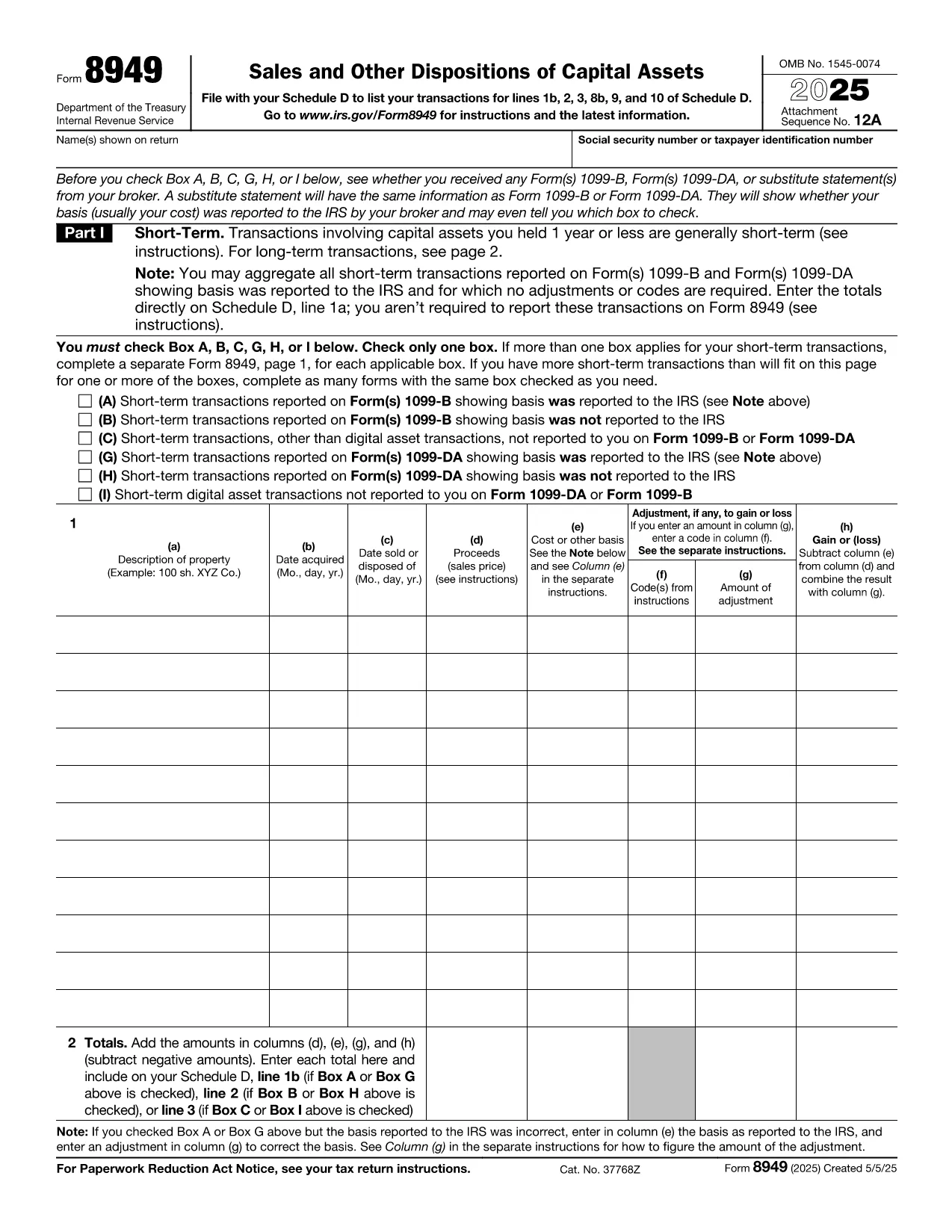
When you sell a primary residence or an investment property, the IRS requires you to report the transaction on Form 8949. This fillable PDF makes it easy to capture capital‑gain details, calculate taxable amounts, and attach the form to your Schedule D filing.

Why You Need Form 8949 After Selling a Home

The IRS Form 8949 is the official document for reporting sales of capital assets, including real estate. Even if you qualify for the home‑sale exclusion, you must still list the transaction on Form 8949 and then transfer the net gain (or loss) to Schedule D.

Key Sections of the Form Explained

  • Part I – Short‑Term Transactions: Use this section if you owned the property for one year or less.
  • Part II – Long‑Term Transactions: Most home sales fall here because the ownership period exceeds one year.
  • Column (a) – Description of Property: Enter the address of the house sold.
  • Column (b) – Date Acquired: Provide the purchase date (or construction date).
  • Column (c) – Date Sold: The closing date of the sale.
  • Column (d) – Proceeds: Gross amount received (usually from Form 1099‑S).
  • Column (e) – Cost or Adjusted Basis: Purchase price plus improvements, minus depreciation.
  • Column (f) – Adjustments: Any codes for exclusions, like the $250,000 (or $500,000) home‑sale exclusion.
  • Column (g) – Gain or (Loss): The calculator will auto‑populate when you fill the previous columns.

Common Mistakes to Avoid

  • Leaving Column (f) blank when the exclusion applies.
  • Using the wrong acquisition date (e.g., the date of a major renovation instead of the original purchase).
  • Reporting the sale on the wrong part of the form (short‑term vs. long‑term).
  • Forgetting to attach Form 8949 to Schedule D, which can delay processing.

How to Submit Your Completed Form

After you finish the fillable PDF, save it as a PDF file and attach it to your tax return when you file electronically through approved tax‑software, or print and mail it with your paper return. The Formize PDF Filler ensures the data is saved correctly, so you won’t have to re‑type anything.

Ready to start? Just click the button below and the Formize PDF Filler will load the fillable version of IRS Form 8949 directly in your browser.

CÂU HỎI THƯỜNG GẶP
  • Do I need to file Form 8949 if I qualify for the home‑sale exclusion?

    Yes. Even if the entire gain is excluded, the IRS still requires you to list the sale on Form 8949 and then mark the exclusion in Column (f).

  • What is the difference between Part I and Part II of Form 8949?

    Part I reports short‑term capital gains (property held ≤1 year). Part II reports long‑term gains (property held >1 year), which is most common for home sales.

  • Can I use the same Form 8949 for multiple property sales?

    Yes. List each property on a separate line within the appropriate part of the form.

  • How do I calculate the adjusted basis for my house?

    Start with the purchase price, add capital improvements, and subtract any depreciation claimed (if the home was partially rented).

  • What code should I use for the $250,000/$500,000 exclusion?

    Enter code “B” in Column (f) and write “Home‑sale exclusion” in the accompanying description.

  • Do I need to attach Form 1099‑S with my return?

    If you received Form 1099‑S from the closing agent, attach it. It provides the gross proceeds that you report on Form 8949.

  • Is the fillable PDF compatible with Mac and Windows?

    Yes. The Formize PDF Filler works in any modern browser on macOS, Windows, Linux, and mobile devices.

  • What should I do if I discover an error after filing?

    Amend your return using Form 1040‑X and attach a corrected Form 8949 with the proper figures.

LÀM THẾ NÀO ĐỂ

Cách điền tax form after selling house miễn phí, trực tuyến trong 5 bước đơn giản:

  1. 1
    Click the Fill‑out Button
    Press the “Fill out this form” button on the page. The Formize PDF Filler app will open in a new tab.
  2. 2
    Wait for the Filler to Load
    The app loads the fillable IRS Form 8949 instantly. No download or extra software is needed.
  3. 3
    Enter Your Information
    Complete each column (description, dates, proceeds, basis, adjustments). The calculator auto‑fills the gain/loss column.
  4. 4
    Review and Save
    Double‑check for errors, then click “Save PDF”. Your completed form is ready to attach to Schedule D.
  5. 5
    Submit with Your Tax Return
    Upload the saved PDF to your e‑file software or print and mail it with your paper return.
Định dạng ứng dụng PDF Filler
TRONG KHOẢNG

Đơn thuế

tax form after selling house là một trong các Biểu mẫu thuế là tài liệu dùng để báo cáo thông tin về thu nhập, các khoản khấu trừ và nghĩa vụ thuế của cá nhân hoặc doanh nghiệp với cơ quan thuế có liên quan. Những biểu mẫu này là cần thiết để tuân thủ luật thuế và thực hiện nghĩa vụ thuế. Các hình thức thuế khác nhau tùy thuộc vào quốc gia và các yêu cầu về thuế cụ thể được áp dụng. Dưới đây là một số loại biểu mẫu thuế phổ biến:

Biểu mẫu thuế cá nhân: Những biểu mẫu này được người nộp thuế cá nhân sử dụng để báo cáo thu nhập cá nhân của họ và yêu cầu các khoản khấu trừ, tín dụng và miễn trừ. Các ví dụ bao gồm biểu mẫu 1040 ở Hoa Kỳ hoặc biểu mẫu Tờ khai thuế tự định ở Vương quốc Anh.

Biểu mẫu thuế doanh nghiệp: Biểu mẫu thuế doanh nghiệp được các công ty, công ty hợp danh hoặc cá nhân tự kinh doanh sử dụng để báo cáo thu nhập, chi phí kinh doanh và các thông tin liên quan đến thuế khác của họ. Ví dụ bao gồm biểu mẫu Phụ lục C (Lãi hoặc lỗ từ kinh doanh) ở Hoa Kỳ hoặc biểu mẫu CT600 (Khai thuế công ty) ở Vương quốc Anh.

Biểu mẫu thuế tiền lương: Những biểu mẫu này được người sử dụng lao động sử dụng để báo cáo tiền lương, tiền công và các khoản thuế được khấu trừ từ tiền lương của nhân viên. Ví dụ bao gồm mẫu W-2 ở Hoa Kỳ hoặc mẫu P60 ở Vương quốc Anh.

Biểu mẫu thuế bán hàng: Các doanh nghiệp sử dụng biểu mẫu thuế bán hàng để báo cáo và nộp thuế bán hàng thu được đối với hàng hóa hoặc dịch vụ chịu thuế. Các biểu mẫu thuế bán hàng cụ thể khác nhau tùy theo khu vực pháp lý.

Biểu mẫu thuế giá trị gia tăng (VAT): Biểu mẫu VAT được sử dụng ở các quốc gia áp dụng thuế giá trị gia tăng để báo cáo và nộp VAT thu được khi bán hàng và yêu cầu khấu trừ VAT khi mua hàng. Ví dụ bao gồm các biểu mẫu hoàn thuế VAT được sử dụng ở nhiều quốc gia.

Biểu mẫu thuế ước tính: Biểu mẫu thuế ước tính được sử dụng để báo cáo và nộp thuế ước tính đối với thu nhập không bị khấu lưu, chẳng hạn như thu nhập từ hoạt động tư doanh hoặc thu nhập từ đầu tư.

Đây chỉ là một vài ví dụ về nhiều hình thức thuế có thể tồn tại. Các biểu mẫu cụ thể được yêu cầu tùy thuộc vào luật và quy định về thuế ở quốc gia hoặc khu vực pháp lý của bạn. Điều quan trọng là phải tham khảo hướng dẫn của cơ quan thuế hoặc tìm kiếm lời khuyên chuyên môn để xác định hình thức nào có thể áp dụng cho trường hợp của bạn.

ĐẶC TRƯNG

Trình điền PDF

Cách dễ nhất để điền vào các mẫu PDF trực tuyến

  • Nhanh chóng điền vào tax form after selling house
    Bạn đang tìm cách điền nhanh tax form after selling house trực tuyến? Với trình điền biểu mẫu PDF miễn phí trực tuyến của chúng tôi, bạn sẽ biết cách chỉnh sửa và điền vào tài liệu pdf này trong vòng chưa đầy một phút.
  • Trình chỉnh sửa PDF trực tuyến dễ sử dụng
    Chán nản với việc in ra các tệp PDF để bạn có thể chỉnh sửa chúng trước khi quét lại và gửi lại? Chỉnh sửa tài liệu PDF trực tuyến miễn phí. Sử dụng trình chỉnh sửa pdf trực tuyến của chúng tôi để tiết kiệm thời gian và giấy.
  • Công cụ tuyệt vời, tất cả các nền tảng
    Bạn muốn biết cách điền tax form after selling house trên máy Mac hoặc có thể là cách sử dụng trình điền PDF miễn phí? Các công cụ PDF trực tuyến của chúng tôi hoạt động trên tất cả các nền tảng.
  • Lưu trữ tệp an toàn
    Các tệp "tax form after selling house" đã hoàn thành được lưu trữ trong cơ sở dữ liệu bảo mật do dịch vụ lưu trữ Amazon Cloud quản lý. Bạn có thể xóa các tệp của mình khỏi hệ thống của chúng tôi bất cứ lúc nào. Trong mọi trường hợp, các tệp này sẽ tự động bị xóa sau 24 giờ.
  • Trò chuyện với tax form after selling house
    Trò chuyện với "tax form after selling house" trên Trò chuyện, một trợ lý đọc PDF miễn phí. Đặt câu hỏi và nhận câu trả lời từ "tax form after selling house". Chỉ cần nhấp vào nút Trò chuyện với tài liệu ở trên.

Xóa phiên điền

Xóa phiên điền đã chọn? Trong trường hợp này, tiến độ của bạn trong việc hoàn thành biểu mẫu sẽ bị mất.

Xóa phiên chỉnh sửa

Xóa phiên chỉnh sửa đã chọn? Trong trường hợp này, tiến trình tạo và chỉnh sửa biểu mẫu của bạn sẽ bị mất.