
언어 선택

Turn Your PDF into a Fillable Form in Seconds

  1. 국가 미국
  2. 언어 영어
  3. 활동 구실
  4. 부서 IRS
Turn Your PDF into a Fillable Form in Seconds

Whether you need a contract, an application, or a simple questionnaire, turning a static PDF into an interactive, fillable form saves time and eliminates printing hassles. With Formize’s PDF Filler you can convert and complete any PDF directly in your browser – no Adobe Acrobat license required.

Why Use an Online Fillable PDF?

  • Accessible from any device – desktop, tablet, or smartphone.
  • Data is saved automatically, reducing the risk of lost information.
  • Easy to share via email or a secure link.
  • Compliant with PDF/A standards for long‑term archiving.

Step‑by‑Step: Convert and Fill Your PDF

Follow the quick guide below to turn your PDF into a fillable form and start entering data right away.

Common Mistakes & How to Avoid Them

  • Skipping field naming: Give each field a clear label so users know what information to enter.
  • Using low‑resolution PDFs: High‑quality source files ensure crisp, readable fields.
  • Forgetting to test: Preview the form in the Filler app before sharing.

Download the Sample PDF Form

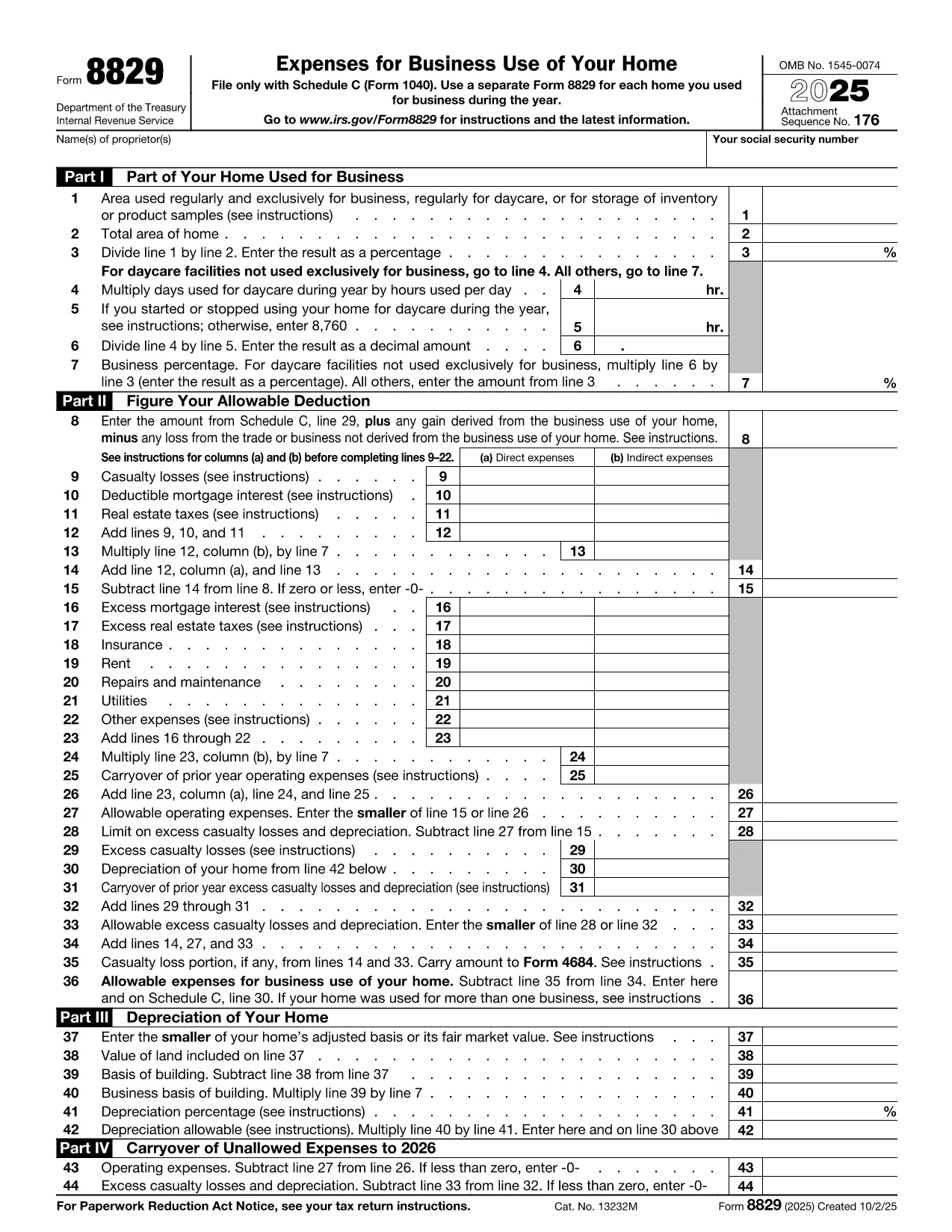
Use our sample IRS Form 8829 (Home Office Deduction) as a real‑world example. Click the button below to open it in the Formize PDF Filler and see how easy it is to turn a regular PDF into a fillable one.

Where to Get Help

If you run into any issues, the Formize help center offers step‑by‑step tutorials and troubleshooting tips.

자주하는 질문
  • Do I need any software to turn a PDF into a fillable form?

    No. Formize PDF Filler runs entirely in your web browser, so you don’t need Adobe Acrobat or any other desktop software.

  • Can I convert a scanned PDF into a fillable form?

    Yes. Upload the scanned PDF, use Formize’s OCR tool to recognize text, then add fillable fields on top of the recognized content.

  • Is my data secure while I’m filling out the form?

    Formize uses SSL encryption for all data transmission and stores files on secure servers that comply with industry standards.

  • Can I share the fillable PDF with others?

    Absolutely. After saving, you can generate a shareable link or send the completed PDF via email directly from the app.

  • What if I make a mistake while filling the form?

    All changes are saved automatically, and you can use the “Undo” button or simply edit any field again before finalizing.

  • Do I need a Formize account to use the filler?

    You can fill out the form without an account, but creating an account lets you save progress, access history, and reuse templates.

  • Is there a limit to the size of PDF I can convert?

    Formize supports PDFs up to 50 MB. Larger files may need to be split or compressed before uploading.

어떻게

4개의 간단한 단계를 통해 온라인으로 turn PDF into form를 무료로 작성하는 방법:

  1. 1
    Click the “Fill out this form” button
    Locate the button on this page and press it. The Formize PDF Filler app will open in a new tab.
  2. 2
    Wait for the Formize PDF Filler to load
    The app loads the PDF automatically. You’ll see editable fields appear where you can type, check boxes, or select dates.
  3. 3
    Enter your information
    Click into each field and fill out the required data. All changes are saved in real time.
  4. 4
    Save or download the completed form
    When you’re finished, click “Save” to store the form in your Formize account or “Download” to get a copy on your device.
Formize PDF 필러 앱
에 대한

세금 양식

turn PDF into form는 관련 세무 당국에 소득, 공제 및 납세 의무를 신고하는 데 사용되는 문서인 세금 양식 중 하나입니다. 이 양식은 세금 신고 절차의 필수적인 부분이며 개인과 기업이 세법을 준수하고 납세 의무를 정확하게 계산하는 데 사용됩니다.

필요한 특정 세금 양식은 개인의 납세자 신분, 소득원, 국가의 세법 등의 요인에 따라 달라질 수 있습니다. 그러나 다음은 몇 가지 일반적인 유형의 세금 양식입니다.

개인 소득세 양식: 미국의 1040 시리즈와 같은 양식이 사용됩니다. 개인이 소득을 신고하고, 공제 및 세액공제를 청구하고, 납세 의무를 계산할 수 있습니다.

사업세 양식: 개인 사업자, 파트너십, 법인, 자영업자를 포함한 기업은 소득, 비용 및 납부해야 할 세금을 신고하기 위해 다양한 양식을 제출해야 할 수 있습니다. 예를 들면 일정 C(사업 이익 또는 손실) 및 양식 1120(미국 법인 소득세 신고서)이 있습니다.

고용세 양식: 고용주는 직원 임금을 신고하고 급여세를 원천징수 및 납부해야 합니다. W-2(임금 및 세금 명세서) 및 941(고용주의 분기별 연방 세금 신고서)과 같은 양식이 이러한 목적으로 사용됩니다.

투자 및 퇴직 계좌 양식: 이 양식은 투자 소득, 자본 이득, 손실은 물론 퇴직 계좌의 기부금과 분배금을 보고하는 데 사용됩니다. 예를 들면 양식 1099-DIV(배당금 및 분배금) 및 양식 5498(IRA 기부 정보).

재산 및 증여세 양식: 개인이 사망하거나 상당한 증여를 한 경우 Form 706(미국 유산(및 세대 생략 양도) 세금 신고) 및 Form 709(미국 증여(및 세대- Skipping Transfer) Tax Return)은 해당 유산세 또는 증여세를 보고하고 계산하는 데 사용됩니다.

세법과 양식은 시간이 지남에 따라 변경될 수 있다는 점을 유념하는 것이 중요합니다. 따라서 개인과 기업은 관련 세무 당국에 문의하거나 전문 세무 조언을 구하여 현재 요구 사항을 준수해야 합니다.

특징

PDF 필러

온라인에서 PDF 양식을 채우는 가장 쉬운 방법

  • turn PDF into form를 빠르게 작성하세요.
    온라인에서 turn PDF into form을(를) 빠르게 채우는 방법을 찾고 계십니까? 온라인 무료 PDF 양식 필러를 사용하면 1분 이내에 이 PDF 문서를 편집하고 채우는 방법을 알 수 있습니다.
  • 사용하기 쉬운 온라인 PDF 편집기
    다시 스캔하여 다시 보내기 전에 편집할 수 있도록 PDF 파일을 인쇄하는 데 지쳤습니까? 온라인에서 무료로 PDF 문서를 편집하세요. 온라인 PDF 편집기를 사용하여 시간과 종이를 절약하십시오.
  • 훌륭한 도구, 모든 플랫폼
    Mac에서 turn PDF into form를 채우는 방법이나 PDF 필러를 무료로 사용하는 방법이 궁금하십니까? 당사의 온라인 PDF 도구는 모든 플랫폼에서 작동합니다.
  • 안전한 파일 저장
    완료된 "turn PDF into form" 파일은 Amazon 클라우드 호스팅에서 관리하는 보안 데이터베이스에 저장됩니다. 언제든지 시스템에서 파일을 삭제할 수 있습니다. 어쨌든 이러한 파일은 24시간 후에 자동으로 삭제됩니다.
  • turn PDF into form님과 채팅
    무료 PDF 리더 도우미인 Chatize에서 "turn PDF into form"와 채팅하세요. "turn PDF into form"에서 질문하고 답변을 받으세요. 위의 문서와 채팅 버튼을 클릭하세요.

필링 세션 삭제

선택한 필링 세션을 삭제하시겠습니까?이 경우 양식 작성 진행 상황이 손실됩니다.

편집 세션 삭제

선택한 편집 세션을 삭제하시겠습니까? 이 경우 양식 작성 및 편집 진행 상황이 손실됩니다.