
hamburger-menu icon
เลือกภาษา

Turn Your PDF into a Fillable Form in Seconds

  1. ประเทศ สหรัฐอเมริกา
  2. ภาษา ภาษาอังกฤษ
  3. กิจกรรม ภาษี
  4. แผนก IRS
Turn Your PDF into a Fillable Form in Seconds

Whether you need a contract, an application, or a simple questionnaire, turning a static PDF into an interactive, fillable form saves time and eliminates printing hassles. With Formize’s PDF Filler you can convert and complete any PDF directly in your browser – no Adobe Acrobat license required.

Why Use an Online Fillable PDF?

  • Accessible from any device – desktop, tablet, or smartphone.
  • Data is saved automatically, reducing the risk of lost information.
  • Easy to share via email or a secure link.
  • Compliant with PDF/A standards for long‑term archiving.

Step‑by‑Step: Convert and Fill Your PDF

Follow the quick guide below to turn your PDF into a fillable form and start entering data right away.

Common Mistakes & How to Avoid Them

  • Skipping field naming: Give each field a clear label so users know what information to enter.
  • Using low‑resolution PDFs: High‑quality source files ensure crisp, readable fields.
  • Forgetting to test: Preview the form in the Filler app before sharing.

Download the Sample PDF Form

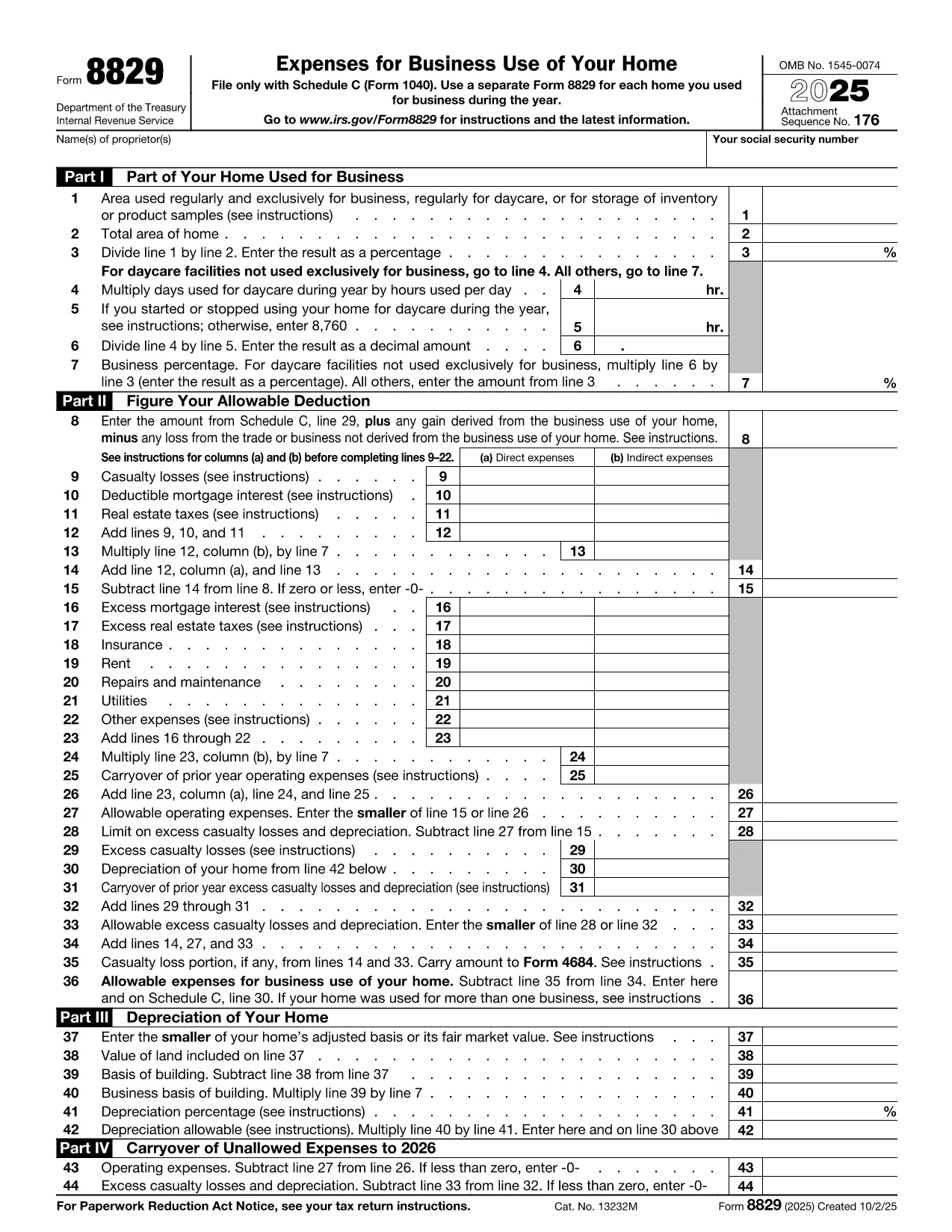
Use our sample IRS Form 8829 (Home Office Deduction) as a real‑world example. Click the button below to open it in the Formize PDF Filler and see how easy it is to turn a regular PDF into a fillable one.

Where to Get Help

If you run into any issues, the Formize help center offers step‑by‑step tutorials and troubleshooting tips.

คำถามที่พบบ่อย
  • Do I need any software to turn a PDF into a fillable form?

    No. Formize PDF Filler runs entirely in your web browser, so you don’t need Adobe Acrobat or any other desktop software.

  • Can I convert a scanned PDF into a fillable form?

    Yes. Upload the scanned PDF, use Formize’s OCR tool to recognize text, then add fillable fields on top of the recognized content.

  • Is my data secure while I’m filling out the form?

    Formize uses SSL encryption for all data transmission and stores files on secure servers that comply with industry standards.

  • Can I share the fillable PDF with others?

    Absolutely. After saving, you can generate a shareable link or send the completed PDF via email directly from the app.

  • What if I make a mistake while filling the form?

    All changes are saved automatically, and you can use the “Undo” button or simply edit any field again before finalizing.

  • Do I need a Formize account to use the filler?

    You can fill out the form without an account, but creating an account lets you save progress, access history, and reuse templates.

  • Is there a limit to the size of PDF I can convert?

    Formize supports PDFs up to 50 MB. Larger files may need to be split or compressed before uploading.

ทำอย่างไร

วิธีกรอก turn PDF into form ฟรีทางออนไลน์ใน 4 ขั้นตอนง่ายๆ:

  1. 1
    Click the “Fill out this form” button
    Locate the button on this page and press it. The Formize PDF Filler app will open in a new tab.
  2. 2
    Wait for the Formize PDF Filler to load
    The app loads the PDF automatically. You’ll see editable fields appear where you can type, check boxes, or select dates.
  3. 3
    Enter your information
    Click into each field and fill out the required data. All changes are saved in real time.
  4. 4
    Save or download the completed form
    When you’re finished, click “Save” to store the form in your Formize account or “Download” to get a copy on your device.
สร้างแอป PDF Filler
เกี่ยวกับ

แบบฟอร์มภาษี

turn PDF into form เป็นหนึ่งในแบบฟอร์มภาษีที่เป็นเอกสารที่ใช้ในการรายงานข้อมูลเกี่ยวกับรายได้ การหักเงิน และความรับผิดทางภาษีของแต่ละบุคคลหรือธุรกิจไปยังหน่วยงานด้านภาษีที่เกี่ยวข้อง แบบฟอร์มเหล่านี้จำเป็นเพื่อให้สอดคล้องกับกฎหมายภาษีและปฏิบัติตามภาระผูกพันด้านภาษี แบบฟอร์มภาษีจะแตกต่างกันไปขึ้นอยู่กับประเทศและข้อกำหนดด้านภาษีเฉพาะที่ใช้อยู่ ต่อไปนี้คือแบบฟอร์มภาษีประเภททั่วไปบางประเภท:

แบบฟอร์มภาษีบุคคลธรรมดา: แบบฟอร์มเหล่านี้ใช้โดยผู้เสียภาษีแต่ละรายเพื่อรายงานรายได้ส่วนบุคคลและการเรียกร้องการหักเงิน เครดิต และการยกเว้น ตัวอย่าง ได้แก่ แบบฟอร์ม 1040 ในสหรัฐอเมริกา หรือแบบฟอร์มการขอคืนภาษีแบบประเมินตนเองในสหราชอาณาจักร

แบบฟอร์มภาษีธุรกิจ: บริษัท ห้างหุ้นส่วน หรือบุคคลที่ประกอบอาชีพอิสระใช้แบบฟอร์มภาษีธุรกิจเพื่อรายงานรายได้ทางธุรกิจ ค่าใช้จ่าย และข้อมูลอื่นๆ ที่เกี่ยวข้องกับภาษี ตัวอย่าง ได้แก่ แบบฟอร์ม Schedule C (กำไรหรือขาดทุนจากธุรกิจ) ในสหรัฐอเมริกาหรือแบบฟอร์ม CT600 (การคืนภาษีบริษัท) ในสหราชอาณาจักร

แบบฟอร์มภาษีเงินเดือน: แบบฟอร์มเหล่านี้ใช้เพื่อรายงานค่าจ้าง เงินเดือน และภาษีหัก ณ ที่จ่ายจากเช็คเงินเดือนของพนักงาน ตัวอย่าง ได้แก่ แบบฟอร์ม W-2 ในสหรัฐอเมริกาหรือแบบฟอร์ม P60 ในสหราชอาณาจักร

แบบฟอร์มภาษีขาย: ธุรกิจต่างๆ จะใช้แบบฟอร์มภาษีขายเพื่อรายงานและนำส่งภาษีขายที่เรียกเก็บจากสินค้าหรือบริการที่ต้องเสียภาษี แบบฟอร์มภาษีขายเฉพาะจะแตกต่างกันไปตามเขตอำนาจศาล

แบบฟอร์มภาษีมูลค่าเพิ่ม (VAT): แบบฟอร์ม VAT ใช้ในประเทศที่กำหนดภาษีมูลค่าเพิ่มเพื่อรายงานและนำส่ง VAT ที่รวบรวมจากการขาย และขอเครดิต VAT สำหรับการซื้อ ตัวอย่าง ได้แก่ แบบฟอร์มการคืนภาษีมูลค่าเพิ่มที่ใช้ในหลายประเทศ

แบบฟอร์มภาษีโดยประมาณ: แบบฟอร์มภาษีโดยประมาณใช้ในการรายงานและชำระภาษีโดยประมาณสำหรับรายได้ที่ไม่ต้องหัก ณ ที่จ่าย เช่น รายได้จากการประกอบอาชีพอิสระ หรือรายได้จากการลงทุน

นี่เป็นเพียงตัวอย่างเล็กๆ น้อยๆ ของแบบฟอร์มภาษีต่างๆ มากมายที่อาจมีอยู่ แบบฟอร์มเฉพาะที่กำหนดขึ้นอยู่กับกฎหมายและข้อบังคับด้านภาษีในประเทศหรือเขตอำนาจศาลของคุณ สิ่งสำคัญคือต้องปรึกษาหลักเกณฑ์ของหน่วยงานด้านภาษีหรือขอคำแนะนำจากผู้เชี่ยวชาญเพื่อพิจารณาว่าแบบฟอร์มใดที่เหมาะกับสถานการณ์ของคุณ

คุณสมบัติ

PDF ฟิลเลอร์

วิธีที่ง่ายที่สุดในการกรอกแบบฟอร์ม PDF ทางออนไลน์

  • กรอก turn PDF into form อย่างรวดเร็ว
    กำลังมองหาวิธีเติม turn PDF into form ทางออนไลน์อย่างรวดเร็วอยู่ใช่ไหม ด้วยตัวกรอกแบบฟอร์ม PDF ออนไลน์ฟรีของเรา คุณจะรู้วิธีแก้ไขและกรอกเอกสาร PDF นี้ในเวลาไม่ถึงนาที
  • โปรแกรมแก้ไข PDF ออนไลน์ที่ใช้งานง่าย
    เบื่อกับการพิมพ์ไฟล์ PDF เพื่อให้คุณสามารถแก้ไขได้ก่อนที่จะสแกนซ้ำและส่งกลับหรือไม่? แก้ไขเอกสาร PDF ออนไลน์ฟรี ใช้โปรแกรมแก้ไข PDF ออนไลน์ของเราเพื่อประหยัดเวลาและกระดาษ
  • เครื่องมือที่ยอดเยี่ยมสำหรับทุกแพลตฟอร์ม
    สงสัยวิธีเติม turn PDF into form บน Mac หรืออาจใช้ตัวเติม PDF ฟรีได้อย่างไร เครื่องมือ PDF ออนไลน์ของเราทำงานได้บนทุกแพลตฟอร์ม
  • การจัดเก็บไฟล์ที่ปลอดภัย
    ไฟล์ "turn PDF into form" ที่เสร็จสมบูรณ์จะถูกจัดเก็บไว้ในฐานข้อมูลที่ปลอดภัยซึ่งจัดการโดย Amazon Cloud hosting คุณสามารถลบไฟล์ของคุณออกจากระบบของเราได้ตลอดเวลา ไม่ว่าในกรณีใด ไฟล์เหล่านี้จะถูกลบโดยอัตโนมัติหลังจากผ่านไป 24 ชั่วโมง
  • สนทนากับ turn PDF into form
    แชทกับ "turn PDF into form" บน Chatize ที่เป็นผู้ช่วยอ่าน PDF ฟรี ถามคำถามและรับคำตอบจาก "turn PDF into form" เพียงคลิกที่ปุ่ม แชทด้วยเอกสาร ด้านบน

ลบเซสชันการบรรจุ

ลบเซสชันการกรอกข้อมูลที่เลือกหรือไม่?ในกรณีนี้ความคืบหน้าในการกรอกแบบฟอร์มจะหายไป

ลบเซสชันการแก้ไข

ลบเซสชันการแก้ไขที่เลือกหรือไม่ ในกรณีนี้ ความคืบหน้าในการสร้างและแก้ไขแบบฟอร์มจะหายไป